


Video content has become one of the most powerful ways to communicate, teach, and market in today’s digital landscape. Whether you are a content creator, educator, business owner, or marketer, the ability to efficiently convert speech into text is now critical. This comprehensive Riverside video transcription review explores why video transcription matters, how it works, what questions to ask when choosing a tool, and which video transcription tools are worth your attention in 2026. We will highlight mainstream options, including Video Transcriber AI’s Video Transcript Generator, and compare them based on accuracy, features, value, and ease of use.
Video transcription turns spoken language in your videos into written text. It is not just a convenience; it is a strategic advantage. Good video transcription improves search engine visibility, supports accessibility, enables content repurposing, and serves as the foundation for subtitles, captions, summaries, and searchable archives. In this Riverside video transcription review, we will look at the role of ai video transcription, online video transcription, and desktop transcription software to help you decide which solution fits your workflow and budget.
What Is Video Transcription and Why It Matters
Video transcription is the automated or human-assisted process of converting spoken audio from a video into written text. This text is typically more than just a raw dump of words. Modern video transcription tools provide timestamps, speaker identification, punctuation, formatting, and support for multiple languages. Once you have a transcript of any video, you can:
- Improve accessibility for users with hearing impairments
- Create subtitles and captions for global audiences
- Improve SEO by making your content crawlable by search engines
- Generate searchable archives for long-term content management
- Repurpose video dialogue into blogs, social posts, ebooks, or newsletters
The process of converting video to text is usually powered by ai video transcription, which leverages machine learning to recognize speech patterns and context. The best tools also offer integrations, mobile support, and export options like SRT, TXT, and DOCX. Accurate video transcription saves time, improves content reach, and unlocks additional value from every piece of video content you create.
How Video Transcription Works
Most modern video transcription tools follow a similar workflow:
- Upload or Input Source – You upload a video file, paste a URL, or connect your video platform.
- AI Processing – The tool’s speech recognition engine analyzes the audio track.
- Generate Text – An editable transcript is created, often with timestamps and optional speaker labels.
- Export or Edit – You can download the transcript in various formats or edit it inside the tool.
Some advanced platforms also offer features such as speaker recognition, translation, text summaries, and direct integration with video editing software.
The core advantage of video transcription over manual methods is speed and scalability. Instead of spending hours listening and typing, AI-driven tools can deliver a full transcript in minutes, making it feasible to process large volumes of video content without prohibitive costs or delays.
Riverside Video Transcription Review
Riverside has emerged as a popular platform for creators, podcasters, and video professionals thanks to its strong suite of tools aimed at high-quality recording and post-production. Its transcription capabilities are designed to convert your video content into accurate, editable text quickly. If you are evaluating Riverside as your primary video transcription tool, here’s what you need to know.
Riverside’s Video Transcription Features
Riverside offers a range of features that support video transcription from both recorded video and live sessions. Key aspects include:
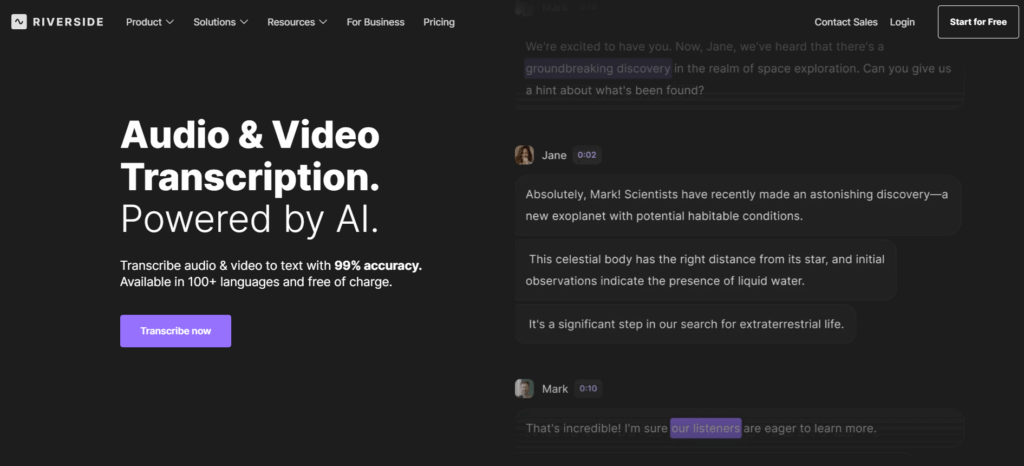
- Automated AI-Based Transcription – Riverside uses artificial intelligence to generate accurate text from the speech in your video.
- Support for Multiple Languages – The platform can transcribe videos in a variety of languages.
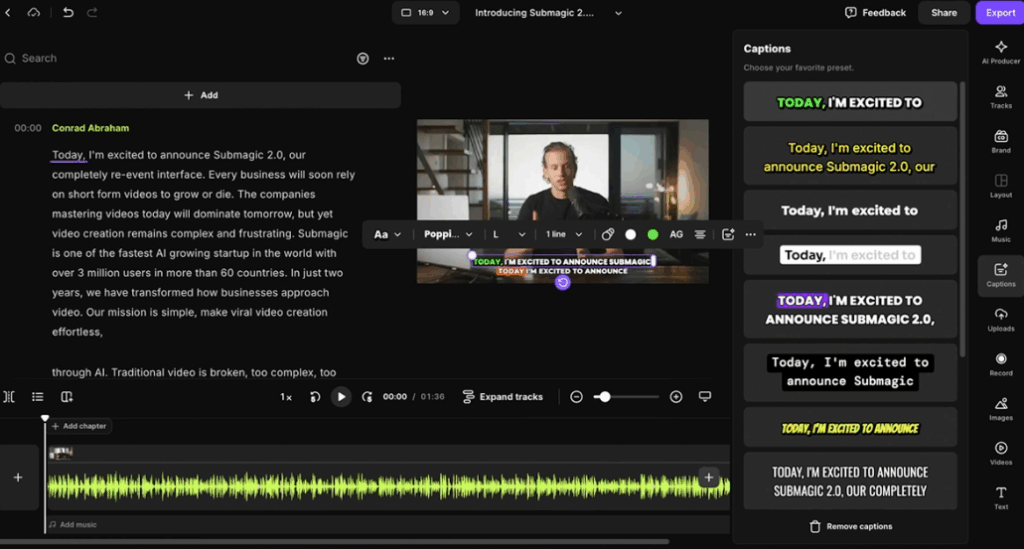
- Subtitle and Caption Export – In addition to raw text, Riverside can export SRT or other common subtitle formats.
- Downloadable Transcript Files – Users can export text in standard formats like TXT or DOCX.
- Integration with Video Editing Workflow – Transcripts can be tied directly to Riverside’s video editor for subtitling and captioning during post-production.
- Transcript of Any Video – Whether you upload a pre-recorded video or capture it live on Riverside, the transcription engine works the same.
To use Riverside for video transcription, you first upload or record your video, wait for automated processing, and then edit or export the results. Because the platform also serves as a full suite for video recording and podcast production, video transcription becomes part of a broader workflow, not a standalone tool.
Advantages of Riverside Video Transcription
Beyond its technical features, Riverside delivers several practical advantages that make it appealing to creators and teams who regularly work with video. Users note that the platform’s design emphasizes efficiency, accuracy, and workflow integration.
- Streamlined Workflow – By combining recording, editing, and Riverside video transcription in a single platform, Riverside reduces the need to switch between multiple tools. This integration is particularly valuable for creators producing podcasts, tutorials, or marketing content.
- Time-Saving AI Transcription – The AI engine quickly generates transcripts, saving hours compared to manual transcription methods while maintaining reliable accuracy. This makes Riverside a dependable video transcription tool for both individuals and teams.
- User-Friendly Interface – The platform’s intuitive design ensures that both beginners and experienced users can navigate the video transcription process without difficulty.
- Collaboration-Friendly – Teams can share and edit transcripts collaboratively, which is ideal for multi-person projects and ensures consistent output quality.
- Content Repurposing Opportunities – Accurate transcripts support SEO, enable subtitles, and allow video content to be repurposed into blogs, social media posts, or educational materials.
In practice, Riverside’s video transcription service is praised for transforming what is typically a time-consuming process into a smooth, integrated experience. By combining powerful AI with practical workflow features, the platform offers creators a versatile video transcription tool that supports the full range of content production needs.
Limitations to Consider
While Riverside offers a solid video transcription experience, there are some limitations users should be aware of, especially when compared to specialized transcription tools:
- Transcript Structure and Formatting – Riverside produces accurate text but the transcripts are relatively simple in structure. Advanced formatting, hierarchical headings, or context-aware labeling (e.g., sections, bullet points for key topics) may require manual editing.
- Limited Smart Summaries – Unlike some AI-powered video transcription tools, Riverside does not automatically generate intelligent summaries or highlight key points, which can slow down content review and repurposing.
- Accuracy with Complex Audio – As with many AI transcription systems, Riverside’s accuracy may decline when dealing with overlapping voices, heavy accents, or background noise.
- Editing Flexibility – While transcripts are downloadable and editable, the platform does not offer robust in-editor tools for restructuring text, tagging speakers extensively, or integrating advanced annotation features.
- Premium Features Cost – Access to the full suite of transcription features, including higher-quality exports or multi-language support, typically requires a paid plan.
Overall, Riverside excels as an integrated recording and video transcription tool, particularly for creators who value workflow continuity and convenience. However, for projects that demand highly structured transcripts, automatic summaries, or advanced text analysis, other specialized tools may offer more targeted capabilities.
Top Video Transcription Tools in 2026
Beyond Riverside, many strong video transcription tools are available. These tools range from simple interfaces for occasional users to enterprise-grade platforms with advanced features. Below are some of the most popular and capable options you should consider.
Video Transcriber AI – Large File Support & Smart Transcription Insights
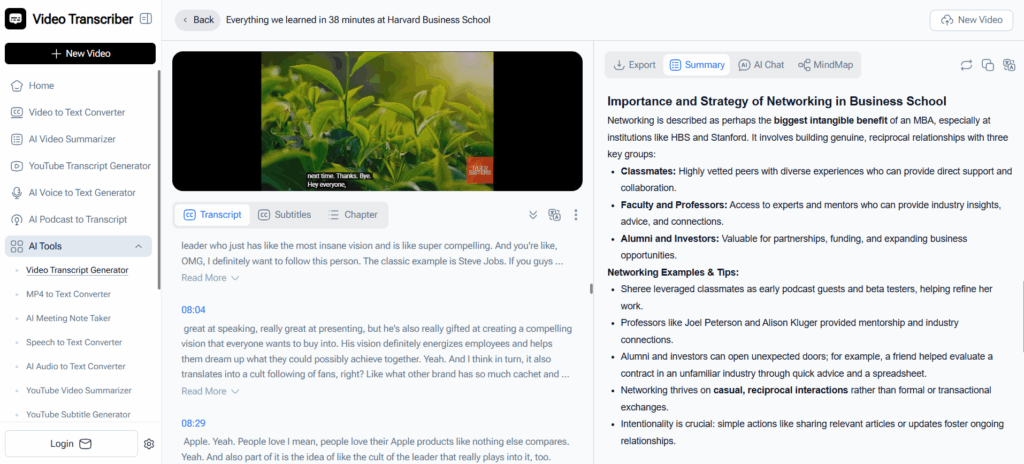
Video Transcriber AI is designed for users who need a video transcription tool that handles large video files (up to 1GB) and provides more than just raw text output. Users get timestamped transcripts that make it easy to identify where key content appears in a video, and the platform’s AI can generate smart summaries to highlight main points automatically. Additionally, its AI conversation feature lets users interact with transcripts to ask questions or explore details, turning a static transcript into an insight‑driven resource.
Quantified Highlights:
- Supports large file uploads up to 1 GB.
- Produces timestamped text, aiding precise reference.
- Offers AI‑generated summaries and interactive querying.
Best for: Long videos, research, education, or content repurposing where large‑file processing and intelligent summary generation are priorities.
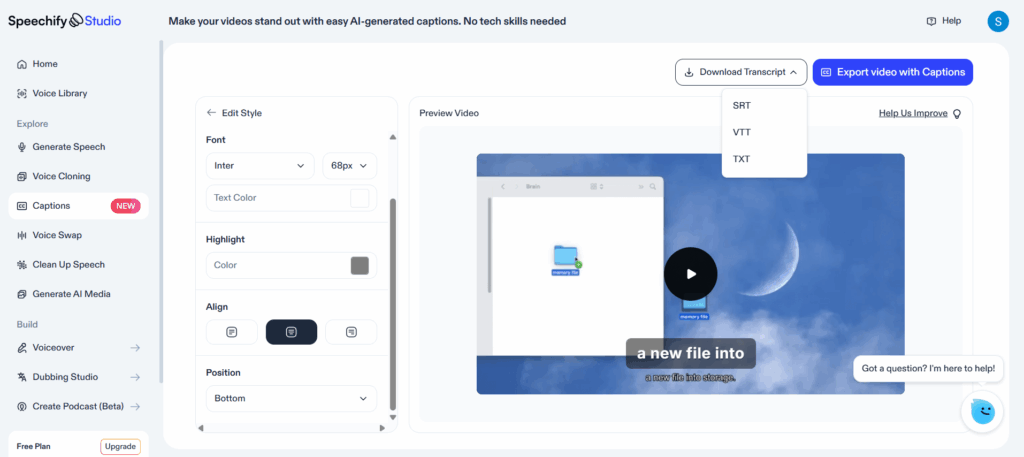
Speechify – Fast, Accessible Online Transcription
Speechify provides a straightforward video transcription experience that is easy to start and doesn’t require advanced setup. Its AI engine supports over 20 languages, and users can upload audio or video files or paste a link (such as a YouTube URL) for instant video to text conversion. While Speechify doesn’t focus on in‑depth editing or team collaboration, it is ideal for beginners or occasional users who want quick transcription with minimal barriers.
Quantified Highlights:
- Supports 20+ languages for transcription.
- Instant upload and transcription processing.
- Free access with simple UI for casual users.
Best for: Casual content creators or users needing basic video transcription without complex features.
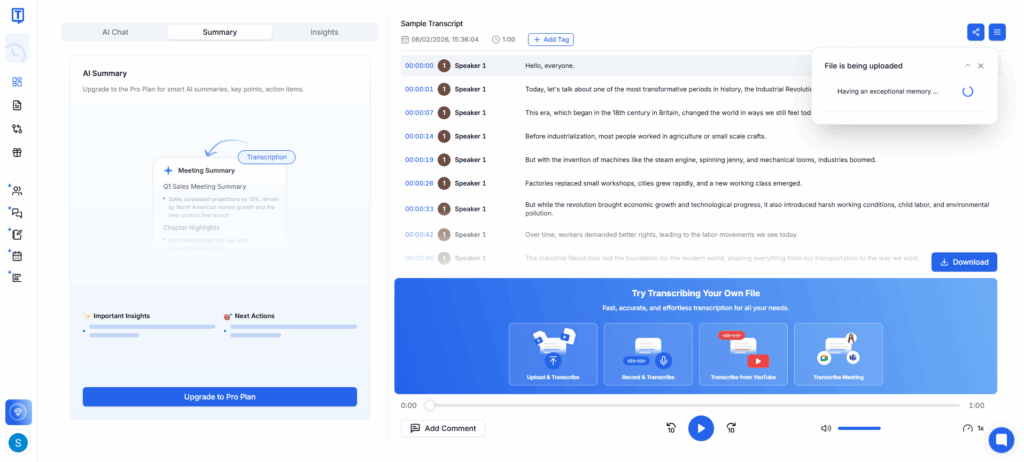
Transkriptor – Multilingual AI with Summaries & Insights
Transkriptor stands out for supporting 100+ languages and offering AI‑powered features beyond basic transcription. Its platform can generate smart summaries, extract keywords, and provide contextual insights that help users better understand long or complex transcripts. Transkriptor also supports interactive search within transcripts and can be used for meetings, interviews, or lectures.
Quantified Highlights:
- AI transcription in 100+ languages.
- Built‑in smart summaries and keyword extraction.
- Transcribes both audio and video automatically.
Best for: Users who value structured outputs, advanced insights, and multi‑language coverage in video to text conversion.
Sonix – Structured Transcription with Collaboration
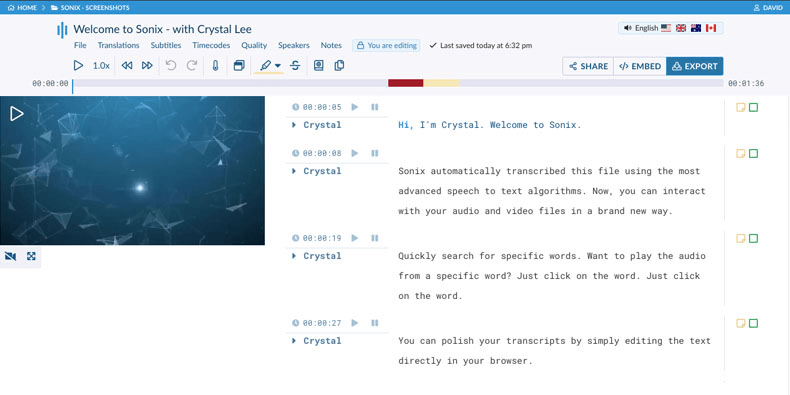
Sonix focuses on structured transcripts and team workflows. It supports transcription in many languages (typically 30+ to 40+ depending on plan) with word‑by‑word timestamps and automatic subtitle syncing, making it suitable for media teams and enterprise use. Sonix’s online editor allows multiple users to refine text collaboratively, and the platform integrates with tools like Dropbox, Zoom, and Adobe Premiere to streamline workflows.
Quantified Highlights:
- Supports 40+ languages for transcription.
- Provides detailed timestamps and speaker labels.
- Collaboration and subtitle export built in.
Best for: Professional teams needing structured transcripts, detailed speaker metadata, and export formats like SRT/VTT.
Trint – Transcription with Editing & Workflow Integration
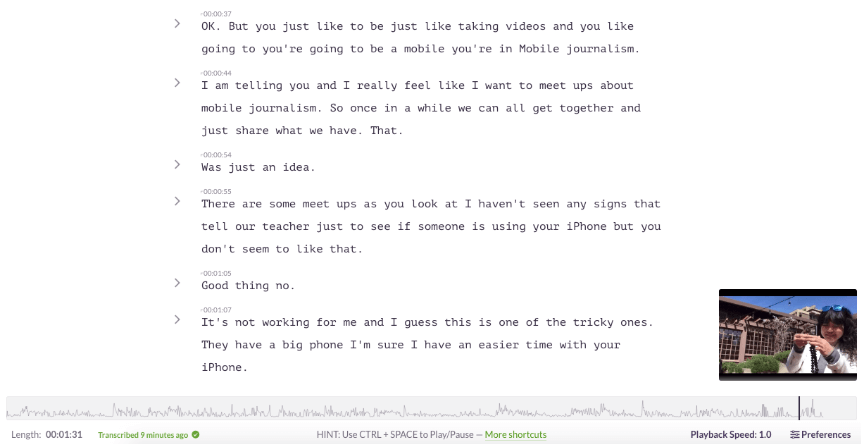
Trint combines video transcription with strong editorial and collaboration tools. The platform supports multiple languages and offers an in‑browser editor where users can refine transcripts, add tags, and collaborate. Trint integrates well with publishing workflows and supports subtitle exports, making it suitable for content creators and business teams producing text from recorded video content.
Quantified Highlights:
- Multilingual transcription with editing features.
- Collaborative workspace for teams.
- Subtitle and text export options.
Best for: Teams requiring both accurate transcription and integrated editorial workflows in video to text projects.
Temi – Affordable, Rapid Transcription
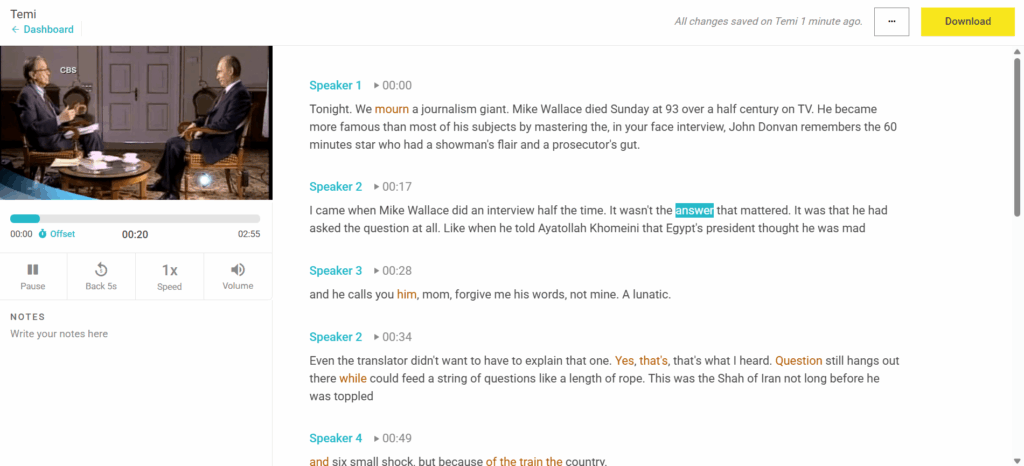
Temi offers straightforward, cost‑effective video transcription with a pay‑as‑you‑go pricing model (around $0.25 per minute). Its AI engine typically delivers around 90–95% accuracy under clear audio conditions, and transcripts include timestamps and speaker identification, with export options such as DOCX, PDF, TXT, and caption files like SRT and VTT. A free trial allows users to test the basics before committing financially.
Quantified Highlights:
- 90–95% transcription accuracy in ideal conditions.
- Supports timestamps and speaker labels.
- Simple, transparent pricing (pay‑as‑you‑go).
Best for: Small teams or individual creators who prioritize affordability and fast video to text results.
Feature & Pricing Comparison Table
| Tool | Language Support | Timestamped Text | Smart Summaries | Pricing Model (Approx.) |
| Video Transcriber AI | 100+ | Yes | Yes | Free |
| Speechify | 20+ | Yes | Limited | Free + ~$29/mo Premium |
| Transkriptor | 100+ | Yes | Yes | Subscription |
| Sonix | 40+ | Yes | Yes | ~$10/hr or ~$5/hr + subscription |
| Trint | Multi | Yes | Limited | Subscription |
| Temi | Multiple | Yes | No | ~$0.25/min pay‑as‑you‑go |
How to Choose the Right Video Transcription Tool
Choosing the right video transcription tool is essential for producing accurate video to text results efficiently. While specific features vary across platforms, understanding your workflow, content type, and priorities will help identify the best solution.
1. File Size and Processing Needs
Consider the typical length and size of your videos. Some tools excel at handling large files, which is important for long webinars, lectures, or podcasts. Fast processing also matters if you regularly perform video transcription.
Recommendation: For creators working with lengthy recordings, platforms like Video Transcriber AI can manage large files efficiently, while still providing AI-generated summaries.
2. Accuracy and Language Support
High transcription accuracy is critical for reliable video to text results. If your videos contain multiple speakers, accented speech, or multilingual content, prioritize tools with robust AI recognition and language support. Accurate video transcription reduces post-editing time and ensures usable outputs.
Recommendation: For multilingual content or complex audio, tools like Transkriptor or Sonix are suitable, providing wide language support and structured transcripts.
3. AI Capabilities and Insights
Advanced AI features can enhance the value of video transcription. Features such as summaries, keyword extraction, or interactive Q&A help users extract insights quickly, rather than simply producing raw text.
Recommendation: Users seeking more than basic transcripts may benefit from Video Transcriber AI, which provides smart summaries and AI conversation capabilities to explore content dynamically.
4. Workflow Compatibility
A video transcription tool should integrate smoothly into your workflow. Export options for TXT, DOCX, SRT, or VTT ensure transcripts can be used directly in editing, publishing, or team collaboration. Ease of integration minimizes additional formatting or conversion work.
Recommendation: For professional teams needing structured output and collaborative editing, platforms like Sonix and Trint offer export flexibility and workspace features.
5. Pricing and Accessibility
Evaluate cost based on your frequency of video transcription. Free tools can suffice for occasional projects, while subscription or pay-per-minute models support high-volume or team-based workflows. Balance affordability with accuracy, file support, and workflow integration.
Recommendation: Independent creators or educators can leverage Video Transcriber AI for full-featured, free video transcription, while pay-per-minute tools like Temi are cost-effective for sporadic use.
6. Use Case Fit
| Content Type | Recommended Features | Suggested Tools |
| Long webinars or lectures | Large file support, AI summaries | Video Transcriber AI, Transkriptor |
| Collaborative projects | Speaker labeling, collaborative editing | Sonix, Trint |
| Quick personal transcription | Fast processing, simple interface | Speechify, Temi |
| Multilingual content | Extensive language support | Transkriptor, Sonix |
Frequently Asked Questions About Video Transcription
Q1: Can I transcribe any video to text?
Yes. Most modern tools allow you to upload video files or paste URLs to generate a transcript of any video using AI-based processing.
Q2: Are free video transcription tools effective?
Yes. Tools like Video Transcriber AI provide reliable video transcription with large file support, timestamps, and AI summaries, making them suitable for independent creators, educators, or occasional use.
Q3: Can video transcription handle multiple languages?
Yes. Many video transcription tools support multilingual content. Platforms like Transkriptor or Sonix enable video to text conversion in multiple languages, helping creators reach global audiences efficiently.
Q4: What additional features can enhance video transcription?
Advanced features in a video transcription tool—such as AI-generated summaries, keyword extraction, interactive transcript queries, and subtitle exports—can add significant value beyond basic video to text conversion. Choosing a tool with these capabilities improves efficiency, usability, and the overall quality of video transcription, especially for long videos, research projects, or educational content.
Conclusion
Choosing the right video transcription tool can transform how you manage your content. Whether you need a dedicated solution like Video Transcriber AI’s Video Transcript Generator, an all‑in‑one platform like Riverside, or a collaborative suite like Sonix, the tools above offer a range of options for different workflows and budgets.
A reliable video transcription tool not only improves productivity but also boosts SEO, accessibility, and content repurposing. With the help of AI‑powered tools, converting video to text is faster and more accurate than ever.
Start by understanding your priorities — accuracy, workflow integration, price, and export needs — and then test a few solutions to see which aligns best with your work. With the right video transcription software, every video becomes a resource you can search, share, and repurpose with confidence.