


When people search “Video Transcriber AI vs Restream,” they are usually not asking which company is bigger.
They are asking something simpler.
Which tool gets me to transcription faster?
That is the real split between these two products. Video Transcriber AI presents itself as a transcription-first product from the first screen. Its homepage navigation leads with tools like Video to Text Converter, Audio to Text Converter, and YouTube Transcript Generator, and the hero section immediately shows an upload box for video or audio files. Restream, by contrast, presents itself first as a live video platform. Its public homepage and product navigation center on Multistreaming, Studio, Upload & Stream, and Clips. Its transcription tools do exist, but they are grouped under Creator Toolkit → AI Tools, alongside other utilities.
That difference matters more than it looks.
For users who want live streaming, creator workflows, and a broader video platform, Restream makes sense. For users who want to open a page, upload a file, and get text quickly, Video Transcriber AI is easier to understand, easier to find, and easier to start. Video Transcriber AI also publicly says “No sign-up”, supports files up to 5GB, and allows up to 5 tasks in queue from the upload module itself. That creates a much shorter path from search intent to action.

Video Transcriber AI vs Restream at a Glance
Before getting into the details, here is the fastest way to understand the comparison.
| Metric | Video Transcriber AI | Restream |
| Homepage focus | Transcription-first | Live video / creator platform |
| Top navigation emphasis | Video to Text, Audio to Text, YouTube Transcript Generator | Multistreaming, Studio, Upload & Stream, Clips |
| First-screen action | Upload video or audio and submit | Explore broader platform products or tools |
| Transcription discoverability | Immediate | Exists, but under Creator Toolkit → AI Tools |
| Product clarity for transcript users | Very high | Lower for transcript-only intent |
| Sign-up friction | Publicly says no sign-up | More account-led platform flow |
| Best fit | Users who want fast transcription | Users who want streaming plus creator workflows |
The comparison above is based on the current public product pages. Video Transcriber AI surfaces transcription as the main job. Restream surfaces streaming and creator tools first, then lists transcription inside its broader tools catalog. That is the entire heart of this article.
What Is Video Transcriber AI?
Video Transcriber AI is a dedicated transcription product.
You can tell that before reading a single paragraph of copy.
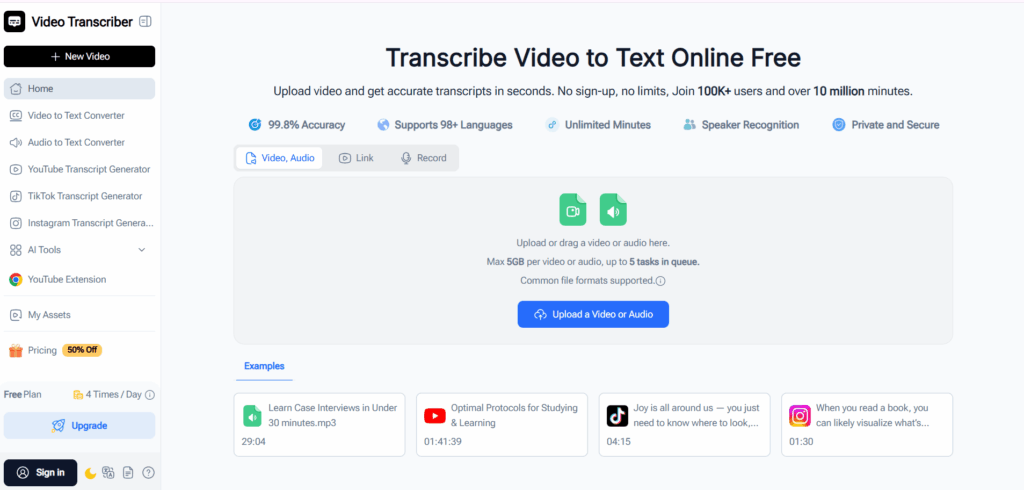
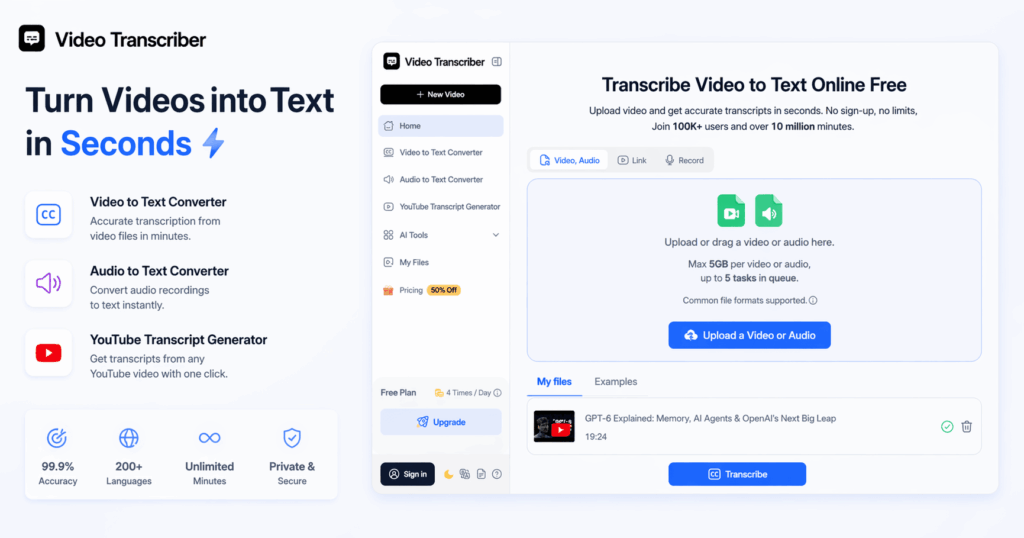
Its current homepage navigation already tells the user what the product is for: Video to Text Converter, Audio to Text Converter, YouTube Transcript Generator, plus other transcript-driven pages. Then the hero section repeats the same message in plain language: “Transcribe Video to Text Online Free.” Below that, the upload module lets users drag a video or audio file directly into the page. The message is simple. The product intent is obvious. The action path is short.
That structure is powerful because it removes guesswork.
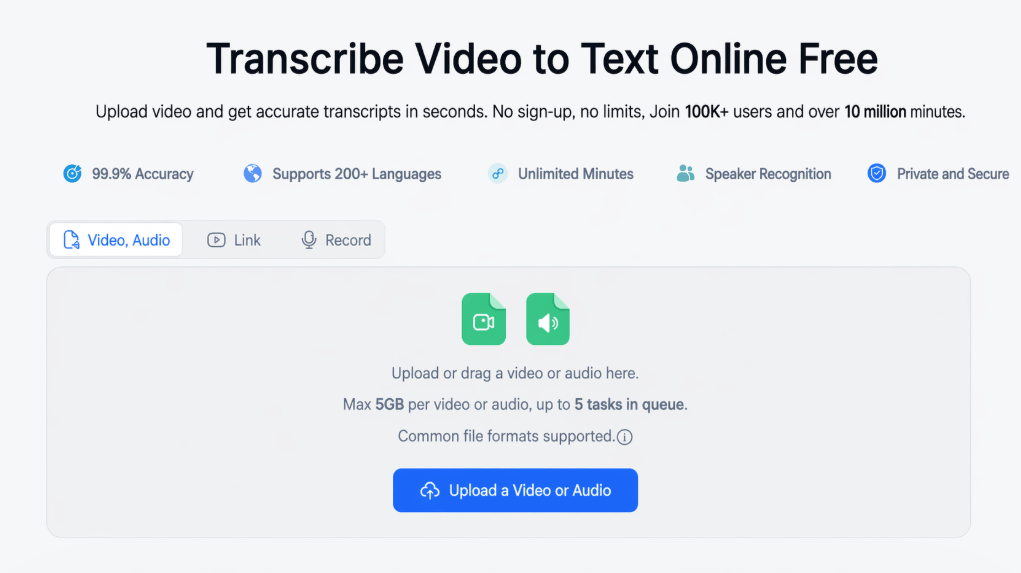
A user who lands on Video Transcriber AI does not need to ask, “Where is the transcription tool?” The page answers that instantly. The upload box is already there. The file types are already there. The submit button is already there. Even the operational limits are visible early: max 5GB per video or audio, up to 5 tasks in queue, and no sign-up. That is a very clean match for search intent like video to text, audio to text, or YouTube transcript generator.
Video Transcriber AI also positions itself as more than a raw converter. On the same homepage, it highlights speaker recognition, private and secure, support for 98+ languages, and a workflow of upload → transcribe → copy, download, or share. That makes it feel like a focused tool designed around one job: get text from spoken content fast, then let the user use that text immediately.
Standout positioning on the public page:
| Video Transcriber AI signal | Why it matters |
| “Transcribe Video to Text Online Free” | The core use case is obvious |
| Video to Text / Audio to Text / YouTube Transcript Generator in nav | Users do not need to hunt for the right tool |
| Upload module on the hero section | Faster path to action |
| No sign-up | Lower friction for first-time use |
| 5GB max per file, 5 tasks in queue | Built for direct, practical use |
Everything above is visible on the current public homepage. It is why Video Transcriber AI feels easier to recommend to students, solo creators, researchers, marketers, and anyone who just wants transcription without exploring a larger platform first.
What Is Restream?
Restream is not a transcription-first product.
It is a broader live video and creator platform.
Its homepage messaging centers on being a simple live video platform that helps users create videos and multistream them to multiple channels. Its product architecture reinforces that: Multistreaming, Studio, Upload & Stream, and Clips are the core products surfaced publicly. That tells users what Restream wants to be known for. It wants to be known for live broadcasting and creator workflows first.
To be clear, Restream does have transcription tools.
Its Creator Toolkit includes an AI Tools section with Audio Transcription, Video Transcription, and Podcast Transcription. So this is not a case where Restream lacks transcription entirely. The real difference is discoverability and positioning. Transcription is part of a toolkit. It is not the first thing the platform asks the user to do.
That difference shapes the user experience.
If a user comes to Restream for streaming, recording, clips, or creator operations, the structure feels natural. If a user comes to Restream only to transcribe a file, the path is less direct. They may need to move from the homepage idea of the product to the tools section, then into AI Tools, then into the right transcription utility. That is a reasonable platform design for a multi-product company. It is just less convenient for users with narrow transcription intent.
Standout positioning on the public pages:
| Restream signal | What it shows |
| Homepage: create and multistream live video | Live video is the main story |
| Core products: Multistreaming, Studio, Upload & Stream, Clips | Creator platform positioning |
| Creator Toolkit | Tools are grouped under a broader workflow |
| AI Tools include Audio Transcription, Video Transcription, Podcast Transcription | Transcription exists, but as one category among others |
This is why Restream is better understood as a multi-purpose creator platform with transcription inside it, not as a dedicated transcription destination.
Key Differences Between Video Transcriber AI and Restream
1. Video Transcriber AI vs Restream: Getting Started
This is the first difference users feel.
Not features. Not pricing. Not model quality.
Just the first 10 seconds.
| Aspect | Video Transcriber AI | Restream |
| First visible promise | Transcribe video to text | Create and multistream live video |
| First obvious action | Upload a file | Explore platform products or get started |
| Transcription path | Direct | Indirect |
| Best for fast one-off use | ✅️Yes | Less clearly |
The current Video Transcriber AI homepage is built like a landing page for one immediate task. Open page. See upload. Add file. Submit. That is exactly how a dedicated transcription tool should behave. Its UI does not ask the user to interpret the product first. It lets the user act first.
Restream behaves more like a platform. Its public story starts with live video creation and multistreaming. That is not bad design. It is just different design. It means transcript-only users are entering a broader ecosystem before they reach the specific task they care about.
Quick takeaway: if the user’s job is simply “transcribe this file now,” Video Transcriber AI is the faster start.
2. Video Transcriber AI vs Restream: Ease of Finding the Transcription Tool
This is the most important difference in the entire comparison.
Because this article is not about whether Restream can transcribe.
It can.
The question is whether transcription is easy to find.
| Discovery question | Video Transcriber AI | Restream |
| Is transcription the homepage focus? | ✅️Yes | ❌ No |
| Is a transcript-related tool in top nav? | ✅️Yes | ❌ No |
| Does the user need to browse a tools hub first? | ❌ No | Usually yes |
| Is the product intent obvious for transcript users? | ✅️Yes | Less obvious |
Video Transcriber AI makes transcription impossible to miss. The side nav is full of transcription-led entries. The hero copy repeats the transcription value proposition. The upload box confirms the use case. This is what “easy to find” looks like in practice. The user does not need product education before they can begin.
Restream takes a different route. Its transcription tools sit inside Creator Toolkit → AI Tools, next to other creator utilities. That is a valid information architecture for a broad platform. But it also means transcription is not the main homepage promise. Users looking only for video-to-text or audio-to-text have to work a little harder to reach the right page.
This is where the dedicated-tool advantage becomes obvious.
Video Transcriber AI is easier to find because transcription is the product, not a side tool. That sentence basically summarizes the page-structure difference between the two brands.
3. Video Transcriber AI vs Restream: Workflow Simplicity
Users often say they want “the best tool.”
What they usually mean is:
“I want the simplest workflow that gets the job done.”
| Workflow step | Video Transcriber AI | Restream |
| Open page | Already inside a transcription-first product | Enter a broader creator platform |
| Decide what to do | Upload file | Find the right product or tool |
| Start transcription | Immediate | More navigation required |
| Cognitive load | Lower | Higher for transcript-only users |
Video Transcriber AI reduces decision fatigue. The page is not asking the user whether they want to stream, record, multistream, clip, schedule, or create. It is asking one thing: what file do you want to transcribe? That makes the product feel lighter, faster, and easier for beginners.
Restream is the opposite. It is broader by design. That breadth is valuable for the right audience, especially creators and live-video teams. But breadth also adds choice. And every extra choice slows down users who already know they only need transcription.
This is why dedicated products often convert better for narrow intents. They eliminate the extra decisions a broader platform introduces. That is exactly what Video Transcriber AI does here.
4. Video Transcriber AI vs Restream: Product Positioning
Positioning shapes trust.
If a user searches for a transcription tool, they want the page to feel aligned with that intent immediately.
| Positioning layer | Video Transcriber AI | Restream |
| Core identity | Dedicated transcription tool | Live video / creator platform |
| Homepage promise | Turn video or audio into text | Create, stream, upload, clip |
| Best-aligned search intent | Video to text, audio to text, transcript generation | Live streaming, creator workflows, broadcasting |
| Better match for transcript-specific queries | ✅️Yes | Less directly |
Video Transcriber AI wins this layer because its public language stays tightly aligned with transcription intent. Even its supporting sections stay close to the same story: upload, transcribe, speaker recognition, copy, download, share, use for lectures, meetings, and content creation. The product speaks one language.
Restream speaks a broader language. It talks to creators and streamers. It talks about multistreaming and studio workflows. It talks about uploading prerecorded videos and turning live video into clips. Again, that is not a weakness in general. It is just a weaker match for a user whose query is narrowly about transcription.
So if your keyword is Video Transcriber AI vs Restream, and your angle is fast online transcription, the cleaner positioning advantage belongs to Video Transcriber AI.
5. Video Transcriber AI vs Restream: Best Use Cases
Not every comparison should end with one universal winner.
The better question is:
Better for whom?
| User type | Better choice | Why |
| First-time transcription users | Video Transcriber AI | Easier to find and start |
| Students | Video Transcriber AI | Faster transcript access |
| Casual creators | Video Transcriber AI | Less friction, more direct workflow |
| Researchers / solo professionals | Video Transcriber AI | Dedicated transcript-first path |
| Live stream creators | Restream | Broader platform features |
| Teams focused on multistreaming | Restream | Core products are built for that |
| Users who need a creator toolkit, not just transcription | Restream | More platform breadth |
Video Transcriber AI is better for users with one clear need: get text from audio or video fast. That includes learners, marketers, podcasters who just want transcripts, journalists, people working from recorded interviews, and creators repurposing content into text. The more focused the task, the more sense Video Transcriber AI makes.
Restream makes more sense when transcription is only one part of a larger workflow. If you are already choosing among multistreaming, studio production, upload-and-stream, and clips, then its platform structure is useful rather than distracting. That is why Restream still wins for broader creator operations, even if it loses on transcription discoverability.
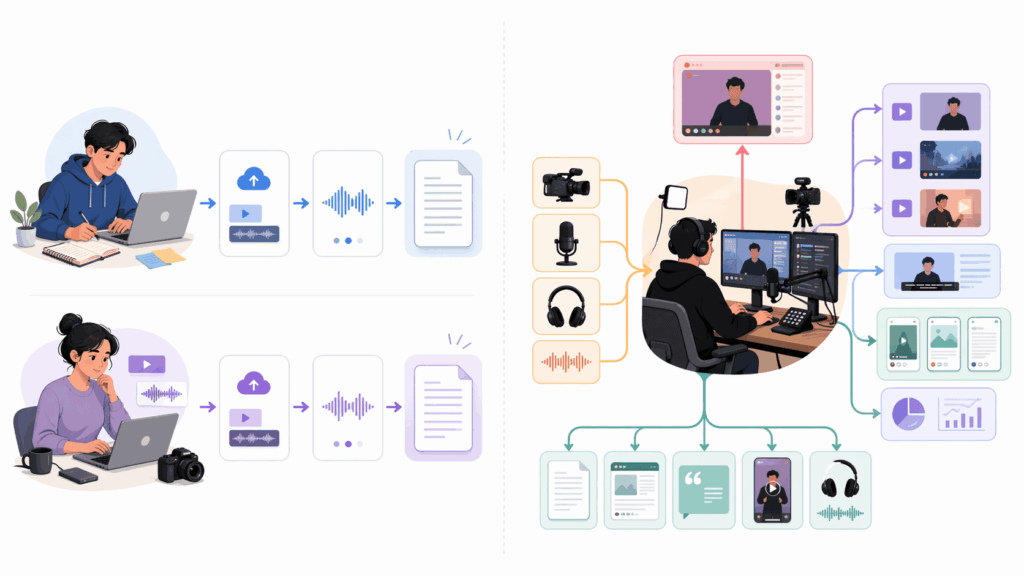
6. Video Transcriber AI vs Restream: Which Is Better for Fast Online Transcription?
This final difference is really the summary of the first five.
If your goal is fast online transcription, the better tool is usually not the broader platform.
It is the tool that gets out of your way.
| Final decision factor | Video Transcriber AI | Restream |
| Faster to understand | ✅️Yes | ❌ No |
| Faster to locate the transcription function | ✅️Yes | ❌ No |
| Better aligned with transcript-only intent | ✅️Yes | ❌ No |
| Better for platform breadth | ❌ No | ✅️Yes |
| Better for fast online transcription | ✅️Yes | ❌ No |
Video Transcriber AI wins this article’s core use case because everything important appears early: transcript-focused navigation, transcript-focused headline, direct upload module, visible operational limits, and no-sign-up messaging. That is a short, efficient path from keyword to task completion.
Restream does not lose because it is weaker software. It loses because this specific use case is not its homepage identity. Its platform is built for a wider category. That wider category is valuable, but it also makes transcription feel secondary in discovery, even though the tools are there.
So for the exact intent behind this comparison, the answer is clean:
Video Transcriber AI is the better choice for fast online transcription.
FAQ
Is Video Transcriber AI easier to use than Restream for transcription?
Yes, for transcription-only use cases. Video Transcriber AI surfaces transcript-related tools directly in the top navigation and puts an upload box on the homepage hero, while Restream places transcription tools under its Creator Toolkit’s AI Tools section.
Does Restream have a transcription tool?
Yes. Restream currently lists Audio Transcription, Video Transcription, and Podcast Transcription inside its AI Tools category in the Creator Toolkit.
Why is Video Transcriber AI easier to find?
Because transcription is the main product story. The homepage navigation, hero copy, and upload module all point to transcript-related actions immediately.
Is Restream better for live streaming than transcription?
Restream’s public homepage and core product architecture are clearly built around live video, multistreaming, studio workflows, uploaded live streams, and clips. So yes, it is better understood as a live-video platform than as a transcription-first tool.
Which tool is better for fast online video-to-text workflows?
For fast online video-to-text workflows, Video Transcriber AI is the better fit because the user can reach the transcription action more directly.
Final Verdict
If you want a dedicated transcription tool that is easy to find, easy to understand, and fast to start, Video Transcriber AI is the better option.
Its current public site structure makes that obvious. The navigation is already built around transcription use cases. The homepage hero already includes the upload workflow. The page already says no sign-up. The product intent is visible in seconds. Users do not need to explore the site before they can act.
Restream is still a strong product.
But it is strong for a different reason.
It is strong as a broader live video and creator platform. Its public structure is centered on Multistreaming, Studio, Upload & Stream, Clips, and creator workflows. Its transcription tools are real, but they live inside that larger ecosystem rather than defining it.
That is why the conclusion here should not be vague.
For users searching specifically for video-to-text, audio-to-text, or a quick browser transcription workflow, Video Transcriber AI is the more convenient, more focused, and more discoverable choice. For users searching for a bigger creator platform with transcription included somewhere inside it, Restream remains relevant. But that is a different search intent.