


In a world where time is precious and content is king, the tools we choose to transcribe audio and video can make or break our productivity. For businesses, creators, and professionals who rely on accurate transcriptions, the right tool can significantly enhance efficiency and quality. This article puts Video Transcriber AI and Descript head-to-head, highlighting their key features, differences, and how each tool can be best leveraged depending on your specific requirements.
Video Transcriber AI vs Descript Quick Comparison Table
| Feature | Video Transcriber AI | Descript |
| Sign-up Required | ✅ No | ❌Yes |
| Free Trial | ✅ Yes, no sign-up required | ✅ Yes, requires sign-up |
| Accuracy | 99.9% | 95-98% |
| Languages Supported | 200+ languages | 20+ languages |
| Maximum File Size | 5GB per file | 2GB per file |
| Core Workflow | Simple, intuitive, minimal steps | More complex with additional editing tools |
| Security Certification | No login, data not stored | Standard security protocols |
| Pricing | Pay-as-you-go, from $5/month | $24/month (Hobbyist) |
| Best Use Case | High-quality, large file transcriptions, multilingual support | Media editing, podcast editing, professional workflows |
In the comparison table above, Video Transcriber AI offers higher accuracy, better language support, and larger file size capabilities, making it an excellent choice for those requiring high-quality transcription for large files. On the other hand, Descript provides powerful editing tools, perfect for users focused on creating media-rich content such as podcasts or video editing.
What is Video Transcriber AI?
Video Transcriber AI is a powerful transcription tool designed to provide fast, high-quality transcriptions for audio and video content. It excels at handling large files and offers 99.9% accuracy, making it ideal for professional use. It supports over 200 languages, which makes it suitable for global businesses or content creators working in multiple languages.
Standout Features:
- 99.9% Accuracy – Offers precise transcriptions with very few errors.
- 5GB File Size Limit – Supports large file uploads, ideal for long-form content.
- 200+ Languages – Multilingual support ensures accessibility for international users.
- Speaker Recognition – Identifies and labels different speakers for better readability.
- Online Editing – Allows users to edit transcriptions directly on the platform.
- Structured Notes – Summarizes content for better content extraction and organization.
In conclusion, Video Transcriber AI is ideal for those who need accurate, scalable transcription solutions without the need for complex workflows or additional editing features.
What is Descript?
Descript is a powerful audio and video editing tool that also provides transcription services. While Descript excels in its multimedia editing features, it also allows users to transcribe videos, podcasts, and other content. However, Descript focus is primarily on content editing and collaboration rather than being a specialized transcription tool.
Standout Features of Descript:
- Multi-Track Editing – Edit audio and video files using a simple text interface, making it easier to make changes and adjust timing.
- Overdub – A unique Descript feature that allows users to correct recordings by typing out the changes, seamlessly integrating new speech into the audio.
- Screen Recording – Record video content and create transcriptions simultaneously, perfect for tutorials, interviews, or presentations.
- Collaboration Tools – Descript makes it easy for teams to collaborate on projects in real-time, allowing for efficient workflows across multiple users.
- Cloud Syncing – Descript cloud syncing ensures files are automatically synced across all devices for maximum convenience and accessibility.
To sum up, Descript is great for users who need a combination of transcription and multimedia editing tools, particularly those in the podcasting, video creation, or media production industries.
Essential Differences Between Video Transcriber AI and Descript
1. Video Transcriber AI vs Descript: User Experience
| Aspect | Video Transcriber AI | Descript |
| First Action | Upload file or paste link | Choose product path and sign up |
| Sign-up Requirement | No | Yes, email confirmation required |
| Time to First Transcript | ~10 seconds from page load | ~2 minutes (including account creation) |
| Workflow Setup | Simple, no registration required | Multi-step setup with account login |
Video Transcriber AI: Quick and Simple
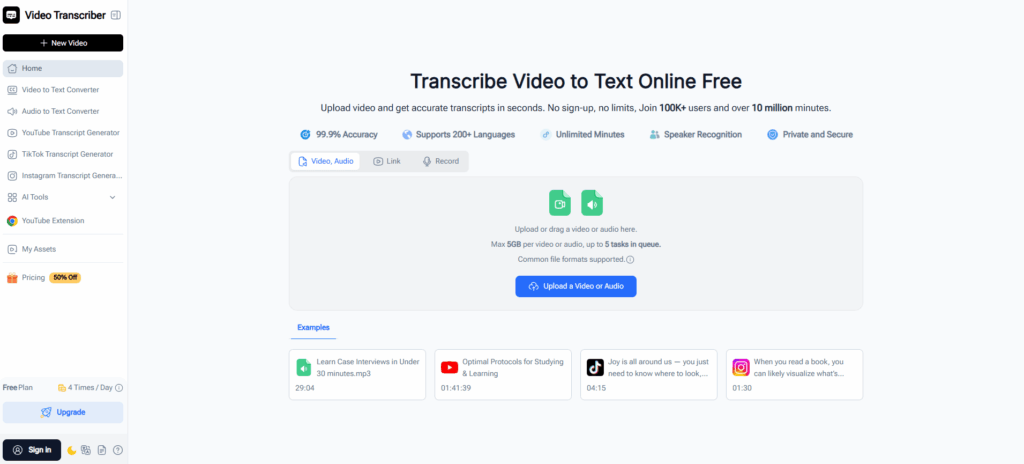
Video Transcriber AI provides an incredibly straightforward user experience, making it easy for users to start transcribing immediately. Upon landing on the website, users are greeted with the core feature zone - just upload your file or paste a link, and the AI takes care of the rest. The process is instant and highly efficient, with the ability to receive your formatted text in just three simple steps.
How to Start with Video Transcriber AI:
- Open the website: The homepage displays everything you need without any sign-up required.
- Upload a file or paste a link: Simply drag and drop your audio/video file or paste a YouTube link.
- AI handles the transcription: With one click, the AI processes your file and transcribes it.
- Download your transcription: After the transcription is complete, choose your desired text format (SRT, TXT, DOC, etc.) and download.
Video Transcriber AI offers a seamless, minimal-effort experience. Users can instantly start transcribing and downloading formatted transcripts with no sign-up and in just three steps, making it ideal for anyone who needs a quick, hassle-free solution.
Descript: More Structured Start
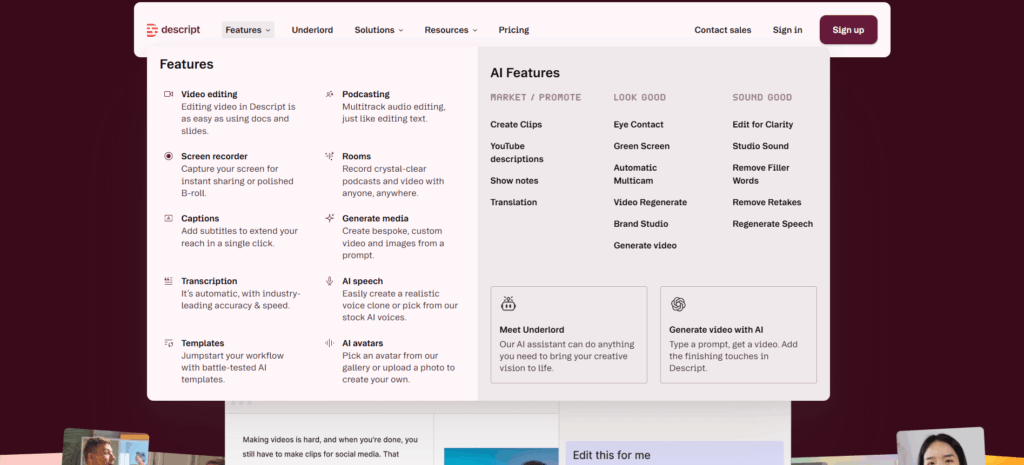
Descript, while powerful, provides a more structured process. Users must go through several steps, including signing up and selecting specific features. This makes the platform better suited for users who need a robust multimedia tool, such as podcasters or video editors, but it takes a bit longer to get started.
How to Start with Descript:
- Open the website: Descript presents various product options (e.g., transcription, podcast editing).
- Create an account: Users need to register with an email and create a profile before accessing the tools.
- Select your feature: Choose whether you want to transcribe, edit a video, or use another feature.
- Upload your file: Upload your audio/video file, or start screen recording if needed.
- Wait for transcription: After uploading, Descript processes the file, which may take a bit longer due to the added editing features.
- Edit and refine: Once the transcription is complete, users can begin editing the text or media within the platform.
While Descript provides powerful tools for media editing, its process requires more setup compared to Video Transcriber AI. It’s more complex and is better suited for users who need both transcription and editing features, rather than a quick transcription solution.
Quick Takeaway
Video Transcriber AI provides a clean, simple interface, allowing users to upload and transcribe quickly without the need for account creation. It's designed for speed and simplicity, making it ideal for those who want to get to work immediately.
Descript, on the other hand, is a more comprehensive tool with a structured setup. It’s great for users who need multimedia editing in addition to transcription, but it requires more time and effort to get started.
2. Video Transcriber AI vs Descript: Accuracy and Language Support
| Feature | Video Transcriber AI | Descript |
| Accuracy | 99.9% | 95-98% |
| Error Handling | Minimal errors, highly reliable | More errors, manual correction may be needed |
| Language Support | 200+ languages | 20+ languages |
Video Transcriber AI: High Accuracy and Comprehensive Language Support
Video Transcriber AI delivers 99.9% transcription accuracy, ensuring that users get professional-quality transcriptions across a wide range of audio, even in complex scenarios. It supports an impressive 200+ languages, making it perfect for global businesses and content creators who need to reach a multilingual audience.
In particular, Video Transcriber AI offers comprehensive support for key global languages, including Simplified Chinese and Traditional Chinese, which are spoken by over 1.4 billion people worldwide. This is a significant advantage for businesses targeting Chinese-speaking markets in Mainland China, Hong Kong, and Taiwan.
Key Languages with High Speaker Populations:
- Simplified Chinese: Spoken by over 1.2 billion people in Mainland China, the largest consumer market globally.
- Traditional Chinese: Used by over 20 million people in Hong Kong and Taiwan.
- Hindi: Spoken by over 500 million people in India, one of the fastest-growing markets globally.
- Telugu: Spoken by approximately 96 million people in India, a rapidly expanding market for tech and media.
- Arabic: Spoken by over 400 million people across North Africa and the Middle East.
Video Transcriber AI provides businesses and content creators with accurate transcriptions in languages spoken by billions of people, including Chinese, Hindi, Arabic, and Telugu. This allows users to engage a global audience without the need for additional transcription tools.
With its 99.9% accuracy and multilingual capabilities, Video Transcriber AI eliminates the hassle of finding separate solutions for each language, streamlining the transcription process for global teams and international content creators.
Video Transcriber AI vs Descript: Language Comparison
| Language | Video Transcriber AI | Descript |
| English | ✅ | ✅ |
| 简体中文 (Simplified Chinese) | ✅ | ✅ |
| 繁体中文 (Traditional Chinese) | ✅ | ✅ |
| हिन्दी (Hindi) | ✅ | ✅ |
| Español (Spanish) | ✅ | ✅ |
| Français (French) | ✅ | ✅ |
| العربية (Arabic) | ✅ | ❌ |
| বাংলা (Bengali) | ✅ | ❌ |
| Русский (Russian) | ✅ | ✅ |
| Português (Portuguese) | ✅ | ✅ |
| اردو (Urdu) | ✅ | ❌ |
| Bahasa Indonesia | ✅ | ✅ |
| Deutsch (German) | ✅ | ✅ |
| 日本語 (Japanese) | ✅ | ✅ |
| Kiswahili (Swahili) | ✅ | ❌ |
| मराठी (Marathi) | ✅ | ❌ |
| తెలుగు (Telugu) | ✅ | ❌ |
| Türkçe (Turkish) | ✅ | ✅ |
| Tiếng Việt (Vietnamese) | ✅ | ❌ |
| 한국어 (Korean) | ✅ | ✅ |
| Polski (Polish) | ✅ | ✅ |
| Italiano (Italian) | ✅ | ✅ |
Descript: Strong in Core Languages, Limited in Global Reach
Descript provides reliable transcription with 95-98% accuracy, which works well for mainstream content but may require additional edits for complex audio. However, Descript language support is much more limited, focusing on 20+ languages, mainly covering widely spoken languages like English, Spanish, French, and German. Notably, Descript does not support key regional languages such as Chinese, Telugu, Punjabi, and Arabic.
Descript is ideal for users working primarily in English or other widely spoken languages. It’s well-suited for video editors, podcasters, and creators working in regions with common languages, but its limited language support can be a barrier for those targeting global or multilingual markets.
Quick Takeaway
Video Transcriber AI provides 99.9% accuracy and supports over 200 languages, including Chinese (Simplified and Traditional), Hindi, Telugu, and Arabic—essential languages for businesses targeting global audiences. It offers comprehensive, multilingual transcription capabilities, making it the ideal tool for those working in diverse regions.
Descript, on the other hand, is great for English and other major languages but lacks support for key regional languages such as Chinese and Telugu, limiting its utility for international or multilingual content creation.
3. Video Transcriber AI vs Descript: File Size and File Handling
| Aspect | Video Transcriber AI | Descript |
| Maximum File Size | 5GB per file | 2GB per file |
| Supported File Types | MP3, MP4, MPEG, MPGA, M4A, WAV, WebM, MOV, and more | MP3, MP4, WAV, M4A, MOV |
| Online File Upload | Supports YouTube, TikTok, Instagram, and other online links | Limited to local file uploads |
| Subtitles | Unlimited video length for subtitled content | Limited video length for subtitled content |
| Timestamps and Insights | Includes timestamps and AI-generated insights | Basic transcription without advanced insights |
| Downloadable File Formats | SRT, TXT, DOC, VTT, CSV, and more | Limited to basic file formats |
Video Transcriber AI: Extensive File Handling and Download Options
Video Transcriber AI stands out not only for its robust file handling but also for its versatile file format options. Supporting MP3, MP4, MPEG, M4A, WAV, WebM, and MOV, it caters to a wide variety of content creators working with different media types. Whether it's an audio podcast or a high-definition video, Video Transcriber AI can handle the job.
It supports files up to 5GB, which makes it ideal for larger video projects like webinars, long-form content, or full-length films. Additionally, Video Transcriber AI can transcribe unlimited-length videos with subtitles, including content from popular platforms like YouTube, TikTok, and Instagram, all without worrying about length restrictions.
Key Features and Benefits:
- Supports 5GB file uploads, allowing users to work with large video and audio files.
- Handles a wide range of file formats such as MP3, MP4, MOV, and more, making it highly adaptable to various media types.
- Unlimited video transcription: Whether it’s a TikTok video or a full-length YouTube documentary, Video Transcriber AI allows for seamless transcription of lengthy videos with subtitles.
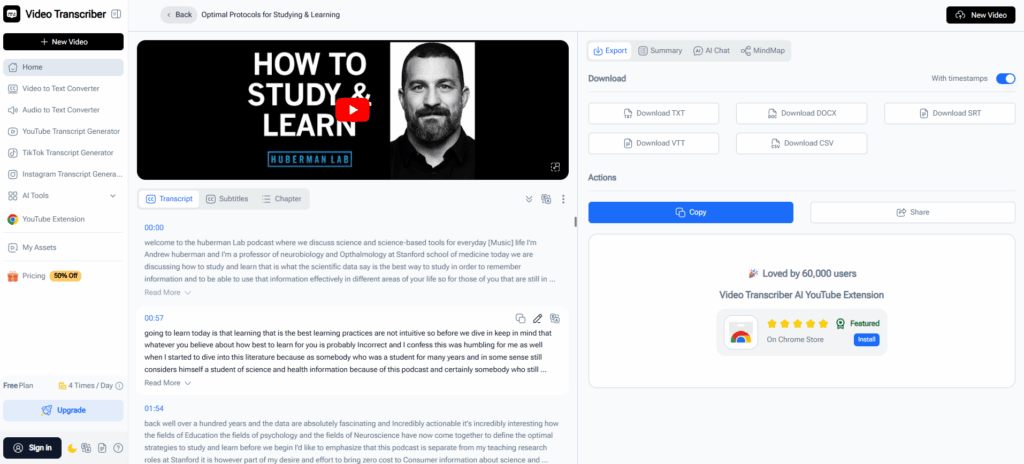
- Users can download transcriptions in multiple formats like SRT, TXT, DOC, VTT, and CSV, allowing easy integration into other creative workflows. This eliminates the need for manual adjustments and provides immediate usability for video editing, captioning, and content localization.
Video Transcriber AI offers seamless integration with your workflow, allowing you to quickly download formatted transcriptions (e.g., SRT for subtitles, TXT for notes, CSV for data management) and directly apply them to your next project.
The AI-generated insights and timestamps make it easier to extract key information and improve the efficiency of post-production workflows without the need for extensive manual edits.
Descript: Limited File Handling and Format Support
Descript, while providing a user-friendly transcription service, is limited by its 2GB file size cap, making it less ideal for users working with larger files. It supports MP3, MP4, WAV, and M4A, but lacks the flexibility of Video Transcriber AI in terms of format variety and file size.
Key Features and Limitations:
- 2GB file size limit, making it restrictive for larger video files or long-form podcasts.
- Limited support for file formats, which may require additional steps to convert files before transcription.
- Basic transcription without AI-powered insights or timestamps, limiting the depth of information extracted from the content.
Descript is suitable for those working with smaller files and simpler projects, but it lacks the file size flexibility and advanced features required for larger-scale projects or workflows requiring a wide range of output formats.
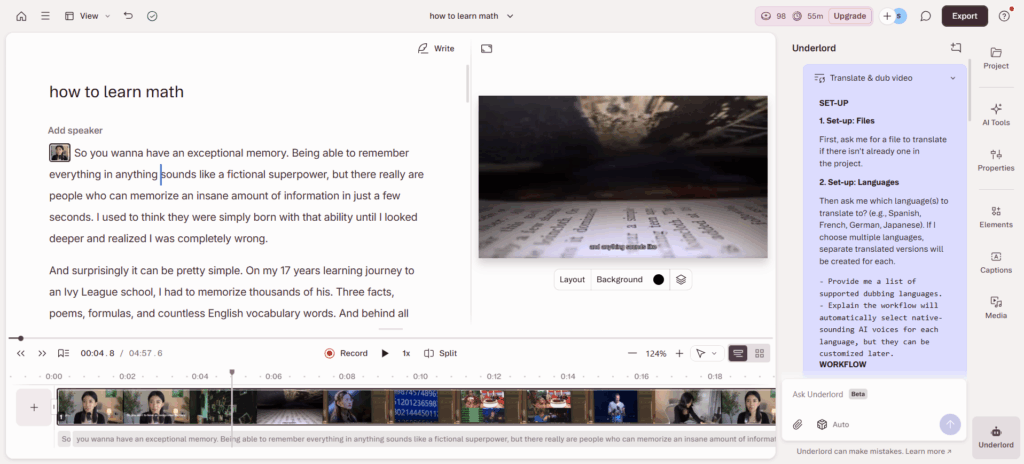
Quick Takeaway
Video Transcriber AI offers a wide range of file formats (including MP3, MP4, WAV, MOV) and supports large file uploads (up to 5GB). It also allows users to download transcriptions in versatile formats such as SRT, TXT, DOC, VTT, and CSV, which integrate seamlessly into video editing and content creation workflows.
Descript is more limited in its file size support (2GB max) and does not offer the same format flexibility or advanced insights as Video Transcriber AI. It’s better suited for simpler projects with smaller files but may require additional tools for larger-scale or more complex workflows.
4. Video Transcriber AI vs Descript: Security and Privacy
Video Transcriber AI: Privacy Focused with Minimal Data Retention
Video Transcriber AI takes a privacy-first approach, ensuring that no user data is stored unless an account is created. This means unregistered users can transcribe content without the concern of their data being retained, offering a secure and easy-to-use experience. Since there is no user database to target, it is inherently more secure, especially for freelancers, students, or small business owners.
Key Privacy Features:
- No sign-up required: Start transcribing immediately without needing to create an account, ensuring minimal collection of personal information.
- No data storage for unregistered users: Data is not stored unless you choose to register, offering users greater control over their content and privacy.
Video Transcriber AI provides a privacy-conscious option for users who prioritize data protection, especially when handling sensitive materials. With minimal data retention and no sign-up required, users can transcribe quickly and securely.
Descript: Standard Security Measures with User Data Storage
Descript requires user registration, which means your files and transcriptions are stored on its cloud servers. The platform adheres to standard security protocols to protect user data. While this may be suitable for users in industries requiring compliance, it's important to note that user data is stored.
Key Security Features:
- User data stored on cloud servers: Files and transcriptions are stored once the user logs in, and the platform uses standard security protocols to protect data.
- Encryption and protection: Data is encrypted and safeguarded, but users should review Descript privacy policy to understand how their data is handled.
Descript is ideal for those who require advanced editing tools and collaborative features. If you are comfortable with your data being stored on the platform, Descript offers a robust suite of transcription and media editing features.
Quick Takeaway:
Video Transcriber AI offers a privacy-focused approach with instant access, no sign-up required, and minimal data retention, making it ideal for users who prioritize privacy and security.
Descript provides advanced editing and collaboration tools but requires user registration and stores data on cloud servers. Users are encouraged to review Descript privacy policy to understand how their data is managed.
5. Video Transcriber AI vs Descript: Pricing and Plans
| Pricing Feature | Video Transcriber AI | Descript |
| Free Tier | 4 transcriptions/day | 1 hour transcription/month |
| Basic Plan | $5/month, $48/year | $24/month, $192/year (Hobbyist) |
| Pro Plan | $18/month, $108/year | $35/month, $288/year (Creator) |
| Maximum File Size | ✅ 5GB per file | ❌ Not specified |
| Batch Processing | ✅ Supports up to 5 files simultaneously | ❌ Not supported |
| Export Formats | ✅ SRT, TXT, DOC, VTT, CSV, etc. | Basic text and caption export formats |
| Online Subtitle Editing | ✅ Built-in (edit after transcription) | ✅ Built-in editor with timeline UI |
| Team/Collaboration Features | ❌ Not applicable | ✅ Available in higher plans |
Video Transcriber AI: Flexible and Affordable
Video Transcriber AI offers a clear, budget-friendly pricing model, with both monthly and annual options. The platform is ideal for those who need simple transcription and online subtitle editing without the complexity of additional media editing tools.
- Free Plan: Up to 4 transcriptions/day, perfect for testing or occasional use.
- Basic Plan:
- $5/month, $48/year (~$4/month).
- Includes 1,000 minutes/month of transcription and 5GB file uploads.
- Supports batch processing of up to 5 files simultaneously, making it great for bulk transcription.
- Online link transcription from platforms like YouTube, TikTok, and Instagram.
- Export options: SRT, TXT, DOC, VTT, CSV, perfect for exporting subtitles, documents, and other formats.
- Pro Plan:
- $18/month, $108/year (~$9/month).
- Unlimited transcription minutes, great for heavy users or larger projects.
Key Advantages:
- Affordable pricing, with no need for long-term commitments.
- No file size limits on the Pro Plan (up to 5GB per file).
- Online subtitle editing built-in, allowing quick edits to the transcribed text.
- Batch processing of multiple files at once, which saves time on large transcription tasks.
Descript: Subscription-Based with Media Editing Features
Descript offers a subscription model that is ideal for users needing both transcription and advanced media editing tools. However, its pricing is higher, especially if you require a significant amount of transcription minutes or additional team collaboration features.
- Free Plan: Includes 1 hour transcription/month with limited access to features.
- Hobbyist Plan:
- $24/month, $192/year (~$16/month).
- Includes 10 hours/month of transcription and basic media editing.
- Offers timeline UI for subtitle editing and text export.
- Creator Plan:
- $35/month, $288/year (~$24/month).
- Includes 30 hours/month of transcription and advanced media editing tools like studio sound and filler word removal.
- Collaboration features are available in higher-tier plans, ideal for teams working together on media projects.
Key Advantages:
- Advanced editing features such as multi‑track editing, AI overdub, and studio sound.
- Team collaboration tools for larger projects or businesses.
- Post‑transcription editing and timeline UI for refining subtitles directly in the platform.
Quick Takeaway
Video Transcriber AI offers cost-effective pricing starting at just $5/month for 1,000 minutes/month. It’s best for users who primarily need transcription services with online subtitle editing and bulk file processing capabilities.
Descript is designed for users who require full multimedia editing, offering features like advanced editing, team collaboration, and audio/video production tools, starting at $24/month. It is a better fit for users who need both transcription and media editing in one platform but at a higher cost.
6. Video Transcriber AI vs Descript: Best Use Cases
Best Use Cases for Video Transcriber AI
Video Transcriber AI is ideal for users who need quick and efficient transcription with minimal effort. Here’s where it excels:
Solo Creators & Freelancers
Perfect for content creators, students, or freelancers who need fast transcription for interviews, lectures, and podcasts. It's great for anyone needing batch processing or quick captioning without complex features.
Long-Form Transcription
Best for users who need to transcribe long recordings like webinars or trainings. The tool handles unlimited length files, making it suitable for large, time-consuming content.
Multilingual Transcription
With support for 200+ languages, it’s ideal for global creators, businesses, or researchers who need to transcribe content in multiple languages for international projects.
Subtitling & Captioning
Perfect for those in video production or YouTube creators needing quick subtitle generation and editing directly from transcriptions.
Best Use Cases for Descript
Descript is best for users who need advanced media editing in addition to transcription. Here’s where Descript shines:
Podcasting & Video Editing
Ideal for podcasters and video editors who need both transcription and advanced editing tools to create polished content. Descript Overdub and multitrack editing make it the go-to platform for editing media along with transcription.
Team Collaboration
Best for businesses or creative teams working on shared projects. Descript collaboration tools make it easy for multiple users to edit, review, and collaborate on transcripts or videos.
Multimedia Production
Suitable for video production teams, content creators, and educators who need a unified platform for both transcription and editing.
Quick Takeaway:
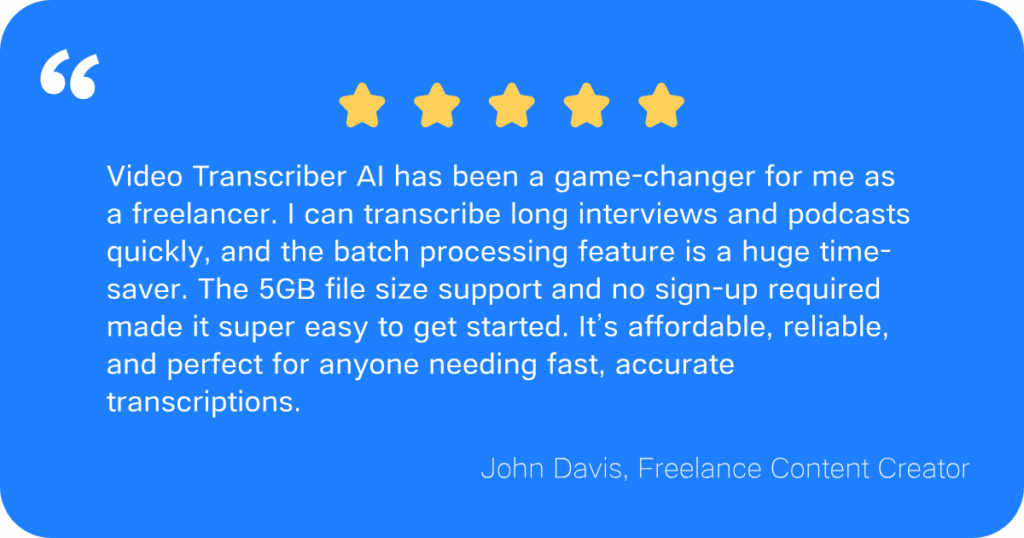
Video Transcriber AI is perfect for freelancers, small businesses, or individual creators who need fast, affordable transcription with easy integration into their workflows.
Descript is tailored for content creators, video editors, and teams needing a full-featured platform that combines transcription with advanced editing and collaboration tools.
Frequently Asked Questions About Video Transcriber AI vs Descript
Q1: Is Video Transcriber AI free?
Yes, it offers a free trial with no sign-up required, allowing you to try the service without any commitments.
Q2: Can I upload large files to Descript?
Yes, Descript allows you to upload files, but it has a maximum file size limit of 2GB for uploads.
Q3: How accurate is the transcription?
Video Transcriber AI offers 99.9% transcription accuracy, while Descript is slightly less accurate but still provides high-quality results.
Q4: Can I use these tools without creating an account?
Video Transcriber AI does not require registration for the free plan, while Descript requires you to create an account before using the service.
Q5: What is the pricing structure?
Video Transcriber AI offers affordable and flexible pricing, starting at just $5/month, while Descript follows a more premium pricing model, starting at $12/month.
Final Verdict
When it comes to transcription, Video Transcriber AI and Descript cater to different needs.
If you’re looking for a simple, affordable transcription solution, Video Transcriber AI delivers everything you need. It’s perfect for small businesses, freelancers, and individuals who need quick and accurate transcriptions without the need for additional editing or collaboration tools.
On the flip side, Descript offers a more comprehensive platform for multimedia creators, video editors, and teams needing a tool that combines both transcription and advanced media editing.
Ready to get started?
For fast, high-quality transcription that fits into your workflow, Video Transcriber AI is your solution. Try it for free today!