


Most AI note taking tools are designed around meetings. They assume that your notes are created in real time, during conversations, calls, or collaborative sessions.
But that assumption doesn’t always hold.
In many cases, the content already exists—recorded interviews, webinars, online videos, or long-form audio. The challenge is not capturing notes, but extracting useful information from that content efficiently.
This is where the difference between Video Transcriber AI and Notta becomes clear. While both are categorized as AI note taking tools, they approach the problem from completely different starting points.
In this comparison of Video Transcriber AI vs Notta, we’ll explore how each tool handles AI note taking, and which one fits better depending on how your content is created and used.
Video Transcriber AI vs Notta Quick Comparison Table
| Feature | Video Transcriber AI | Notta |
| Sign-up required | ✅ No (basic use) | ❌️ Yes (required) |
| Free plan | ✅ Yes (no login trial) | ✅ Yes (120 minutes/month) |
| Starting price | From $5/month | From $13.49/month |
| Security approach | Minimal data required for basic use | Account-based with cloud storage |
| Note source | Existing audio/video content | Live meetings & conversations |
| Note generation style | Post-processing (after upload/link) | Real-time (during meetings) |
| Video link transcription | ✅ Supported (YouTube, TikTok, etc.) | ❌️ Not supported |
| Handling long content | Up to 5GB per file | Limited by plan minutes |
| Batch processing | ✅ Supports multiple files | Not designed for batch workflows |
| AI output type | Structured notes, summaries, subtitles | Meeting notes and summaries |
| Content reuse flexibility | High | Moderate |
| Real-time meeting capture | ❌️ Not primary feature | ✅ Core feature |
| Third-party integrations | ❌️ Not required | ✅ Zoom, Google Meet, Slack |
| Collaboration features | ❌️ Limited | ✅ Built for team collaboration |
| Workflow focus | Content-to-notes | Meeting-to-notes |
Both Video Transcriber AI and Notta support AI note taking, but they are designed for different types of workflows. Video Transcriber AI focuses on extracting structured notes from existing content with fewer barriers to entry, while Notta is built around capturing and managing notes within meeting and collaboration environments.
What is Video Transcriber AI?
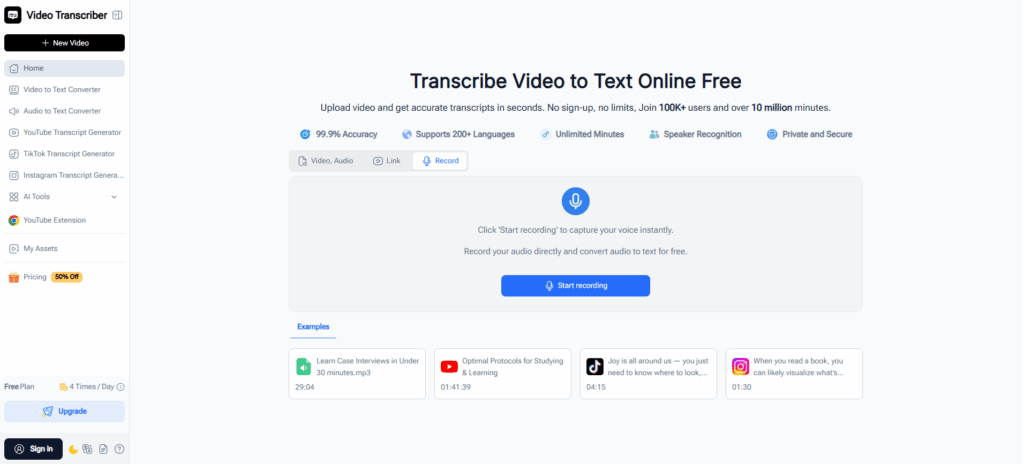
Video Transcriber AI is an AI-powered transcription and note taking tool designed to convert audio and video content into structured, searchable text. Unlike tools focused primarily on live meetings, it is built to handle both existing content and on-demand recording within a single workflow.
Users can upload files, paste video links, or start recording directly in the browser. Once processed, the tool generates transcripts, summaries, and structured notes that are easy to review, navigate, and reuse. Beyond basic transcription, it also supports deeper interaction with content, helping users move from note taking to understanding.
Standout features
- Flexible input: files, video links, and online recording Capture or import content in multiple ways within a single workflow
- Supports long-form content with speaker-aware transcripts Handles files up to 5GB with speaker identification and timestamps for easier navigation
- AI-powered notes with interactive exploration Generate summaries and interact with transcripts through AI chat to extract insights
- Structured outputs with visual organization Export transcripts in multiple formats and convert them into mind maps for better understanding
- No sign-up required for quick access Start transcribing immediately without account setup
Video Transcriber AI is a content-first AI note taking tool with deep content interaction capabilities, designed not just to capture notes, but to help users understand, organize, and reuse information more effectively.
What is Notta?
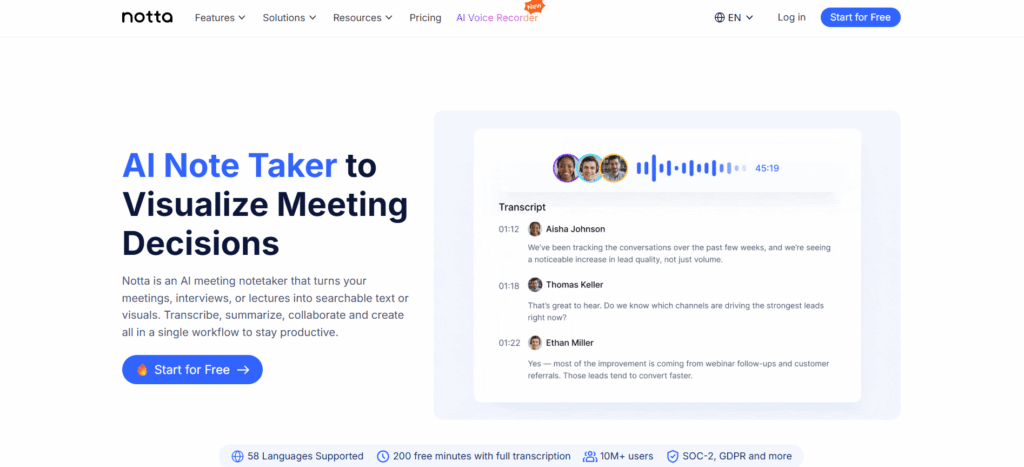
Notta is an AI note taking tool built for capturing and organizing conversations, particularly in meeting and collaboration environments. It focuses on real-time transcription, allowing users to record discussions and generate notes as conversations happen.
Its workflow typically starts with a meeting or live session. Users can connect Notta to platforms like Zoom or Google Meet, or record directly within the app. Transcripts, summaries, and notes are then generated automatically and stored for later review.
Standout features
- Real-time transcription for meetings and conversations Capture spoken content instantly during calls, interviews, or discussions
- Integration with third-party meeting tools Works with platforms like Zoom, Google Meet, and Slack for automated workflows
- Speaker identification with timestamps Helps organize conversations and makes it easier to review key moments
- Cloud-based storage and searchable notes Keeps meeting records accessible and easy to manage over time
- Collaboration and team-based workflows Allows teams to share, review, and manage notes within a structured environment
Notta is a meeting-first AI note taking tool, designed for capturing, organizing, and managing notes from live conversations and collaborative workflows.
Essential Differences Between Video Transcriber AI and Notta
1. Video Transcriber AI vs Notta: User Experience
| Step | Video Transcriber AI | Notta |
| Entry | Open page and input content | Sign up and access dashboard |
| Setup | No setup required | Account and workspace setup |
| Start task | Upload / paste link / record | Create or join a meeting |
| Processing | Automatic after input | During or after recording |
| Time to result | Minutes | Real-time or post-session |
Video Transcriber AI: Direct, Input-First Flow
The interface is designed around a single goal: getting content into the system as quickly as possible. Users can land on the page and immediately choose how to input content—upload a file, paste a link, or start recording.
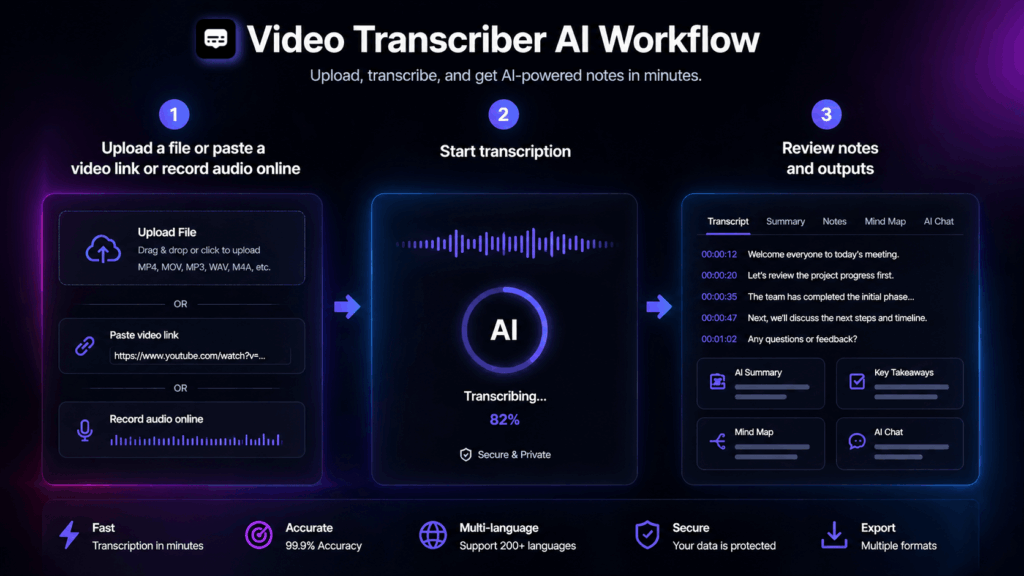
A typical workflow looks like this:
- Open the tool
- Upload a file or paste a video link
- Start transcription
- Review notes and outputs
There is no requirement to create projects or manage sessions, which reduces friction for one-off tasks or repeated processing.
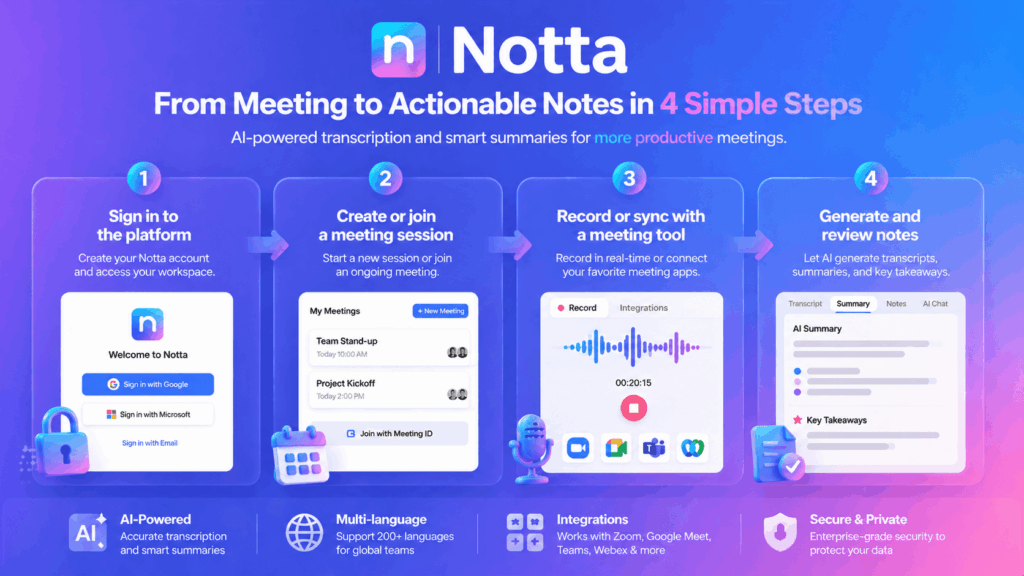
Notta: Structured, Meeting-Centric Flow
Notta’s interface reflects its focus on meetings and collaboration. Users typically work within a dashboard that organizes recordings, notes, and sessions.
A typical workflow looks like this:
- Sign in to the platform
- Create or join a meeting session
- Record or sync with a meeting tool
- Generate and review notes
This structure works well for ongoing collaboration, but introduces additional steps for users who only need transcription.
Summary
Video Transcriber AI provides a lower-friction experience for direct transcription tasks, while Notta offers a more structured environment designed for managing meetings and ongoing workflows.
2. Video Transcriber AI vs Notta: Note Creation Workflow
| Aspect | Video Transcriber AI | Notta |
| Starting point | Existing content or online recording | Live conversation |
| Recording type | Browser-based recording (processed after) | Real-time recording with transcription |
| Note timing | After processing | During recording |
| Workflow type | Content-driven with flexible input | Session-driven |
| Tool dependency | No external tools required | Often relies on integrations |
Video Transcriber AI: Asynchronous Note Creation
Video Transcriber AI generates notes after content has been provided and processed. This means note creation happens independently of when the content is recorded.
In practice, users can:
- Work with pre-recorded material
- Record content first and process it later
- Generate notes without being tied to a live session
This asynchronous model allows more flexibility in how and when notes are created, especially for users working with existing or long-form content.
Notta: Real-Time Note Creation
Notta generates notes in real time as conversations happen. Note creation is directly tied to live sessions, where recording and transcription occur simultaneously.
In this model:
- Notes are created during meetings or conversations
- The process depends on active sessions or integrations
- Timing is aligned with the flow of the discussion
This approach is well suited for capturing live interactions but less flexible for asynchronous workflows.
Summary
Video Transcriber AI separates note creation from the moment of recording, enabling asynchronous workflows. Notta generates notes in real time, making it better suited for capturing live conversations.
3. Video Transcriber AI vs Notta: Content Understanding and AI Capabilities
| Feature | Video Transcriber AI | Notta |
| AI summaries | ✅ Yes | ✅ Yes |
| AI chat interaction | ✅ Supported | ❌️ Not supported |
| Mind map generation | ✅ Supported | ❌️ Not supported |
| Insight extraction | Interactive and query-based | ❌️ Summary-based |
| Content exploration | Deep (multi-step interaction) | Basic (review and read) |
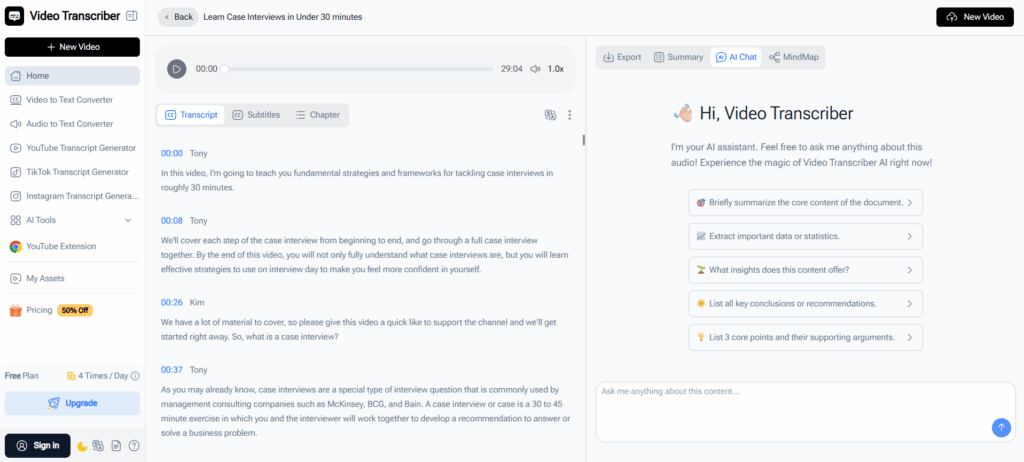
Video Transcriber AI: Interactive Content Exploration
Video Transcriber AI allows users to go beyond static summaries by interacting directly with transcripts. Instead of relying only on pre-generated outputs, users can explore content through AI chat and extract insights on demand.
In this workflow, notes become more than just records:
- Users can ask follow-up questions based on transcripts
- Key ideas can be expanded or clarified through interaction
- Complex content can be reorganized into visual formats such as mind maps
This makes Video Transcriber AI especially useful for users who need to analyze, research, or repurpose content after transcription.
Notta: Summary-Based AI for Meeting Notes
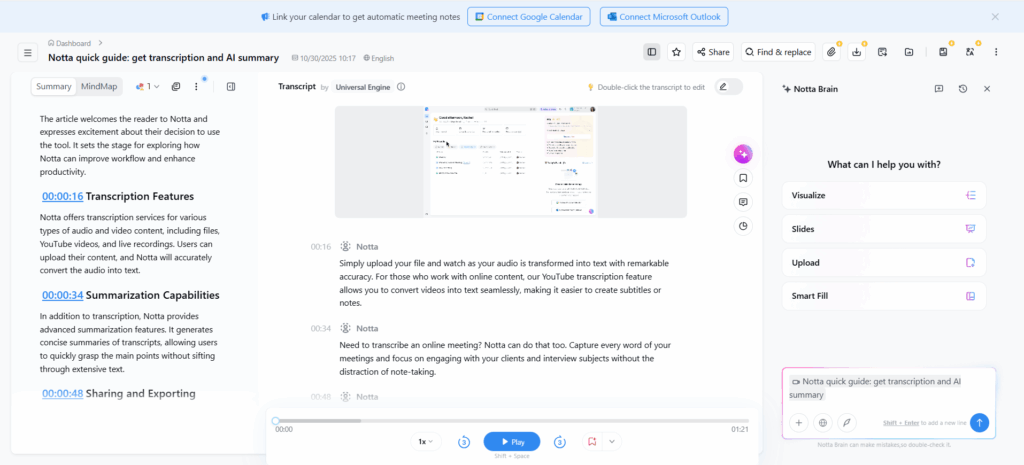
Notta focuses on helping users quickly review and understand meeting content through AI-generated summaries. Within Notta, transcripts are automatically processed into key points, highlights, and action items, making it easier to navigate conversations.
In typical Notta workflows:
- AI summaries provide a quick overview of meetings
- Key points and decisions are extracted automatically
- Transcripts remain searchable for reference
However, Notta’s AI capabilities are primarily designed for reviewing and organizing meeting notes, rather than enabling deeper, interactive exploration of content.
Summary
Video Transcriber AI enables interactive content understanding through AI chat and structured outputs, while Notta focuses on summary-based AI to help users review and navigate meeting notes more efficiently.
4. Video Transcriber AI vs Notta: Pricing and Plans
| Aspect | Video Transcriber AI | Notta |
| Pricing model | Subscription (transcription-focused) | Subscription (meeting-focused) |
| Monthly starting price | From $5/month | From $13.49/month |
| Annual starting price | From ~$4/month (billed annually) | From $8.17/month (billed annually) |
| Free plan | Yes (no login required) | Yes (120 minutes/month) |
| Usage limits | Flexible (based on usage) | Limited by transcription minutes |
| Recording limits | No strict limits (online recording) | Limited by plan minutes |
| Storage | Unlimited (registered users) | Cloud storage (limited by plan) |
| AI features | Chat, summaries, mind maps | Summaries, highlights, action items |
| Team collaboration | Not core feature | Built-in collaboration in Notta |
Pricing note: Pricing and features may change over time. Please refer to the official pricing pages of Video Transcriber AI and Notta for the most up-to-date information.
Video Transcriber AI: Flexible Pricing for Content-Based Workflows
Video Transcriber AI offers a low entry price starting from around $5 per month, making it accessible for users who primarily need transcription and AI note taking without committing to a higher-tier subscription.
In practice, Video Transcriber AI is more flexible because:
- Users are not strictly limited by transcription minutes in the same way as Notta
- Manual recordings and uploaded content can be processed without session constraints
- It supports a mix of inputs, including files, links, and recordings, within the same pricing structure
This makes Video Transcriber AI suitable for users who work with varying volumes of content, especially when transcription needs are not tied to recurring meetings.
Notta: Subscription Plans Built Around Meeting Usage
Notta uses a subscription model that starts at approximately $13.49 per month for the Notta Pro plan. Notta pricing is structured around transcription minutes and meeting usage, reflecting its focus on real-time note taking.
Under a typical Notta plan:
- Users receive a fixed number of transcription minutes per month
- Real-time transcription is included during meetings
- Storage and collaboration features are tied to the Notta account
- Additional usage may require upgrading to higher Notta plans
For example, a user relying on Notta for weekly meetings may find the included minutes sufficient. However, for heavier usage or longer sessions, Notta limits can become a factor in overall cost.
Summary
While both Video Transcriber AI and Notta use subscription-based pricing, the difference lies in how usage is structured. Video Transcriber AI offers more flexibility for processing content without strict time limits, while Notta pricing is closely tied to meeting duration and transcription minutes.
For users focused on AI note taking from existing content, Video Transcriber AI provides a more cost-efficient option. For users who rely on Notta for ongoing meetings and collaboration, its structured plans align better with that workflow.
5. Video Transcriber AI vs Notta: Best Use Cases
Video Transcriber AI is best for:
Video Transcriber AI is best suited for users whose note taking workflow starts with existing content or requires flexibility in how notes are created and processed.
- Content creators working with existing media If you regularly turn videos, podcasts, or interviews into written content, Video Transcriber AI provides a direct way to generate structured notes and transcripts without relying on meeting-based workflows
- Individuals who need flexible AI note taking without setup For users who want to quickly record audio, upload files, or paste video links and generate notes without creating accounts or managing sessions
- Researchers and knowledge workers analyzing content When your focus is on understanding and exploring content rather than capturing conversations, Video Transcriber AI supports deeper analysis through structured notes and AI-assisted interaction
- Users handling long-form or multiple recordings Video Transcriber AI is better suited for processing large files or multiple pieces of content without being limited by transcription minutes or session-based constraints
Notta is best for:
Notta is best suited for users whose note taking workflow is centered around meetings, conversations, and collaborative environments.
- Professionals relying on real-time meeting notes Notta is designed for capturing conversations as they happen, making it a strong choice for users who depend on real-time transcription during meetings
- Teams using tools like Zoom or Google Meet Notta integrates with popular meeting platforms, allowing users to automatically record and transcribe conversations within their existing workflow
- Collaborative teams managing shared notes Notta provides structured workspaces where teams can store, organize, and review meeting notes over time
- Users with recurring meeting schedules For workflows built around regular meetings, Notta’s session-based structure and transcription minutes align well with ongoing usage
When to choose Video Transcriber AI vs Notta
- Choose Video Transcriber AI if your workflow is based on existing audio or video content and you need flexible, on-demand AI note taking
- Choose Video Transcriber AI if you want to record, upload, or process content without relying on meetings or third-party tools
- Choose Notta if your primary need is real-time AI note taking during meetings or conversations
- Choose Notta if your workflow depends on integrations with tools like Zoom or Google Meet and involves team collaboration
Frequently Asked Questions About Video Transcriber AI vs Notta
Q1: Do I need an account to use Video Transcriber AI or Notta?
Video Transcriber AI can be used without an account for quick tasks, while Notta requires sign-in.
Q2: Which is better for AI note taking?
Use Video Transcriber AI for content-based notes, and Notta for meeting notes.
Q3: Can Notta transcribe video links like YouTube?
No. Video Transcriber AI supports direct video link transcription, while Notta does not.
Q4: Is Notta suitable for individual use?
It can be used individually, but Notta is better suited for meeting-based or team workflows.
Q5: Which is more cost-effective?
Video Transcriber AI is generally more flexible and lower cost. Notta depends on transcription minutes.
Q6: Can Video Transcriber AI replace Notta for meetings?
Not for real-time meetings. Notta is still the better choice for live transcription.
Final Verdict
Most AI note taking tools are built around capturing conversations, which is exactly where Notta fits. It works best when your workflow depends on meetings, real-time transcription, and team collaboration.
Video Transcriber AI takes a different approach. Instead of focusing on when notes are created, it focuses on how content is turned into usable insights. If your workflow involves existing audio, video, or flexible input sources, Video Transcriber AI offers a more direct and efficient way to generate, explore, and reuse notes.