


As remote work and digital content creation continue to expand, tools like Otter AI and Video Transcriber AI are becoming essential parts of modern workflows. Whether you're capturing meeting note transcription or trying to convert video to text for content reuse, the real challenge is not just transcription—but what you can do with it afterward.
This is where the difference between tools starts to matter. Some platforms are built to capture conversations in real time, while others are designed to transform existing media into structured, reusable content.
This guide compares Video Transcriber AI vs Otter AI in depth, helping you understand how each tool fits into your workflow—from recording and transcription to editing and output—so you can choose the right solution for meetings, content creation, or both.
Video Transcriber AI vs Otter AI: Quick Comparison
| Feature | Video Transcriber AI | Otter AI |
| Registration Required | No (basic use) | Yes |
| Free Tier | Limited trial | Yes (limited minutes) |
| Accuracy | 99.9% (recorded media) | ~85–95% (live speech) |
| Supported Languages | 200+ | ~50+ |
| Max File Size | Up to 5GB | Limited (meeting-based) |
| File Formats | MP4, MP3, WAV, YouTube, links | Audio, live meetings |
| Security | No login needed for trial | Account-based storage |
| Starting Price | From $5/month | From $16.99/month |
| Best Use Case | Content & video workflows | Meeting transcription |
At a glance, Video Transcriber AI vs Otter AI highlights a key distinction: Video Transcriber AI is optimized for media processing and content output, while Otter AI is optimized for capturing live conversations.
What is Video Transcriber AI?
Video Transcriber AI is a transcription platform designed for users who need to convert video to text and turn that output into structured, reusable content.
Instead of focusing only on transcription, it supports the full workflow—from uploading large files or links to generating subtitles, summaries, and even structured notes.
Standout features:
- No login required for instant use
- Supports video, audio, YouTube, TikTok, and more
- Up to 5GB file upload
- 99.9% transcription accuracy
- 200+ language support
- AI-powered summaries and structured notes
Summary:
Video Transcriber AI is best described as a content-first transcription tool, designed to turn media into usable assets.
What is Otter AI?
Otter AI is a meeting-focused AI transcription tool designed to capture conversations in real time and make them searchable and shareable.
It is widely used by teams for meeting notes, interviews, and collaboration workflows.
Standout features:
- Real-time transcription during meetings
- Speaker identification
- Meeting summaries
- Collaboration tools and sharing
- Integration with Zoom and Google Meet
- Cloud-based storage
Summary:
Otter AI is best understood as a conversation capture tool, built for meetings rather than content creation.
Essential Differences Between Video Transcriber AI and Otter AI
Video Transcriber AI vs Otter AI: User Experience
| Aspect | Video Transcriber AI | Otter AI |
| Account Required | No (basic use) | Yes |
| Steps to First Transcript | 2–3 steps | 4–6 steps |
| Input Method | Upload file or paste link | Join or record meeting |
| Time to Result | Minutes | Real-time + review |
| Setup Required | Minimal | Moderate |
When evaluating Video Transcriber AI vs Otter AI, user experience is largely defined by how quickly a user can move from “intent” to “usable output.” The difference here reflects two fundamentally different workflows: one optimized for immediacy, the other for structured collaboration.
Video Transcriber AI: Fast, Direct, and Low Friction
Video Transcriber AI is designed to minimize the steps between having content and getting results. Users can access the platform without registration, upload a file or paste a video link, and receive a transcript within minutes. This reduces friction at the very first interaction and makes it suitable for quick, task-based usage.
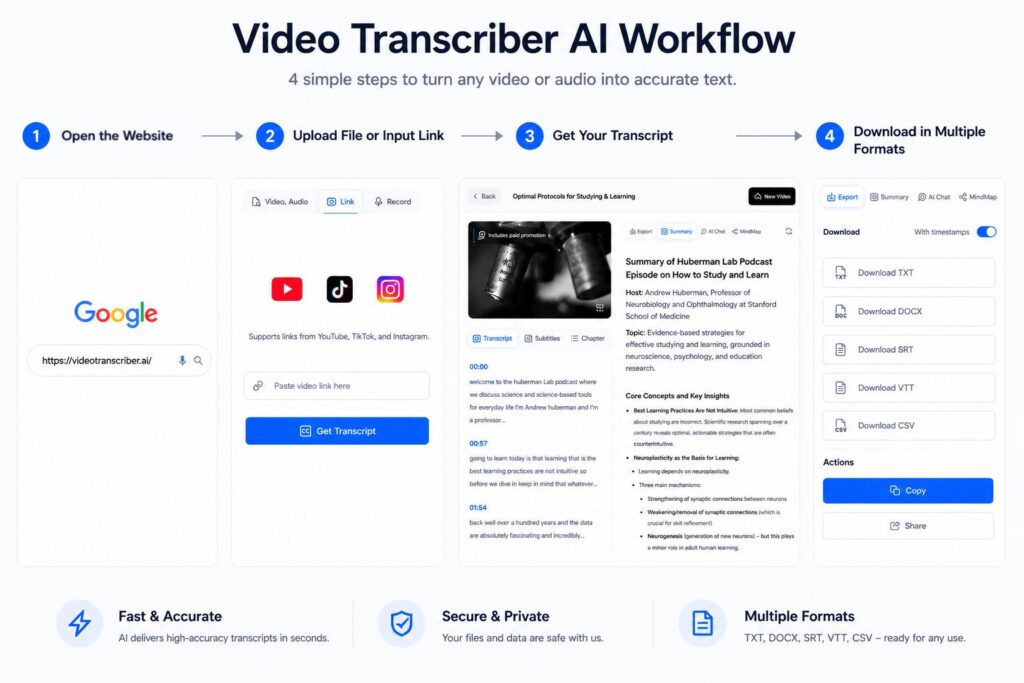
In practical terms, the workflow looks like:
- Open the tool and start immediately (no login required)
- Upload video/audio or paste a link
- Receive transcript and begin editing or exporting
Because there is no dependency on accounts or integrations, the experience is lightweight and fast. This is especially valuable for users who process content occasionally or in batches.
Otter AI: Structured and Workflow-Oriented
Otter AI takes a different approach, focusing on structured usage within ongoing workflows. Users are required to create an account, connect meeting tools, and operate within a session-based environment.
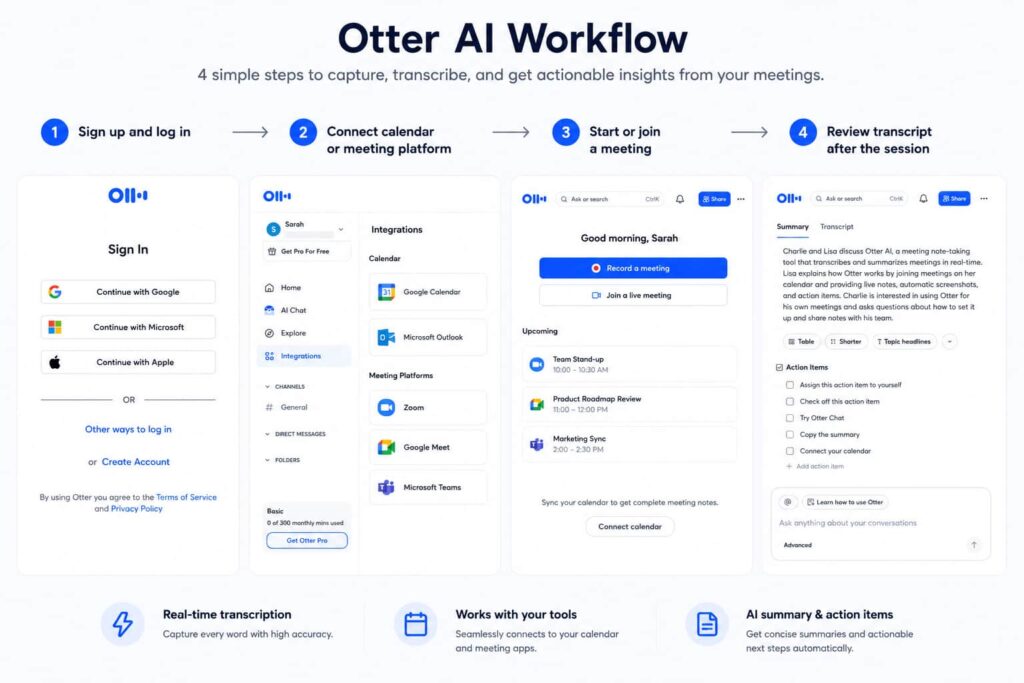
A typical workflow includes:
- Sign up and log in
- Connect calendar or meeting platform
- Start or join a meeting
- Review transcript after the session
While this introduces more upfront steps, it enables persistent storage, collaboration, and synchronization across devices. This makes it more suitable for teams and recurring usage scenarios.
Summary
In Video Transcriber AI vs Otter AI, Video Transcriber AI offers a lower-friction, faster entry point for transcription tasks, while Otter AI provides a more structured experience designed for continuous, team-based workflows.
Video Transcriber AI vs Otter AI: Media Processing Capability
| Aspect | Video Transcriber AI | Otter AI |
| Video Upload | ✅ Yes | Limited |
| Online Video Links | ✅ Yes (YouTube, TikTok, etc.) | ❌ No |
| Max File Size | Up to 5GB | Limited |
| Subtitle Generation | ✅ Yes | ❌ No |
| Long Video Support | ✅ Yes (no limit with subtitles) | Limited |
The difference in Video Transcriber AI vs Otter AI becomes more pronounced when dealing with recorded media. This is where the tools diverge in capability rather than just workflow.
Video Transcriber AI: Built for Large-Scale Media Processing
Video Transcriber AI is optimized for handling a wide range of media inputs, including large files and online video links. This makes it particularly useful for users working with long-form content or external platforms like YouTube.
Its strengths include:
- Direct processing of large files (up to 5GB)
- Support for online video links without download
- Ability to handle long-duration videos efficiently
- Built-in subtitle generation for content publishing
This design reflects a content production mindset, where flexibility and scalability are critical.
Otter AI: Optimized for Live Audio Capture
Otter AI focuses primarily on live audio input, which limits its flexibility when working with external or large media files. While it can process recordings, it is not designed for handling large-scale video workflows.
Typical capabilities include:
- Recording and transcribing live meetings
- Processing shorter audio recordings
- Limited support for external video sources
This makes it more aligned with real-time usage rather than asynchronous media processing.
Summary
In Video Transcriber AI vs Otter AI, Video Transcriber AI provides broader and more scalable support for media processing, while Otter AI remains focused on live audio capture.
Video Transcriber AI vs Otter AI: Content Output and Repurposing
| Aspect | Video Transcriber AI | Otter AI |
| Output Type | Structured content, subtitles | Notes, transcripts |
| Export Formats | SRT, TXT, DOC, VTT, CSV | TXT, PDF |
| AI Summaries | Advanced | Basic |
| Content Repurposing | Built-in | Limited |
A key distinction in Video Transcriber AI vs Otter AI lies in what happens after transcription. The difference is not just functional—it directly impacts how much additional work is required.
Video Transcriber AI: Designed for Content Creation
Video Transcriber AI treats transcription as the starting point of a larger content workflow. Instead of delivering raw text, it enables users to transform transcripts into structured outputs that can be used immediately.
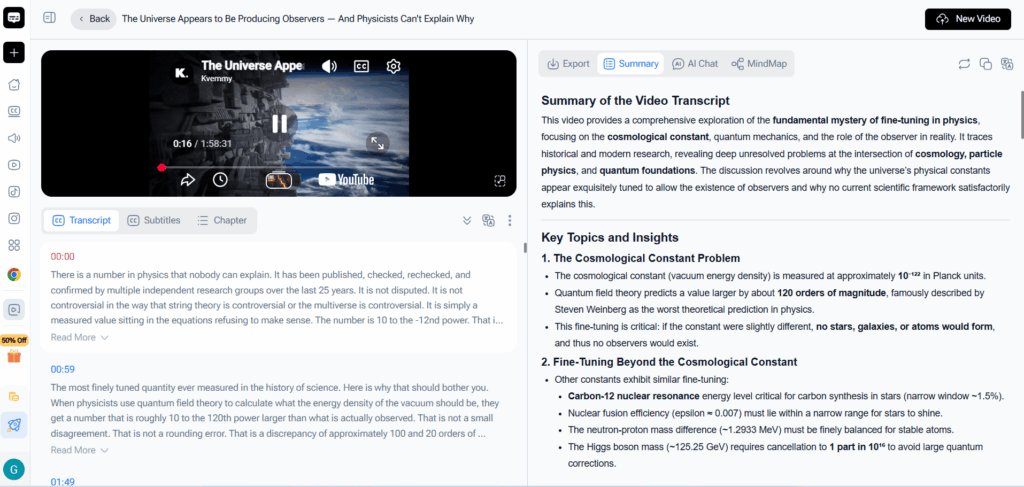
Typical workflow includes:
- Generate transcript from media
- Convert into structured notes or summaries
- Export as subtitles or documents
- Use AI chat for deeper content extraction
This reduces the need for manual editing and external tools, making it highly efficient for content-driven use cases.
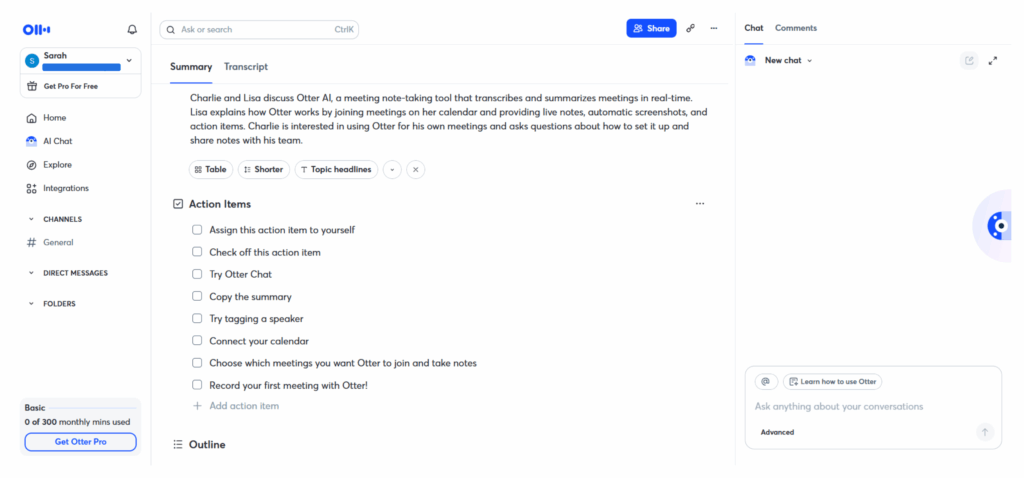
Otter AI: Focused on Documentation
Otter AI approaches transcription as a final deliverable. Its goal is to provide accurate and searchable meeting records, rather than content-ready outputs.
Typical usage includes:
- Capture meeting transcript
- Review and search content
- Share notes with team members
If further content creation is needed, users must handle it manually outside the platform.
Summary
In Video Transcriber AI vs Otter AI, Video Transcriber AI extends beyond transcription into content production, while Otter AI focuses on documentation and organization.
Video Transcriber AI vs Otter AI: Pricing and Value
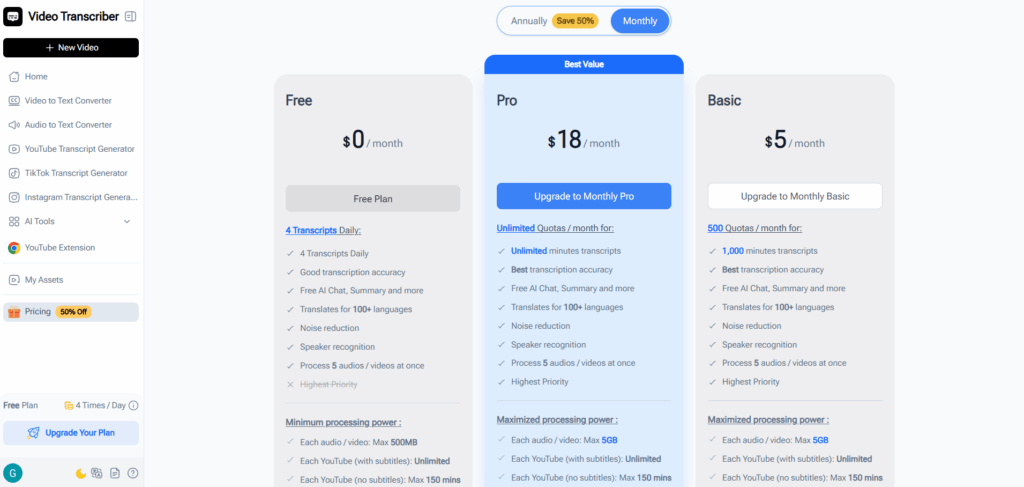
| Aspect | Video Transcriber AI | Otter AI |
| Pricing Model | Usage-based | Subscription |
| Free Access | Trial without login | Free tier with limits |
| Starting Price | From $5/month | From $16.99/month |
| Cost Efficiency | High for content workflows | High for teams |
Pricing in Video Transcriber AI vs Otter AI reflects how each product delivers value. The difference is not just cost, but how that cost scales with usage.
Video Transcriber AI: Flexible and Output-Oriented
Video Transcriber AI uses a usage-based model, allowing users to pay based on how much they process. This is particularly effective for users with variable workloads.
Key advantages include:
- Lower entry cost
- No long-term commitment
- Scales with content production volume
This makes it suitable for creators and occasional users.
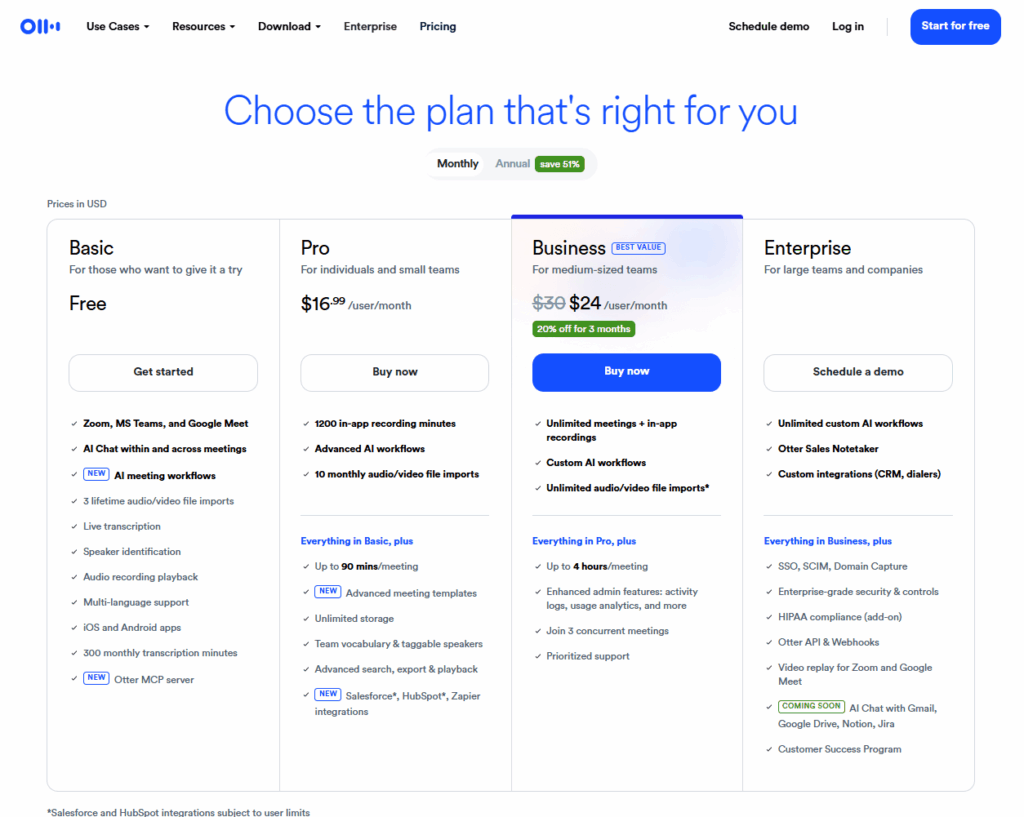
Otter AI: Predictable and Team-Focused
Otter AI uses a subscription model, which provides predictable pricing but requires ongoing payment regardless of usage.
Key characteristics include:
- Monthly subscription tiers
- Built-in collaboration features
- Designed for frequent, ongoing use
This model works well for teams that rely on daily meeting transcription.
Summary
In Video Transcriber AI vs Otter AI, Video Transcriber AI offers more flexibility for content-based usage, while Otter AI provides structured pricing for team environments.
Video Transcriber AI vs Otter AI: Security and Privacy
| Aspect | Video Transcriber AI | Otter AI |
| Account Requirement | Optional | Required |
| Data Storage | Minimal (for trial users) | Cloud-based |
| Access Control | User-controlled | Account-based |
| Collaboration Data | Limited | Shared workspace |
Security and privacy in Video Transcriber AI vs Otter AI reflect different design priorities.
Video Transcriber AI: Minimal Data Exposure
Video Transcriber AI allows users to access core features without creating an account, which reduces the amount of personal data stored. This approach can be beneficial for users who prioritize privacy or occasional use.
Otter AI: Cloud-Based Collaboration
Otter AI stores data within user accounts to enable collaboration and access across devices. This supports team workflows but requires trust in cloud-based storage systems.
Summary
In Video Transcriber AI vs Otter AI, Video Transcriber AI emphasizes simplicity and minimal data handling, while Otter AI focuses on accessibility and collaboration through cloud storage.
Video Transcriber AI vs Otter AI: Best Use Cases
| Aspect | Video Transcriber AI | Otter AI |
| Primary Scenario | Video & audio content processing | Meeting transcription |
| Best For | Creators, marketers, educators | Teams, professionals |
| Workflow Type | Asynchronous (file-based) | Real-time (meeting-based) |
| Output Goal | Publishable content | Searchable notes |
| Frequency | Batch or on-demand | Continuous daily use |
When comparing Video Transcriber AI vs Otter AI, the most practical way to choose is by looking at your daily workflow. The difference is not just what the tools can do, but when and how you use them.
Video Transcriber AI: Best for Content and Media Workflows
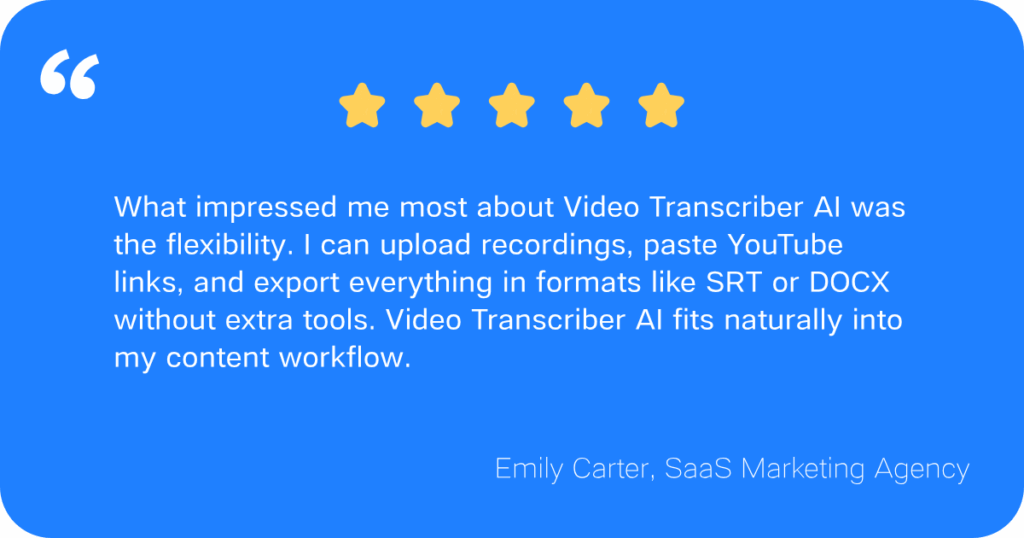
Video Transcriber AI is best suited for users who work with existing media and need to turn it into usable content. If your workflow starts with a file—such as a video, podcast, or recording—this tool fits naturally into that process.
Typical use cases include:
- Converting YouTube videos into articles or summaries
- Generating subtitles for online content
- Repurposing webinars, courses, or interviews
- Processing large batches of media files
Because it supports large file sizes, multiple formats, and structured outputs, it works especially well for content creators and marketers who need scalable production.
Otter AI: Best for Meetings and Collaboration
Otter AI is designed for users whose workflow revolves around conversations rather than files. It performs best in environments where capturing and organizing discussions is the main goal.
Typical use cases include:
- Recording and transcribing team meetings
- Taking notes during interviews or calls
- Sharing meeting transcripts across teams
- Keeping searchable records of discussions
Its integration with meeting tools and collaboration features makes it particularly effective for business teams and remote work environments.
Summary
In Video Transcriber AI vs Otter AI, the choice becomes clear when mapped to use cases. If your work starts with media and ends with content, Video Transcriber AI is the better fit. If your work starts with conversations and ends with organized notes, Otter AI is the more practical solution.
Final Verdict
After comparing Video Transcriber AI vs Otter AI across workflow, output, and real-world use cases, the key difference comes down to how transcription fits into your overall process.
If your work centers on meetings, collaboration, and capturing conversations in real time, Otter AI remains a strong and reliable choice. It is designed for teams that need organized, searchable records of discussions and ongoing communication.
If your goal is to convert video to text, generate subtitles, and turn media into structured content, Video Transcriber AI provides a more complete solution. It extends beyond transcription and supports the full path from raw media to usable output, which can significantly reduce manual effort in content workflows.
The decision is not about which tool is better in general, but which one aligns with how you work. Otter AI is better suited for conversation-driven workflows, while Video Transcriber AI is better suited for content-driven workflows.
For users who want to move beyond basic transcription and turn audio or video into publishable content, Video Transcriber AI is a practical option to explore as part of a more efficient content process.