


Not sure whether Video Transcriber AI or HappyScribe is better for fast online transcription? The answer depends on what kind of workflow you need. Some users want a tool that lets them start quickly, transcribe video or audio online, and keep moving with less friction. Others may prefer a broader platform with deeper subtitle, translation, collaboration, and enterprise-oriented layers. HappyScribe publicly presents itself in that broader platform category, while Video Transcriber AI is easier to position around direct browser-based transcription, no-sign-up access, and quick handling of uploaded media.
This guide compares Video Transcriber AI and HappyScribe through the lens of fast online transcription. We will look at user experience, security, language support, workflow, pricing, use cases, and practical speed signals so you can decide which tool fits your needs more confidently.
Video Transcriber AI vs HappyScribe at a Glance
| Metric | Video Transcriber AI | HappyScribe |
| Sign-up required to start | ✅ Not required | ❌ Required |
| Free entry | ✅️4 times/day | ✅️Yes |
| Accuracy claim | 99.9% | 95% |
| Supported languages | 200+ | 120+ |
| Max file size | 5GB | — |
| Queue capacity | Up to 5 tasks | — |
| Speaker recognition | ✅️Yes | ✅️Yes |
| Workflow | Fast, direct, browser-based | Broader, platform-style |
| Security | Private and secure | Enterprise-grade security |
| Pricing | Pay-as-you-go, from $5/mo | Pay-as-you-go, from $9/mo |
| Use cases | Best for creators, learners, solo users | Best for teams, localization, business use |
From a quick comparison alone, Video Transcriber AI stands out more clearly for users who want a lower-friction path into transcription. HappyScribe looks stronger as a broader platform choice. That makes the real question less about which tool is “bigger” and more about which one is better suited to the kind of work you actually do.
What Is Video Transcriber AI?
Video Transcriber AI is an online transcription tool built for users who want to turn spoken content into usable text quickly and with less friction. It works especially well for video, audio, and online platform video workflows where speed, accessibility, and practical output matter.
Compared with broader platform-style products, Video Transcriber AI feels more direct for users who want to transcribe content from YouTube, Instagram, TikTok, and other online sources, then keep working with the result right away instead of treating transcription as a separate, heavier process.
Standout features:
- No sign-up required, for a faster start with less friction
- Up to 99.9% accuracy, for cleaner transcript output
- Supports 200+ languages, for broader multilingual use
- Speaker recognition, for clearer multi-speaker transcripts
- Online transcript editing, for easier review and cleanup
- Structured summaries, for faster content review and key-point capture
Rather than stopping at raw text, Video Transcriber AI is designed to turn spoken content into something easier to review, shape, and reuse.
What Is HappyScribe?
HappyScribe is a broader transcription and language workflow platform built for users who need more than direct online transcription. It covers transcription, subtitles, translation, and related workflow needs, which makes it more suitable for users looking for a wider platform-style solution.
Compared with lighter transcription-first tools, HappyScribe feels more aligned with team use, localization work, and business-oriented workflows where transcription is only one part of a larger process.
Standout features:
- Supports 120+ languages, for broader multilingual workflows
- Human proofreading, for users who need more polished output
- Speaker recognition, for handling multi-speaker recordings
- Enterprise-grade security, for stronger business-facing trust
- Integrations, for fitting into larger workflow environments
- Broader platform-style workflow, for subtitles, translation, and structured production use
Rather than focusing only on fast transcript generation, HappyScribe is built around a wider workflow that extends into language, review, and production needs.
Key Differences Between Video Transcriber AI and HappyScribe
1. Video Transcriber AI vs HappyScribe: Getting Started
| Aspect | Video Transcriber AI (Stronger) | HappyScribe |
| First action | Upload file or paste link (visible immediately) | Choose product path or “Get Started Free” |
| Account required? | ❌ No – start in seconds | ✅ Yes – email confirmation needed |
| Time to first transcript | ~10 seconds from page load | ~2 minutes (account creation) |
| Friction level | Very low – one screen, one job | Moderate – multiple options |
Video Transcriber AI: Faster to Begin
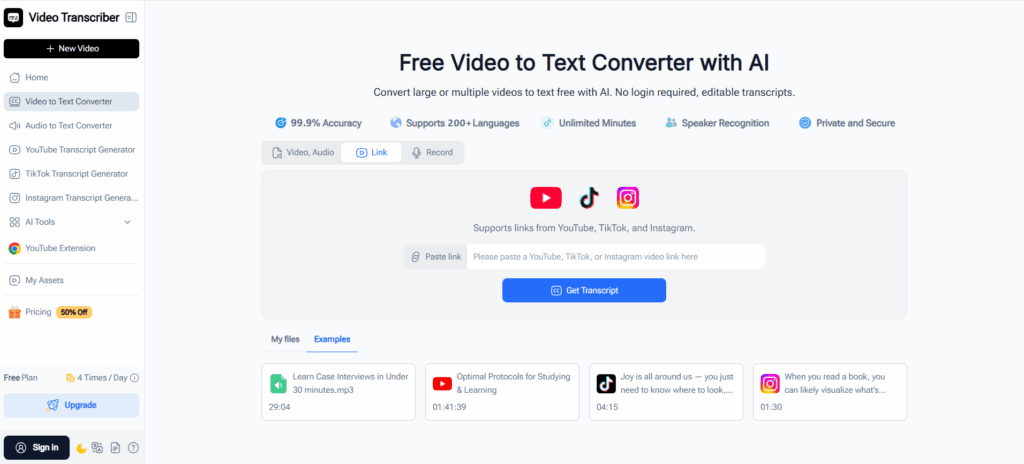
From a UX perspective, Video Transcriber AI feels more immediate. The page is built around one primary action: upload a file or paste a link and start transcribing. The upload area is visible right away, and the workflow is easy to understand without much exploration. It also supports direct input for video, audio, and links, with a file limit of up to 5GB and up to 5 tasks in queue, which makes the product feel ready for real use from the first screen. It does not require sign-up to begin, and the homepage frames the flow in three simple steps: upload, let AI transcribe, then copy, download, or share the transcript.
In practical terms, the startup flow feels like this:
- Open the page.
- Upload a video or audio file, or paste a supported link.
- Submit the task.
- Wait for transcription, then review, copy, download, or share.
Because there is less setup and the action path is visible immediately, Video Transcriber AI feels better suited to users who want fast online transcription without a heavier entry process.
HappyScribe: More Structured from the Start
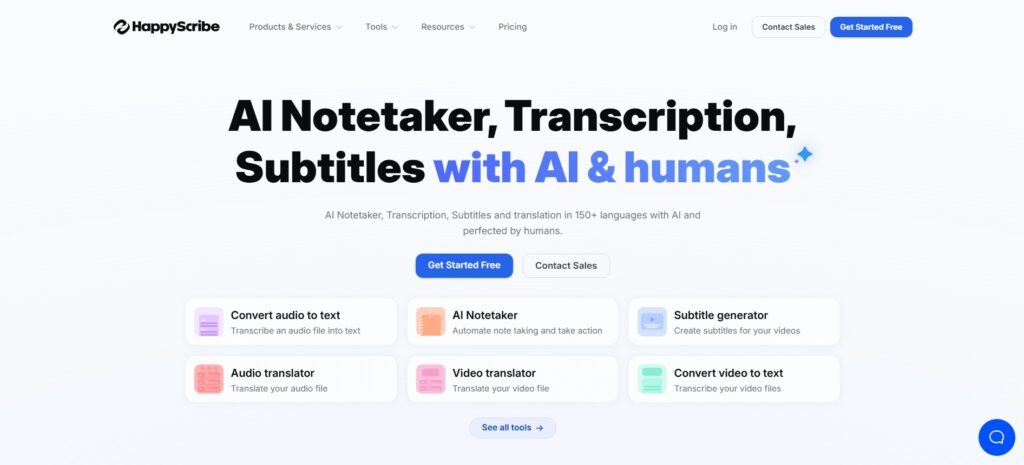
HappyScribe feels more like entering a broader workspace. The homepage immediately presents multiple product paths, including AI Notetaker, Subtitles, and Transcription, along with business-oriented entry points such as Contact Sales and Get Started Free. That makes the product feel broader and more platform-like from the first screen. It also foregrounds features such as 120+ supported languages, enterprise-grade security, human proofreading, and integrations, which reinforces the idea that the tool is designed for a wider workflow environment, not only instant-start transcription.
The startup experience therefore feels more like this:
- Open the page.
- Choose a product path or click Get Started Free.
- Enter the product flow through the account-based platform.
- Move into transcription within the wider workspace.
That structure is not a weakness, but it creates a different first-use experience. For users who want broader workflow depth, it can feel more complete. For users whose first question is simply “How fast can I start transcribing this file online?”, Video Transcriber AI feels more direct and faster to begin.
Quick UX takeaway
If the goal is fast online transcription, Video Transcriber AI has the lighter startup path: open, upload, submit, transcribe. HappyScribe feels more like a platform you enter first and a transcription tool second. That makes Video Transcriber AI easier to understand at a glance and quicker to start for users who care most about speed and low friction.
2. Video Transcriber AI vs HappyScribe: Accuracy and Language Support
| Metric | Video Transcriber AI (Stronger) | HappyScribe |
| Accuracy claim (AI‑only) | 99.9% – out of the box | 95% – may need cleanup |
| Human proofreading | Not offered | Available at $2/min for 99% |
| Languages supported | 200+ (including regional) | 120+ (mostly mainstream) |
Video Transcriber AI: Stronger Headline Range
When people compare transcription tools, accuracy and language coverage are usually two of the first things they look at. That is also where Video Transcriber AI creates a stronger first impression. With an accuracy claim of up to 99.9% and support for 200+ languages (compared with 120+ on HappyScribe), it feels better positioned for users who want both dependable transcript quality and broader multilingual flexibility in one workflow.
That combination matters in real use. Fast online transcription becomes much more valuable when the output is not only quick, but also accurate enough to reduce cleanup work and broad enough to support different languages, audiences, and content sources. For creators, educators, researchers, and users handling international or mixed‑language material, Video Transcriber AI gives a clearer sense of range.
Language comparison snapshot (retained from original document):
| Language | Video Transcriber AI | HappyScribe |
| Total supported languages | 200+ | 120+ |
| English | ✅ | ✅ |
| Traditional Chinese / 繁體中文 | ✅ | ✅ |
| Spanish | ✅ | ✅ |
| French | ✅ | ✅ |
| German | ✅ | ✅ |
| Japanese | ✅ | ✅ |
| Korean | ✅ | ✅ |
| Arabic | ✅ | ✅ |
| Hindi | ✅ | ✅ |
| Kiswahili | ✅ | ❌ |
| Oʻzbek | ✅ | ❌ |
| Kyrgyz / Кыргызча | ✅ | ❌ |
| Telugu / తెలుగు | ✅ | ✅ |
| Malayalam / മലയാളം | ✅ | ✅ |
| Punjabi / ਪੰਜਾਬੀ | ✅ | ✅ |
Both tools cover major global languages well, including Traditional Chinese, which is an important signal for users working with Chinese-language content across different regions. The difference becomes more visible beyond the most common language set, where Video Transcriber AI appears to include a wider range of regional and less commonly highlighted languages.
HappyScribe: Strong, but Less Expansive Here
HappyScribe still performs well in this category. A 95% accuracy claim and support for 120+ languages already make it a capable multilingual tool, especially for users who are working across mainstream international languages and do not need the broadest possible language range.
The difference is that HappyScribe feels stronger as part of a broader platform story, while Video Transcriber AI feels stronger on the headline numbers themselves. In other words, HappyScribe gives users solid multilingual coverage, but Video Transcriber AI makes the more immediate case for users who want higher stated accuracy and wider language support in the same lightweight workflow.
For users whose work stays mostly within common business and global content languages, HappyScribe may already be enough. But for users who want stronger top-line language range, especially across regional and less commonly highlighted languages, Video Transcriber AI feels like the more compelling choice in this part of the comparison.
Quick Takeaway
If accuracy and multilingual flexibility are central to your workflow, Video Transcriber AI has the stronger edge here. Both tools handle major languages well, but Video Transcriber AI feels more expansive in overall coverage and more useful for users who want transcription that can scale across a wider variety of languages and content types.
3. Video Transcriber AI vs HappyScribe: Transcript Usability
| Feature | Video Transcriber AI (More immediate) | HappyScribe (More workflow‑oriented) |
| Timestamps | ✅ Yes | ✅ Yes |
| Speaker recognition | ✅ Yes | ✅ Yes |
| Online transcript editing | ✅ Yes | ✅ Yes |
| Chapter summaries | ✅ Yes – scan long content | ❌ No |
| Structured notes | ✅ Yes – organised takeaways | ❌ No |
| Transcript & subtitle output | ✅ Yes | ✅ Yes |
| Human proofreading | ❌ No | ✅ Yes (extra cost) |
| Integrations | ❌ No | ✅ Yes (Google Drive, YouTube, Vimeo) |
Video Transcriber AI: More Useful Right After Transcription
This is one of the clearest practical differences between the two tools.
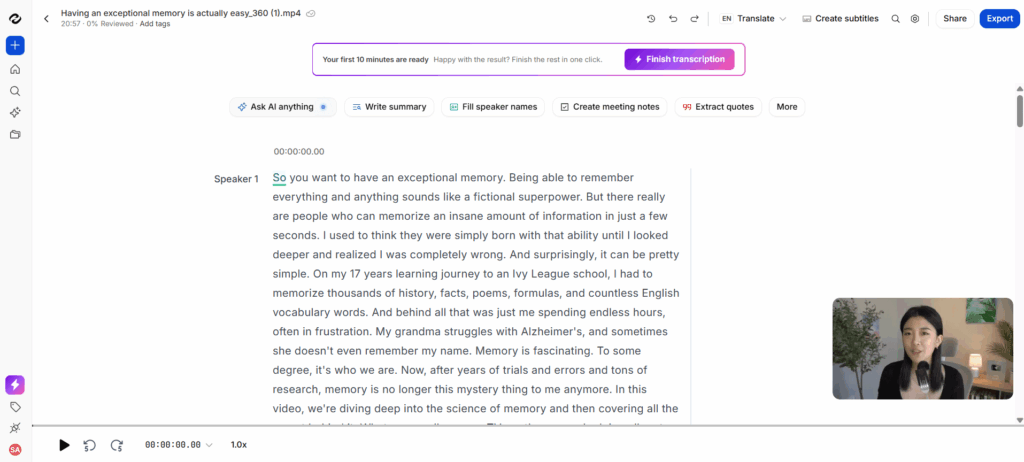
Video Transcriber AI does not just generate text. It makes the transcript easier to work with right away, which is especially helpful for users who want to review content, extract key ideas, or reuse the result for creation and follow-up tasks.
What makes the output more usable:
- Timestamps, which help users track key moments in long recordings
- Speaker recognition, which makes multi-speaker content easier to follow
- Online transcript editing, which makes review and cleanup easier in the same workflow
- Transcript-style and subtitle-style text output, which supports different writing and publishing needs
- Chapter summaries, which help users scan long content section by section
- Structured notes, which make it easier to turn spoken content into more organized takeaways
These features make the transcript feel more flexible after generation. Instead of stopping at raw text, the output can be used for different goals, such as:
- reviewing interviews or meetings more efficiently
- creating captions or subtitle-ready content
- pulling out key points from long videos
- turning spoken material into notes, scripts, or reusable written content
That makes Video Transcriber AI feel more action-oriented. The result is not only faster to get, but also easier to follow, edit, organize, and reuse.

HappyScribe: More Workflow-Oriented Beyond the Transcript
HappyScribe also supports post-transcription work well, but it feels more like part of a broader platform than a fast transcript-first workflow. Its strengths become clearer when the user needs transcription to connect with a wider language or production process rather than simply become usable text as quickly as possible.
What stands out more in the HappyScribe workflow:
- A broader platform structure, which is more suitable for users working across multiple language tasks
- Human proofreading options, which are more useful when polished final output matters more than speed alone
- Subtitle-focused workflow support, which fits users producing content for publishing and localization
- Business-oriented security positioning, which is more relevant for teams and organizations
- Integrations and a larger workflow environment, which make more sense in structured production settings
These strengths are useful, but they support a different kind of need. HappyScribe feels better when transcription is part of a broader subtitle, translation, review, or business workflow, rather than the fastest route to a usable transcript.
That is why the difference here is not simply about features. It is about how quickly the transcript becomes practical for the next step. Video Transcriber AI feels more immediate, while HappyScribe feels more embedded in a larger workflow system.
Quick Takeaway
If transcript usability matters most right after transcription, Video Transcriber AI has the clearer advantage for fast-moving workflows. Features like timestamps, editable transcripts, speaker recognition, chapter summaries, structured notes, and flexible transcript output make the result easier to use immediately.
If the goal is broader workflow depth around subtitles, review quality, and more structured language or production needs, HappyScribe feels better aligned with that kind of setup.
4. Video Transcriber AI vs HappyScribe: Security and Privacy
Video Transcriber AI: Private by design, no credentials to steal
Video Transcriber AI takes a different route: no accounts, no passwords, no sign‑up. Files are encrypted (HTTPS/TLS), and because there's no user database, there's nothing for attackers to target. For most individuals – students, creators, solo professionals – this is not only secure enough, but actually safer than managing another account.
HappyScribe: Enterprise compliance for regulated teams
HappyScribe offers formal certifications: GDPR, SOC 2 Type 2, 2FA, and EU data centres. That's essential for legal, healthcare, or large media teams. But for everyday fast online transcription, it adds friction without much benefit.
Quick takeaway
For strong privacy without the hassle, choose Video Transcriber AI. Pick HappyScribe only if you're bound by formal compliance requirements.
5. Video Transcriber AI vs HappyScribe: Pricing and Plans
When it comes to pricing, Video Transcriber AI is clearly built for individuals who want low cost and no hidden limits. HappyScribe’s plans target teams with predictable monthly minute quotas.
| Pricing Feature | Video Transcriber AI | HappyScribe |
| Free tier | 4 transcriptions/day | 10‑min free trial |
| Starting paid price | $5/month (Basic plan) | $17/month (Basic plan) |
| Paid plan structure | Unlimited minutes on Pro plan | Capped minutes: 120–6,000 per month |
| Max file size | 5GB (Pro) | Not specified |
| Human proofreading | Not offered | Available at $2/minute extra |
| Team seats | Not applicable | Included from Pro plan (3–5 seats) |
Why Video Transcriber AI wins on price:
- Free tier that actually works – Video Transcriber AI gives you 4 full transcriptions every day, while HappyScribe’s free tier is only a 10‑minute trial that forces you to create an account.
- Lower entry cost – Video Transcriber AI starts at just $5 per month, whereas HappyScribe’s cheapest paid plan costs $17 per month. For casual users, that’s a massive difference.
- No per‑minute caps – Video Transcriber AI’s Pro plan offers unlimited transcription minutes, while HappyScribe limits you to 120–6,000 minutes per month depending on your plan. You never have to count minutes with Video Transcriber AI.
- Larger file support – Video Transcriber AI allows uploads up to 5GB per file on the Pro plan, while HappyScribe does not publish any file size limit – creating uncertainty for users with long recordings.
Quick takeaway
If you’re an individual creator, student, or anyone who doesn’t want to count minutes, Video Transcriber AI is the clear winner. HappyScribe only makes sense for teams that need human proofreading, compliance, or collaboration seats – and are willing to pay a premium for them.
6. Video Transcriber AI vs HappyScribe: Best Use Cases
Choose Video Transcriber AI if you are:
- Student & Educator – Turn a 2-hour lecture into searchable study notes with chapter summaries, no sign‑up required.
- Content Creator (YouTuber, Podcaster, TikToker) – Generate captions, show notes, or blog posts without counting minutes or file sizes.
- Journalist & Solo Professional – Transcribe interviews on deadline – structured notes ready immediately, 99.9% accuracy out of the box.
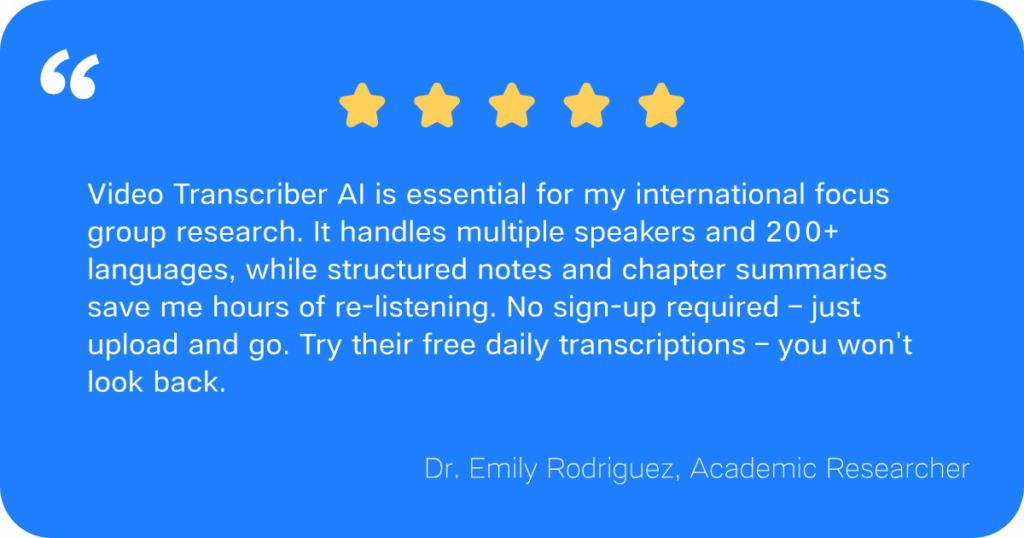
- Researcher – Process focus groups or long-form interviews with up to 5GB files and queue up to 5 tasks at once.
Choose HappyScribe if you are:
- Media & Localization Team – Produce subtitles for a global documentary release across 10+ languages with side‑by‑side translation.
- Enterprise & Regulated Organisation – Need GDPR or SOC 2 compliance for healthcare, legal, or financial transcripts.
- Team Requiring Human Proofreading – Publish legal depositions or annual reports where 99% accuracy is mandatory (at $2/min extra).
- User Relying on Integrations – Work within Google Drive, YouTube, or Vimeo and need transcription inside your existing pipeline.
Quick takeaway
Video Transcriber AI is for individuals who want the fastest, most affordable path from audio/video to usable text. HappyScribe is for teams and regulated environments that need collaboration, compliance, or human polish.
Final Verdict
Choosing between Video Transcriber AI and HappyScribe really comes down to one question: Do you want to transcribe, or do you want to build a production pipeline?
If you just need to turn speech into text – fast, accurately, and without jumping through hoops –Video Transcriber AI is the obvious answer. No account, no per‑minute math, no waiting. Just upload and go.
HappyScribe is a fine choice for teams that live inside compliance checklists and collaboration tools. But for everyone else – students, creators, journalists, solo pros – it’s like renting a bulldozer to hang a picture.
See for yourself. Four free transcriptions, zero sign‑up, and a working transcript in seconds. That’s the Video Transcriber AI difference.