


Video Transcriber AI and Clideo can both help users turn spoken video content into text. But they are built for different outcomes.
Video Transcriber AI is built for transcript reuse. The goal is not just to create text from audio or video. The goal is to help users turn spoken content into summaries, notes, AI chat answers, mind maps, scripts, study material, and research content.
Clideo is different. Clideo is an online video editing tool suite. Clideo can convert video to text, generate subtitles, let users edit subtitle text, and export SRT or TXT files. Clideo can also embed captions into a finished video. That makes Clideo useful when the final output is a captioned video, not necessarily a reusable knowledge asset. Clideo’s own Video to Text page says users can create subtitles online, edit text, save SRT or TXT, or add subtitles to the video.
This is why the comparison matters.
If your goal is to publish a video with subtitles, Clideo makes sense. If your goal is to turn a lecture, interview, podcast, meeting, or YouTube video into reusable text, Video Transcriber AI is the stronger fit.
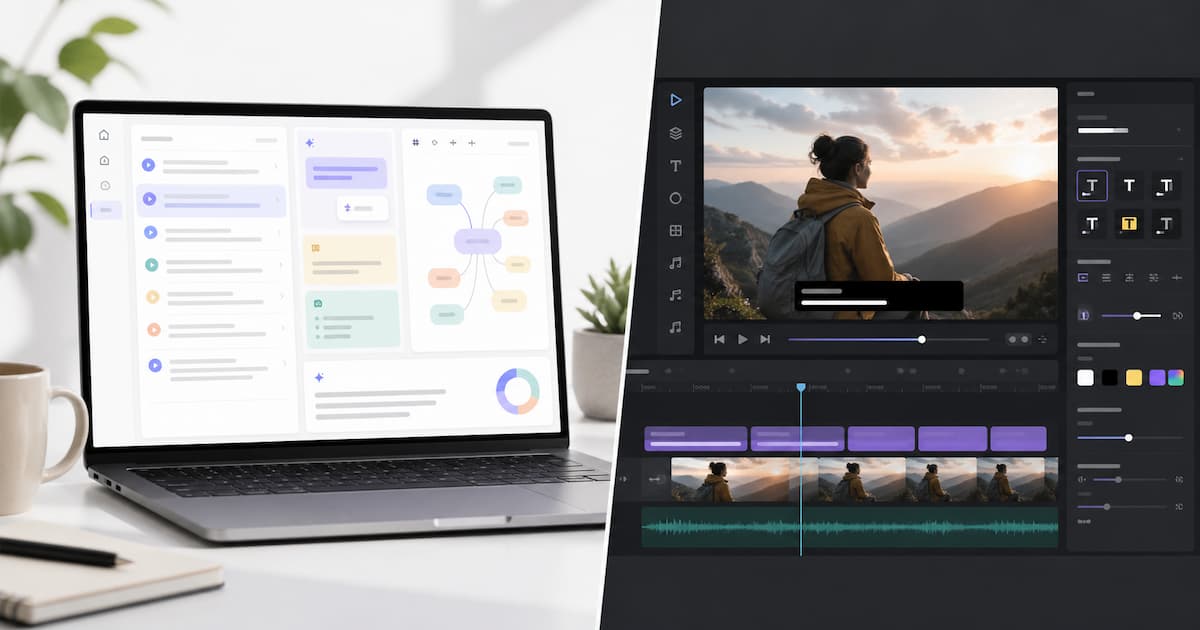
Video Transcriber AI vs Clideo Quick Comparison Table
| Field | Video Transcriber AI | Clideo |
| Core positioning | Transcript-first AI workflow | Online video editor with subtitle tools |
| Main output | Transcript, summary, AI chat, mind map, subtitle exports | SRT, TXT, embedded subtitles, captioned video |
| Best for transcript reuse | Strong | Basic |
| Best for subtitle editing | Basic / export-focused | Strong |
| AI summary | ✅Yes | Not the core public workflow |
| AI chat with transcript | ✅Yes | Not the core public workflow |
| Mind map | ✅Yes | Not the core public workflow |
| Video publishing | Not the main focus | Stronger |
| Free access | 4 transcripts daily on the free plan | Free access has usage limits by access level |
| Starting paid plan | Basic from $4/month yearly; Pro from $9/month yearly | Clideo Pro is $9/month monthly or $6/month annually |
| Best user | Students, researchers, creators, interviewers, knowledge workers | Social video creators, casual editors, subtitle users |
The main difference is not whether Clideo can transcribe. Clideo can. The real difference is what happens after the text appears.
Video Transcriber AI is built around transcript reuse. A transcript can become a summary, study notes, blog content, research material, or a mind map. Clideo is built around video editing and subtitle output. A transcript in Clideo is more likely to become subtitles, captions, or a finished video file.
Clideo is a good option if the user wants to add subtitles to a video. Clideo is less focused on deeper transcript workflows like AI chat, knowledge extraction, or mind map generation. Video Transcriber AI is better when the transcript itself is the main asset.
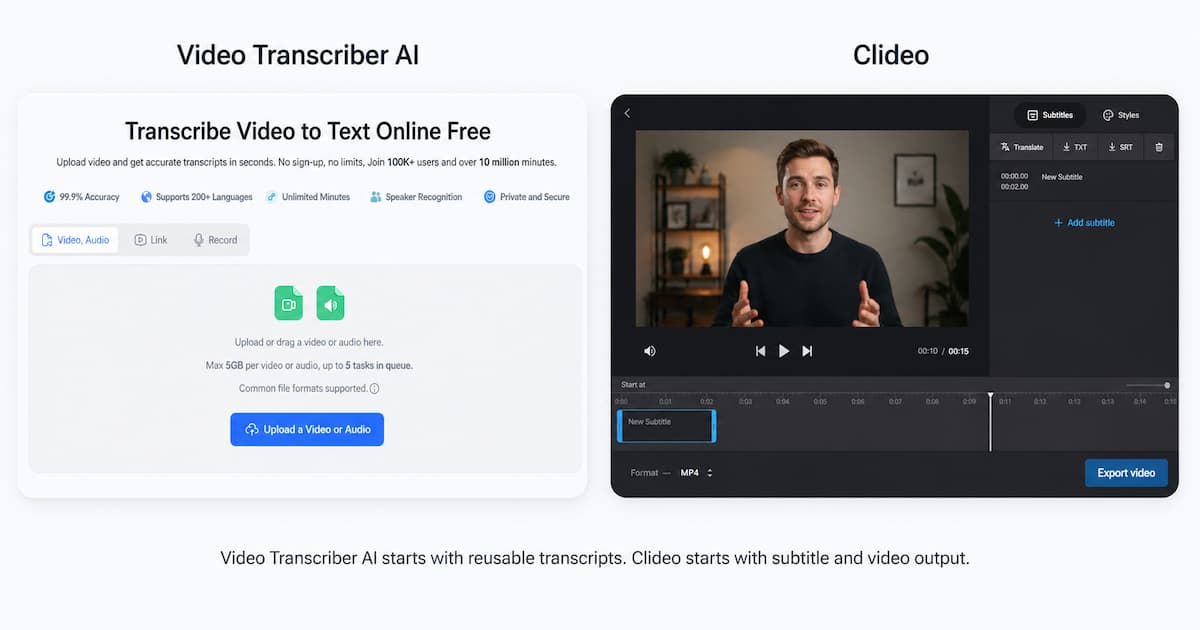
What is Video Transcriber AI?
Video Transcriber AI is an online AI transcription tool built for turning video, audio, YouTube links, and recordings into editable text. It is designed for people who want to work with the transcript after the transcription is complete.
That matters because many users do not only need captions. A student may want lecture notes. A researcher may want to search an interview. A creator may want to turn a video into a script or article. A business user may want a meeting summary. Video Transcriber AI is built for those post-transcription needs.
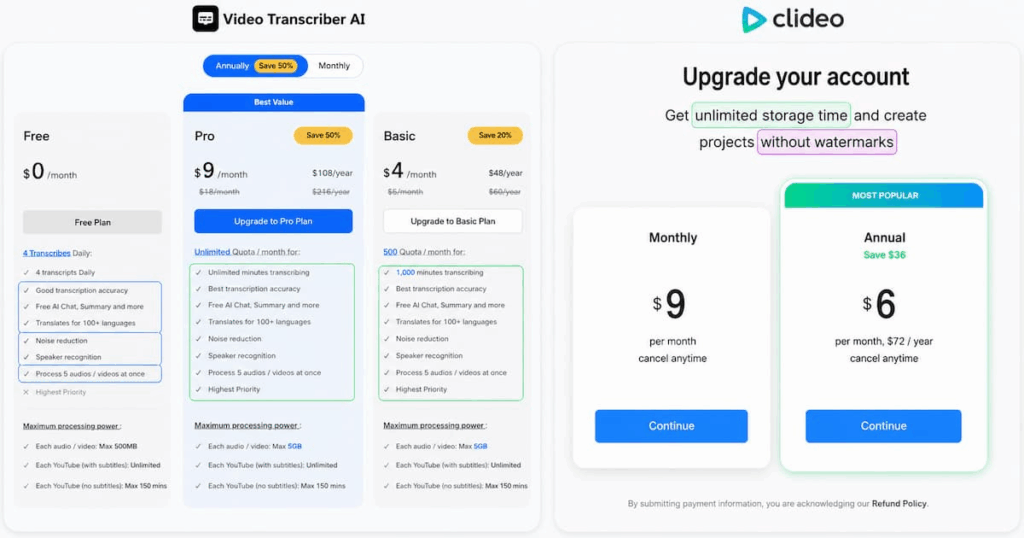
Video Transcriber AI pricing shows that the free plan includes 4 transcripts daily, AI Chat, Summary, translation, noise reduction, speaker recognition, and processing 5 audio or video files at once. The free plan also lists a 500MB limit for each audio or video file.
Standout features
- Video, audio, YouTube link, and recording transcription
- 4 transcripts daily on the free plan
- AI Chat
- Summary
- Translation
- Noise reduction
- Speaker recognition
- Multiple file processing
- Transcript-based follow-up workflow
- Mind map generation
- Export options for text and subtitle workflows
The key point is simple.
Video Transcriber AI treats the transcript as the beginning of the workflow. The user can keep asking questions, summarizing, editing, translating, and repurposing the content.
For users who care about transcript reuse, this is the main advantage over Clideo.
What is Clideo?
Clideo is an online video tool suite. Clideo offers many tools for editing, converting, compressing, merging, resizing, subtitling, and translating video. Clideo is useful for people who want browser-based video editing without installing desktop software.
Clideo also has transcription and subtitle tools. Clideo Video to Text lets users upload a video, generate subtitle text, edit it, and save the output as SRT or TXT. Clideo also lets users export the clip with captions embedded in the video.
This makes Clideo practical for social video creators. If the user wants to create a captioned video for TikTok, Instagram, YouTube Shorts, Facebook, or a simple online project, Clideo can be useful. Clideo is especially relevant when the final deliverable is still a video.
Clideo pricing also supports this positioning. Clideo Pro focuses on unlimited storage time and projects without watermarks. Its pricing page lists monthly Pro at $9/month and annual Pro at $6/month, billed as $72/year.
Standout features
- Online video editing
- Video to text
- Audio transcription
- Auto subtitle generation
- Subtitle text editing
- Subtitle style editing
- SRT and TXT downloads
- Embedded captions
- Watermark-free export on Pro
- Unlimited storage time on Pro
Clideo is not a bad transcription option. Clideo is simply video-first. Clideo makes more sense when subtitles are part of a video project.
For users who want transcript notes, AI chat, mind maps, or long-term content reuse, Clideo is less direct than Video Transcriber AI.
Essential differences between Video Transcriber AI and Clideo
1. Video Transcriber AI vs Clideo: User Experience
| UX factor | Video Transcriber AI | Clideo |
| First impression | Transcription-first | Video-editing-first |
| First task | Upload and transcribe | Upload and generate subtitles |
| Main next step | Summary, AI chat, mind map, export | Edit subtitles, style captions, export video |
| Best user flow | Content understanding | Video publishing |
| Learning curve | Lower for text workflows | Lower for video subtitle editing |
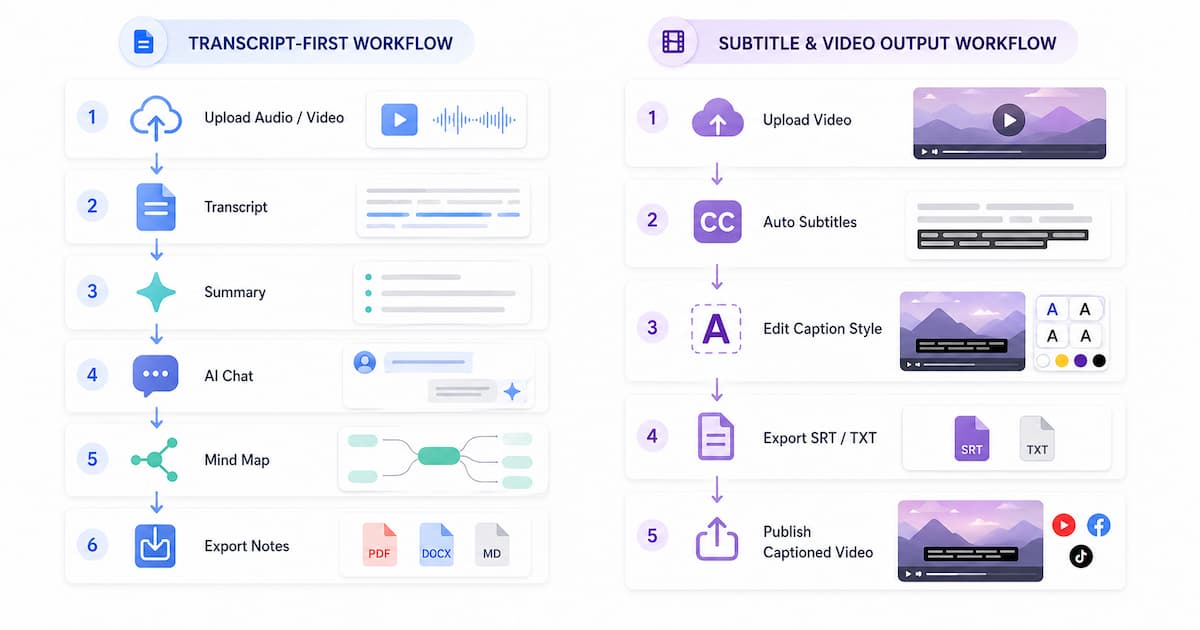
Video Transcriber AI is more direct for users who want text. The path is simple: upload the file, generate the transcript, review the text, then continue with summary, AI chat, mind map, translation, or export.
A typical Video Transcriber AI workflow looks like this:
- Upload a video or audio file.
- Generate a transcript.
- Review the transcript.
- Generate a summary.
- Ask questions with AI chat.
- Create a mind map or export the text.
Clideo is more direct for users who want subtitles in a video project. Clideo’s Video to Text workflow is built around creating subtitle text, editing it, saving SRT or TXT, or exporting the video with captions.
A typical Clideo workflow looks like this:
- Upload a video.
- Choose the speech language.
- Generate subtitle text.
- Correct text and timing.
- Adjust subtitle style.
- Download SRT/TXT or export a captioned video.
This is the cleanest UX difference.
Video Transcriber AI is smoother when the user wants to use the transcript as text. Clideo is smoother when the user wants subtitles inside a video project.
2. Video Transcriber AI vs Clideo: Transcript Reuse and Subtitle Editing
This is the core difference between Video Transcriber AI and Clideo.
| Comparison point | Video Transcriber AI | Clideo |
| Transcript reuse | Strong | Basic |
| Subtitle editing | Basic / export-focused | Strong |
| Summary | ✅Yes | Not the main public workflow |
| AI chat | ✅Yes | Not the main public workflow |
| Mind map | ✅Yes | Not the main public workflow |
| Embedded subtitles | Not the main focus | Strong |
| Best final output | Notes, summaries, research, scripts | Captioned video |
Video Transcriber AI is better when the transcript needs to become knowledge. The transcript can be summarized, questioned, translated, structured, and reused. That makes Video Transcriber AI useful for learning, research, interviews, content writing, and meeting review.
For example, a student can upload a lecture and ask Video Transcriber AI to summarize the core points. A creator can upload a video and turn it into a blog outline. A researcher can upload an interview and ask follow-up questions about the speaker’s comments.
Clideo is better when the subtitles need to become part of the video. Clideo lets users create subtitle text, edit the text, download SRT or TXT, or embed captions into the video. Clideo’s help center also says the Video to Text tool can automatically convert videos to text and save the text as TXT or SRT.
The difference is not small.
A subtitle is built for viewing with video. A reusable transcript is built for reading, searching, summarizing, quoting, analyzing, and repurposing.
Clideo is useful if your output is a captioned video. Video Transcriber AI is useful if your output is reusable knowledge.
Actionable tip
Before choosing between Video Transcriber AI and Clideo, ask one question:
Do I need captions on a video, or do I need text I can use later?
If the answer is captions, choose Clideo. If the answer is reusable text, choose Video Transcriber AI.
[Image: Product screenshot]
Screenshot cue: Use a Video Transcriber AI screenshot showing AI summary, AI chat, or mind map. Put it after this section because this is the strongest proof of transcript reuse.
3. Video Transcriber AI vs Clideo: Export and Output Value
The export options also show the difference between Video Transcriber AI and Clideo.
| Output type | Video Transcriber AI | Clideo |
| TXT | ✅Yes | ✅Yes |
| SRT | ✅Yes | ✅Yes |
| VTT | ✅Yes | Not the main public message |
| DOCX | ✅Yes | Not the main public message |
| CSV | ✅Yes | Not the main public message |
| Captioned video | Not the core product | Strong |
| Summary | ✅Yes | Not core |
| AI chat answer | ✅Yes | Not core |
| Mind map | ✅Yes | Not core |
Video Transcriber AI gives users more text-based output value. A transcript can become study notes, a meeting recap, a research summary, a content outline, a script, or a searchable knowledge base.
This is why Video Transcriber AI works well for people who want to reuse spoken content. The text is not just a subtitle file. It becomes working material.
Clideo gives users more video-publishing output value. Clideo can export SRT or TXT, but Clideo is especially useful when the user wants a video with visible captions. Clideo’s Add Subtitles page is built around adding captions to video and preparing videos for social platforms.
This makes Clideo practical for social media. If the goal is to publish a video where viewers can read captions on-screen, Clideo is the more natural tool.
Actionable tip
Use Video Transcriber AI when the transcript will become another content asset.
Use Clideo when the subtitle file or captioned video is the final deliverable.
4. Video Transcriber AI vs Clideo: Pricing and Plans
| Pricing factor | Video Transcriber AI | Clideo |
| Free entry | 4 transcripts daily | Free access with usage limits |
| Entry paid plan | Basic from $4/month yearly | Clideo Pro $9/month monthly |
| Annual plan | Pro from $9/month yearly | Clideo Pro $6/month annually |
| Main paid value | AI transcript workflow | No watermark and unlimited storage time |
| Best for | Ongoing transcript reuse | Watermark-free video projects |
Video Transcriber AI pricing is easier to connect with transcript-heavy users. Its free plan includes 4 transcripts daily, AI Chat, Summary, translation, noise reduction, speaker recognition, and 5-file processing.
This means the value is centered on what happens with spoken content.
Clideo pricing is centered on video project output. Clideo Pro gives users unlimited storage time and projects without watermarks. Clideo pricing is $9/month on the monthly plan or $6/month on the annual plan.
This makes Clideo pricing logical for users who edit videos often and want clean exports. Clideo Pro is not only about transcription. Clideo Pro is about the full Clideo video tool suite.
So the pricing comparison should not be framed as “which one is cheaper?” only.
The better question is:
What are you paying for?
With Video Transcriber AI, you are paying for transcript workflows. With Clideo, you are paying for video editing, subtitle editing, storage time, and watermark-free projects.
Actionable tip
If most of your work ends in notes, summaries, scripts, or research, Video Transcriber AI is the better pricing fit.
If most of your work ends in exported videos, Clideo is the better pricing fit.
5. Video Transcriber AI vs Clideo: Security and Privacy
Security is not the main differentiator in this comparison. The bigger difference is product intent.
Video Transcriber AI is better for transcript-focused users who want to process audio or video into reusable text. Clideo is better for users who are comfortable uploading videos into an online editor and exporting edited video files.
Clideo’s help center explains that Clideo has different access levels: Visitor, Registered user, and Premium user. It also notes that each access level has its own usage limitations.
That is useful context because Clideo is a tool suite with different usage levels, while Video Transcriber AI is easier to understand as a transcript-first product.
HappyScribe’s Clideo comparison also frames Clideo as a tool with video editing strengths rather than a deep transcription-first platform. That supports the idea that Clideo is better evaluated as a video-editing and subtitle tool.
Actionable tip
For sensitive content, review the privacy and security pages of both tools before uploading files. For normal creator content, choose based on output: reusable transcript or captioned video.
6. Video Transcriber AI vs Clideo: Best Use Cases
| User type | Better choice | Why |
| Student | Video Transcriber AI | Better for summaries, notes, AI chat, mind maps |
| Researcher | Video Transcriber AI | Better for interview analysis and transcript Q&A |
| Content writer | Video Transcriber AI | Better for turning video into articles or scripts |
| Meeting user | Video Transcriber AI | Better for summaries and searchable notes |
| Social video creator | Clideo | Better for captions and visual subtitle editing |
| Casual video editor | Clideo | Better for online video editing |
| Subtitle user | Clideo | Better for SRT/TXT and embedded captions |
| User creating captioned videos | Clideo | Better for final video output |
Video Transcriber AI is stronger for students. A student needs more than subtitles. A student needs summaries, explanations, and organized notes. Video Transcriber AI fits that workflow better than Clideo.
Video Transcriber AI is also stronger for researchers. A researcher usually needs to review, search, summarize, and quote interview content. Clideo can create text, but Clideo is not mainly built around transcript research.
Video Transcriber AI is stronger for creators who want to repurpose content. A YouTube video can become a blog post, newsletter, short script, or content outline. That is transcript reuse.
Clideo is stronger for social media creators who need visible captions. Clideo lets users edit subtitle text and prepare captioned videos. Clideo is practical when the video is still the main product.
Clideo is also stronger for casual video editing. If the user wants to add captions, remove a watermark with Pro, store projects longer, and export a video, Clideo makes sense.
Actionable tip
Choose Video Transcriber AI when your main asset is the text. Choose Clideo when your main asset is the video.
[Image: AI-generated use-case visual]
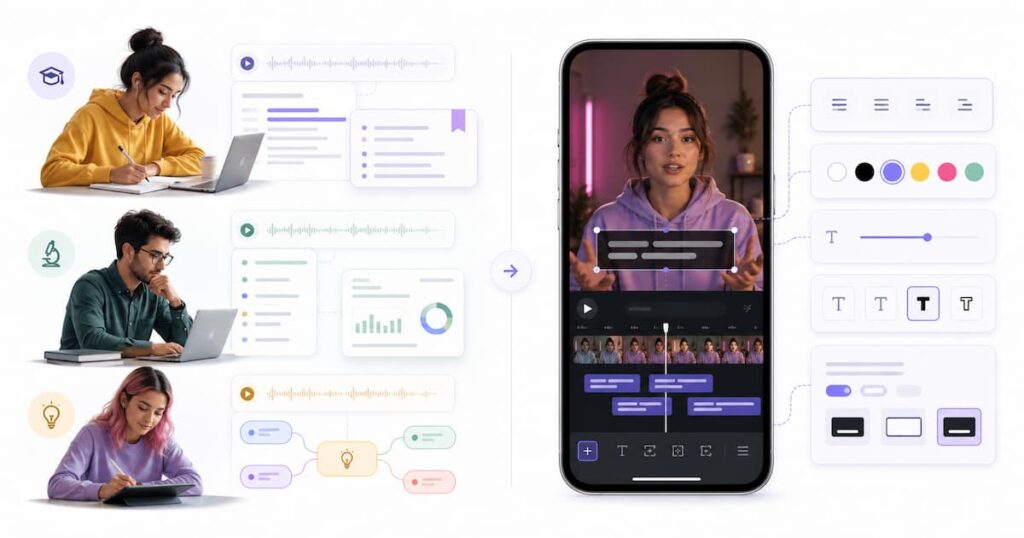
AI image prompt: Clean SaaS comparison illustration. Left side shows a student, researcher, and creator using transcript notes, summaries, and mind maps. Right side shows a social media creator editing subtitles on a vertical video timeline. White background, minimal editorial style, soft shadows, no logos, no readable text, 1200x630.
Frequently Asked Questions About Video Transcriber AI vs Clideo
Is Video Transcriber AI a good Clideo alternative?
Yes, Video Transcriber AI is a good Clideo alternative if you want transcript reuse. It is better for summaries, AI chat, mind maps, research notes, study notes, and content repurposing.
However, Video Transcriber AI is not a full replacement for Clideo if your main need is video editing. Clideo is better if you want to edit subtitles visually, export a captioned video, or remove watermarks from video projects through Clideo Pro.
Is Clideo better than Video Transcriber AI for subtitles?
Yes. Clideo is better for subtitle editing and captioned video output. Clideo lets users create subtitle text, edit text, save SRT or TXT, and export videos with embedded captions.
Video Transcriber AI can support subtitle-related workflows, but Clideo is more focused on subtitle editing inside a video project.
Which tool is better for transcript reuse?
Video Transcriber AI is better for transcript reuse.
The reason is simple. Video Transcriber AI helps users keep working with the transcript after it is generated. Users can summarize, ask questions, translate, organize, and reuse the content. Clideo is better when the transcript is mainly used as subtitles.
Can Clideo export transcripts?
Yes. Clideo Video to Text supports SRT and TXT downloads. Clideo also allows users to embed captions into the video and export the clip with captions.
This makes Clideo useful for subtitle workflows. But if the user wants summaries, AI chat, and mind maps, Video Transcriber AI is still the stronger transcript workflow option.
What is the difference between subtitle editing and transcript reuse?
Subtitle editing is about preparing text for a video. It focuses on timing, line breaks, caption style, and video export. Clideo is strong here.
Transcript reuse is about turning spoken content into text that can be searched, summarized, studied, quoted, analyzed, or rewritten. Video Transcriber AI is strong here.
Which tool should creators choose?
Creators should choose based on the final output.
If the final output is a captioned video, Clideo is the better choice.
If the final output is a blog post, script, summary, content outline, newsletter, study note, or research document, Video Transcriber AI is the better choice.
Is Clideo only a subtitle tool?
No. Clideo is broader than subtitles. Clideo is an online video tool suite with many video editing features. Clideo has tools for video editing, subtitles, conversion, compression, and more. But in this comparison, Clideo’s most relevant strength is subtitle editing and captioned video output.
Is Video Transcriber AI better than Clideo for students?
Yes, for most student workflows. Students usually need notes, summaries, and searchable text. Video Transcriber AI is stronger for that.
Clideo is useful if a student needs to add subtitles to a video project. But for lecture transcription, class notes, or study review, Video Transcriber AI is the better fit.
Final Verdict
Video Transcriber AI and Clideo are both useful. But they solve different problems.
Video Transcriber AI is better for transcript reuse. It is the better choice when users want to turn audio or video into summaries, notes, scripts, AI chat answers, mind maps, research material, and reusable text. It is a better fit for students, researchers, creators, teachers, interviewers, podcasters, and anyone who wants to keep working with spoken content after transcription.
Clideo is better for subtitle editing. Clideo is the better choice when users want to create subtitles, edit captions, export SRT or TXT, embed subtitles into a video, or publish a captioned video. Clideo is a stronger fit for social media creators, casual editors, and users who care more about video output than transcript reuse.
So the conclusion is simple.
Choose Video Transcriber AI when the transcript matters most.
Choose Clideo when the final video matters most.
If your goal is to turn spoken content into reusable knowledge, start with Video Transcriber AI. If your goal is to edit subtitles and export a captioned video, Clideo is the better fit.