


As video becomes the dominant content format, the real challenge is no longer creation, but repurposing. A single video can be turned into blog posts, subtitles, summaries, or short clips—but the workflow depends heavily on the tool you choose.
This is where Video Transcriber AI vs Vizard becomes an important comparison. Both tools help you repurpose video content, but they approach the problem from completely different directions. One focuses on converting video to text and building structured content, while the other focuses on editing and generating short-form video clips.
In this guide, we break down how each tool fits into the video content repurposing workflow, helping you decide which approach works better for your content strategy.
Video Transcriber AI vs Vizard Quick Comparison Table
| Aspect | Video Transcriber AI | Vizard |
| Registration Required | No (can start without login) | Yes (account required before use) |
| Free Access | Trial available without signup | Free plan with watermark and export limits |
| Transcription Accuracy | Up to 99.9% (speech-to-text) | No native transcription accuracy focus |
| Supported Languages | 200+ languages | ~20+ languages for captions |
| Max File Size | Up to 5GB per file | Typically supports standard uploads up to ~2GB |
| Input Methods | Upload files, paste video links, online recording | Upload video files only |
| Supported Sources | YouTube, TikTok, Instagram, audio/video files | Local video uploads (MP4, MOV) |
| Output Formats | SRT, VTT, TXT, DOC, CSV | MP4 (video clips with captions) |
| Starting Price | From $5/month | From $16/month |
| Best Use Case | Text-based content repurposing | Short-form video clip creation |
From this comparison, Video Transcriber AI vs Vizard reflects two distinct approaches. Video Transcriber AI is designed for extracting meaning and turning it into reusable content, while Vizard focuses on editing video into short, engaging clips.
What is Video Transcriber AI?
Video Transcriber AI is a platform built for converting video to text and transforming that text into structured, reusable content. It is designed for users who care more about the information inside the video than the visuals themselves.
Instead of focusing on editing, it focuses on extraction and transformation. Once a video is processed, users can immediately work with transcripts, subtitles, summaries, or documents.
Standout features:
- High-accuracy transcription up to 99.9%
- Supports large files and online video links
- AI subtitle generator with multiple export formats
- Structured summaries and note generation
- AI chat for deeper content extraction
- No login required for initial use
In essence, Video Transcriber AI is a text-first system that turns video into scalable, multi-format content.
What is Vizard?
Vizard is an AI-powered video editing tool designed to turn long videos into short, shareable clips. It focuses on visual storytelling and social media distribution rather than text extraction.
The platform analyzes video content to identify highlights, then allows users to refine and export clips optimized for platforms like TikTok, Instagram, and YouTube Shorts.
Standout features:
- Automatic clip generation from long videos
- Social media optimization for vertical formats
- Timeline-based video editing
- Caption overlays for engagement
- Highlight detection
- Cloud-based editing workflow
Vizard is best understood as a clip-first tool, built for maximizing reach and engagement through short-form video content.
Essential Differences Between Video Transcriber AI and Vizard
Video Transcriber AI vs Vizard: Video Content Repurposing Workflow
| Aspect | Video Transcriber AI | Vizard |
| Workflow Type | Text-based workflow | Clip-based workflow |
| Starting Point | Transcript generation | Video timeline editing |
| Output Goal | Structured, reusable content | Short-form video clips |
| Content Depth | High (information-focused) | Medium (visual-focused) |
When comparing Video Transcriber AI vs Vizard, the most important difference is how each tool defines video content repurposing. One focuses on extracting meaning, while the other focuses on reshaping visuals.
Video Transcriber AI: Built for Content Transformation
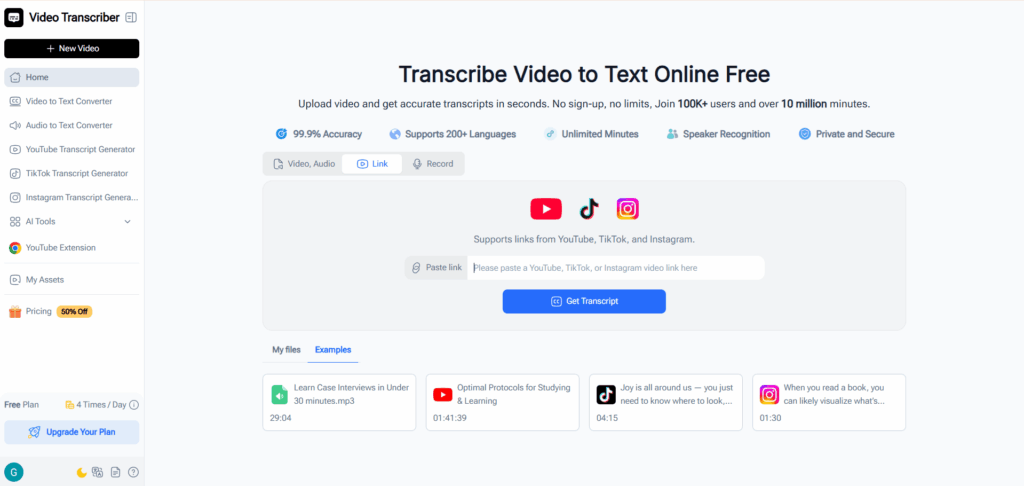
Video Transcriber AI treats transcription as the starting point of content creation. Once speech is converted into text, it becomes flexible and reusable across multiple formats.
A typical workflow looks like:
- Upload a video file or paste a link
- Convert video to text automatically
- Export subtitles, summaries, or documents
This approach allows one piece of content to be reused across blogs, SEO pages, documentation, and captions without needing to rewatch or manually rewrite the content.
Vizard: Built for Content Distribution
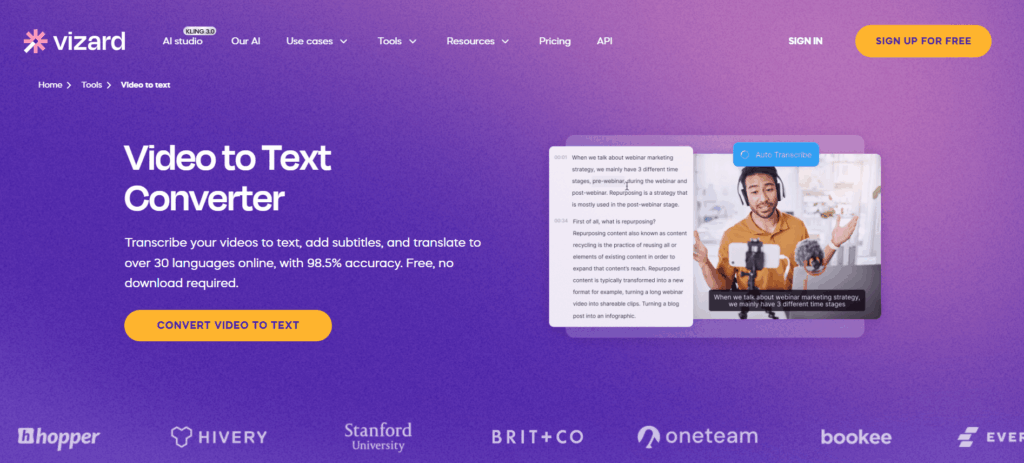
Vizard approaches repurposing as a process of turning long videos into short, engaging clips.
A typical workflow includes:
- Upload a video file
- Detect highlights automatically
- Edit clips using a timeline interface
- Export short-form videos for social platforms
This makes it effective for increasing reach and engagement, but less suitable for deeper content reuse.
Summary
In Video Transcriber AI vs Vizard, Video Transcriber AI focuses on transforming content into reusable formats, while Vizard focuses on distributing content through short-form video.
Video Transcriber AI vs Vizard: Content Output and Reusability
| Aspect | Video Transcriber AI | Vizard |
| Output Formats | TXT, DOC, SRT, VTT, CSV | MP4 (video clips) |
| Subtitle Export | SRT, VTT files | Captions embedded in video |
| Editing Method | Edit transcript text | Edit video timeline |
| Reusability | High across formats | Limited to video format |
The difference in Video Transcriber AI vs Vizard becomes more visible once the output is generated.
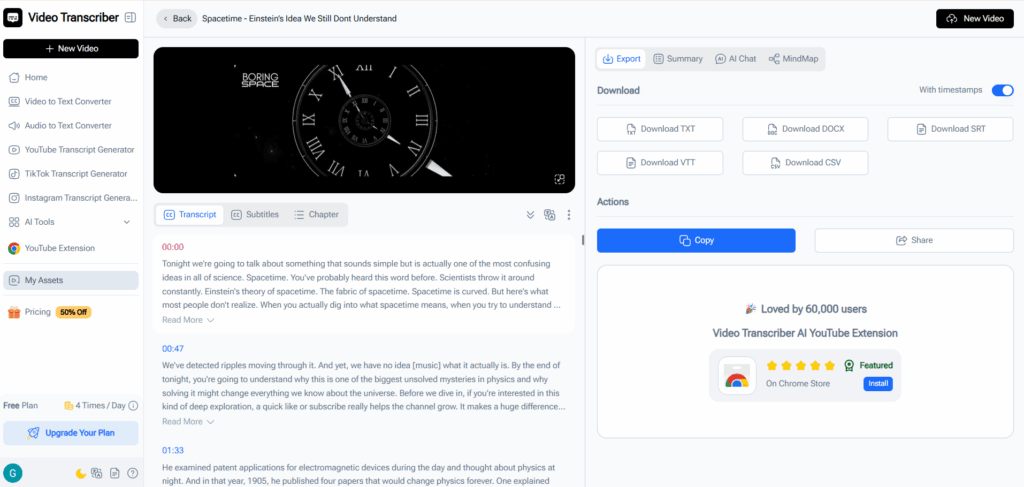
Video Transcriber AI: Multi-Format Output
Video Transcriber AI produces outputs that can be used immediately across different workflows without additional formatting.
You can directly:
- Upload SRT / VTT files to video platforms for subtitles
- Use TXT / DOC files for blog posts or documentation
- Export CSV for structured content or indexing
Because the output is already structured, there is no need for manual conversion or additional tools.
Vizard: Video-Only Output
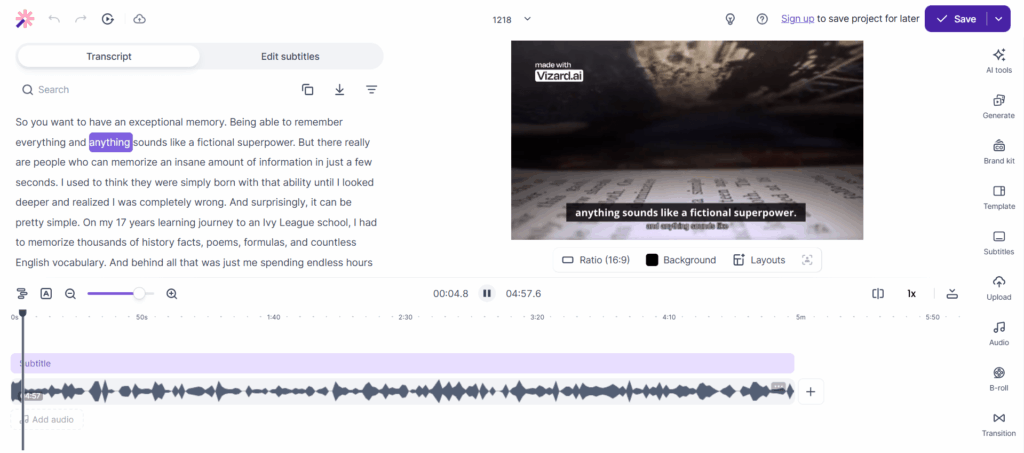
Vizard produces output as edited video clips in MP4 format, with captions embedded directly into the video.
Typical usage includes:
- Publishing clips to TikTok, Instagram, or YouTube Shorts
- Using captions for on-screen engagement
Since captions are not exported separately, the content cannot be easily reused in text-based workflows.
Summary
In Video Transcriber AI vs Vizard, Video Transcriber AI enables multi-format reuse, while Vizard focuses on finalized video output.
Video Transcriber AI vs Vizard: Input Methods and Flexibility
| Aspect | Video Transcriber AI | Vizard |
| File Upload | Video and audio files | Video files only |
| Online Links | YouTube, TikTok, Instagram supported | Not supported |
| Recording | Built-in online recording | Not available |
| Max File Size | Up to 5GB | Typically up to ~2GB |
Input flexibility determines how easily users can start working with content.
Video Transcriber AI: Multiple Input Options
Video Transcriber AI supports a wide range of input methods, allowing users to work with content from different sources without extra preparation.
You can:
- Paste a YouTube, TikTok, or Instagram link directly
- Upload large video or audio files
- Record audio inside the platform
This reduces preparation time and simplifies the workflow.
Vizard: Upload-Based Workflow
Vizard relies on direct video uploads, which requires users to prepare files in advance.
Typical steps include:
- Export or download video from source
- Upload file
- Begin editing process
This adds an extra step before processing begins.
Summary
In Video Transcriber AI vs Vizard, Video Transcriber AI offers more flexible input methods, while Vizard uses a more controlled upload-based workflow.
Video Transcriber AI vs Vizard: Processing Speed and Workflow Efficiency
| Aspect | Video Transcriber AI | Vizard |
| Time to First Output | Minutes after upload | Depends on editing time |
| Automation Level | Fully automated transcription | Semi-automated clip detection |
| Steps to Result | 2–3 steps | 4–6 steps |
| Batch Processing | Supported | Not optimized for batch use |
Processing speed is influenced by both system performance and required user interaction.
Video Transcriber AI: Fast and Scalable
Video Transcriber AI minimizes both processing time and manual effort. Once a file is uploaded, transcription and structuring are handled automatically.
Typical advantages include:
- Minimal user interaction required
- Ready-to-use output within minutes
- Ability to process multiple files efficiently
This makes it suitable for workflows where speed and scale are important.
Vizard: Editing-Dependent Workflow
Vizard includes automation for detecting highlights, but still requires users to review and refine clips before exporting.
Typical workflow involves:
- Reviewing suggested clips
- Adjusting edits manually
- Exporting finalized videos
This increases the time required per project.
Summary
In Video Transcriber AI vs Vizard, Video Transcriber AI provides faster and more scalable processing, while Vizard requires more time due to manual editing.
Video Transcriber AI vs Vizard: Pricing and Value
| Aspect | Video Transcriber AI | Vizard |
| Pricing Model | Monthly subscription | Monthly subscription |
| Starting Price | From $5/month | From $16/month |
| Billing Style | Tiered plans | Tiered plans |
| Best Value | Content creation workflows | Short-form video production |
Pricing in Video Transcriber AI vs Vizard reflects how each tool is typically used.
Video Transcriber AI: Lower Entry Cost
Video Transcriber AI offers a lower starting price, making it accessible for individuals and small teams.
Key characteristics:
- Entry price at $5/month
- Suitable for both occasional and regular use
- Scales with content production needs
This makes it easier to adopt for content-focused workflows.
Vizard: Higher Entry for Editing Workflows
Vizard starts at a higher monthly price point, reflecting its focus on video editing and clip generation.
Typical characteristics:
- Entry price at $16/month
- Designed for continuous video production
- Focus on social media content workflows
Summary
In Video Transcriber AI vs Vizard, both tools use subscription pricing, but Video Transcriber AI offers a lower entry cost, while Vizard is positioned for ongoing editing workflows.
Video Transcriber AI vs Vizard: Security and Data Handling
| Aspect | Video Transcriber AI | Vizard |
| Account Requirement | Optional for trial | Required |
| Data Storage | Minimal for non-logged users | Cloud-based storage |
| Access Control | User-controlled | Account-based |
| Collaboration Data | Not required | Stored for team use |
Security and privacy considerations differ based on how each platform is designed.
Video Transcriber AI: Minimal Data Exposure
Video Transcriber AI allows users to start without creating an account, which reduces the amount of stored user data.
This means:
- No mandatory account creation
- Less persistent data storage
- More control over usage
Vizard: Cloud-Based Collaboration
Vizard requires account-based access and stores data in the cloud to support editing and collaboration.
This enables:
- Access across devices
- Project storage and editing
- Team-based workflows
Summary
In Video Transcriber AI vs Vizard, Video Transcriber AI minimizes data exposure, while Vizard enables cloud-based collaboration through account systems.
Video Transcriber AI vs Vizard: Best Use Cases
| Aspect | Video Transcriber AI | Vizard |
| Primary Use | Converting video to structured text content | Creating short-form video clips |
| Best For | Creators, educators, marketers | Social media teams, video editors |
| Workflow Type | File-based, asynchronous | Editing-based, distribution-focused |
| Content Goal | Reuse and scale content | Increase reach and engagement |
| Output Usage | Blogs, subtitles, documentation | TikTok, Instagram, YouTube Shorts |
Choosing between Video Transcriber AI vs Vizard becomes much easier when you look at how each tool fits into your daily workflow rather than just comparing features.
Video Transcriber AI: Best for Content Scaling and Knowledge Extraction
Video Transcriber AI is best suited for users who want to turn video into reusable content across multiple formats. It works particularly well when the goal is to extract information and repurpose it into text-based assets.
Typical use cases include:
- Turning long YouTube videos into blog posts or SEO articles
- Generating SRT or VTT subtitles for publishing
- Converting webinars, courses, or interviews into structured notes
- Processing multiple videos for content pipelines
Because the output can be exported as TXT, DOC, SRT, VTT, or CSV, the same video can support multiple channels without additional work.
Vizard: Best for Social Media and Content Distribution
Vizard is designed for users who focus on visual storytelling and social media growth. It works best when the goal is to turn long videos into engaging short clips.
Typical use cases include:
- Creating TikTok, Instagram Reels, or YouTube Shorts
- Extracting highlight clips from podcasts or interviews
- Producing short-form content for marketing campaigns
- Editing clips for audience engagement
Since the output is exported as MP4 video clips, it is ready for immediate publishing on social platforms.
Summary
In Video Transcriber AI vs Vizard, the difference in use cases reflects two different content strategies. Video Transcriber AI is ideal for users who want to scale content across formats and channels, while Vizard is better suited for users focused on short-form video distribution and audience growth.
Final Verdict
Choosing between Video Transcriber AI vs Vizard is less about features and more about what you want your video to become after it’s created.
Some workflows treat video as the final product. Others treat it as the starting point.
If your goal is to turn a single video into multiple assets that can live across platforms, formats, and contexts, then a text-driven approach opens up far more possibilities. That is where Video Transcriber AI fits naturally. It shifts video from something you publish once into something you can reuse, adapt, and scale.
If your priority is speed to distribution and visual engagement, then focusing on clips and short-form content will feel more aligned, which is where tools like Vizard are most effective.
In the end, the difference is simple: one helps you multiply the value of your content, the other helps you distribute it faster.
If you are building a workflow where video is not the endpoint but the source of ongoing content creation, Video Transcriber AI is a strong place to start.