


Not sure whether Video Transcriber AI or Any2Text is better for fast online transcription?
The answer depends on what kind of workflow you actually need.
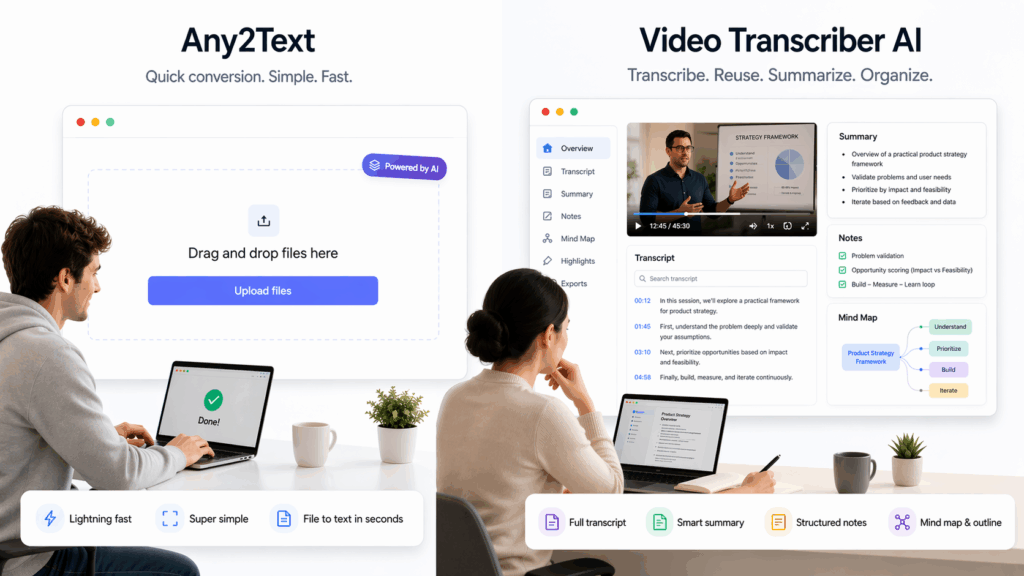
Some users want the fastest possible route from audio or video to text. Other users want more than a raw transcript file. They want summaries, follow-up questions, cleaner structure, and a way to keep working after the transcript appears. That is where the difference between Video Transcriber AI and Any2Text becomes much easier to understand. On its public homepage, Video Transcriber AI presents itself as a transcript-first product with direct navigation to Video to Text Converter, Audio to Text Converter, and YouTube Transcript Generator, plus a hero section built around uploading files immediately. On its public homepage, Any2Text presents a much simpler three-step flow: upload, transcribe, and download.
That difference matters because Video Transcriber AI publicly describes a deeper post-transcription workflow. The Help Center for Video Transcriber AI lists editable transcripts, structured summaries, AI chat with transcript content, and mind maps from transcript content. By contrast, the public pricing and homepage content for Any2Text highlight text editing, AI templates for text, AI translations as coming soon, and export formats like DOCX, XLSX, SRT, and TXT. That makes Video Transcriber AI easier to frame as a fuller transcription product, while Any2Text looks more like a lightweight file-to-text utility.
This guide compares Video Transcriber AI and Any2Text through the same practical lens as the reference structure: fast online transcription, product depth, transcript usability, AI features, pricing, and best use cases. If your job is simply to generate a transcript file, Any2Text may be enough. If your job continues after the transcript appears, Video Transcriber AI has the stronger public product story.
Video Transcriber AI vs Any2Text at a Glance
The table below compares the current public positioning of Video Transcriber AI and Any2Text. It focuses on the features and workflow signals that are actually visible right now on their public pages.
| Metric | Video Transcriber AI | Any2Text |
| Product identity | Full transcription product | Basic file-to-text tool |
| Homepage focus | Transcription-first workflow | Upload, transcribe, download |
| Sign-up required to try | ❌️No | ❌️No |
| Free entry | 4 transcripts daily | First 15 minutes free |
| Transcript editing | ✅Yes | ✅Yes |
| Structured summaries | ✅Yes | Not clearly surfaced on public homepage |
| AI chat with transcript | ✅Yes | Not clearly surfaced on public homepage |
| Mind maps from transcript | ✅Yes | Not clearly surfaced on public homepage |
| Export formats | TXT, DOCX, SRT, VTT, CSV | DOCX, XLSX, SRT, TXT |
| Best fit | Users who want to work with transcripts after transcription | Users who want basic conversion and export |
From a quick comparison alone, Video Transcriber AI stands out more clearly for users who want a deeper transcript workflow. Any2Text looks more suitable for users who want fast conversion and a downloadable output file. That means the real question is not which brand is “bigger.” The real question is whether you need a true transcription workflow or a simpler utility.
What Is Video Transcriber AI?
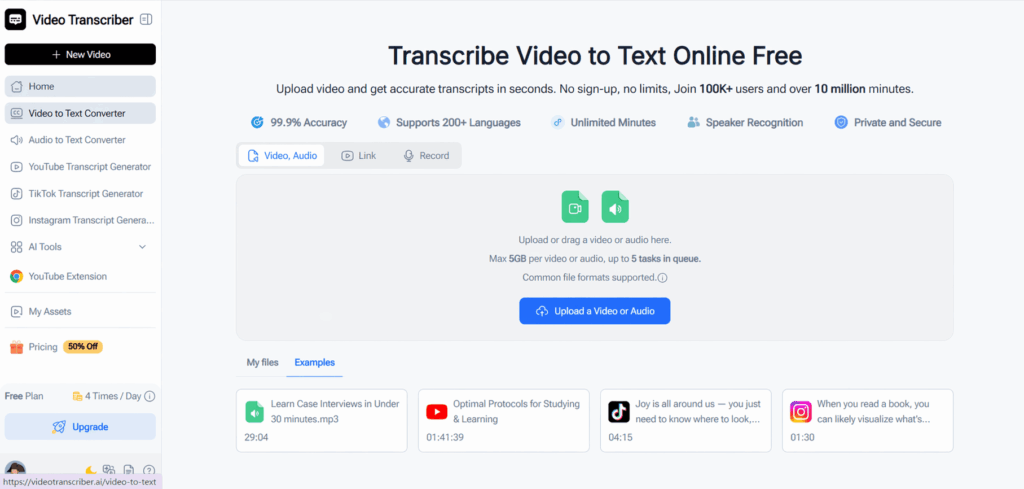
Video Transcriber AI is an online transcription tool built for users who want to turn spoken content into usable text quickly and with less friction. The public homepage of Video Transcriber AI includes transcript-related navigation items, a visible upload area, no-sign-up messaging, support for 98+ languages, speaker recognition, private and secure messaging, up to 5GB per file, and up to 5 tasks in queue. Those details make Video Transcriber AI feel like a transcription product from the first screen.
The public Help Center gives Video Transcriber AI a broader identity than a simple converter. According to the Help Center, Video Transcriber AI supports transcription, translation, editable transcripts, structured summaries, AI chat with transcript content, and mind maps from transcript content. The public pricing page also says Video Transcriber AI includes free AI chat, summary, translation for 100+ languages, noise reduction, speaker recognition, and the ability to process 5 audio or video files at once on the free plan. That makes Video Transcriber AI look like a product designed for what happens after transcription, not just for transcript generation itself.
Standout features of Video Transcriber AI on the current public pages:
- No sign-up required
- 4 transcripts daily on the free plan
- Editable transcripts
- Structured summaries
- AI chat with transcript content
- Mind maps from transcript content
- Speaker recognition
- Export in TXT, DOCX, SRT, VTT, and CSV
Rather than stopping at raw text, Video Transcriber AI is positioned as a way to review, understand, and reuse spoken content. That is why Video Transcriber AI feels more like a complete transcription workspace than Any2Text does.
What Is Any2Text?
Any2Text is a simpler audio/video-to-text utility built around conversion. On the current public homepage, Any2Text describes itself as “Transcription Software Online,” offers “No Sign Up,” and explains the product in three steps: upload audio or video, transcribe, and download transcription. That makes Any2Text easy to understand immediately.
The visible strengths of Any2Text are also clear. The public page says Any2Text supports a wide range of audio and video formats, works across 50+ languages with language auto-detection, allows text editing, and supports downloads in DOCX, XLSX, SRT, and TXT. The pricing section also shows the first 15 minutes free, monthly plans, AI templates for text, and AI translations marked as coming soon. Those details make Any2Text useful for straightforward transcript conversion and export.
What Any2Text does not clearly show on the public homepage is the same transcript-centered post-processing layer that Video Transcriber AI shows through its Help Center and pricing page. There is no equally prominent public workflow around structured summaries, transcript chat, or mind maps on the main public experience of Any2Text. That is why Any2Text feels more like a small utility, while Video Transcriber AI feels more like a fuller transcription product.
Key Differences Between Video Transcriber AI and Any2Text
1. Video Transcriber AI vs Any2Text: Getting Started
The table below compares the first-use experience visible on the public pages of Video Transcriber AI and Any2Text.
| Aspect | Video Transcriber AI | Any2Text |
| First action | Upload file from a transcript-first homepage | Upload file from a utility-style homepage |
| Account required? | ❌️No | ❌️No |
| Free entry | 4 transcripts daily | First 15 minutes free |
| Workflow message | Upload, transcribe, keep working | Upload, transcribe, download |
| Friction level | Very low | Very low |
Video Transcriber AI: Faster to Understand as a Product
From a UX perspective, Video Transcriber AI feels more immediate as a dedicated transcription product. The upload area is visible right away, transcript-related navigation appears in the header, and the homepage already tells users what Video Transcriber AI is for. Video Transcriber AI also includes visible limits and capacity signals, such as up to 5GB per file and up to 5 tasks in queue, which makes the product feel ready for more serious use from the first screen.
In practical terms, the startup flow for Video Transcriber AI feels like this:
- Open Video Transcriber AI.
- Upload a video or audio file.
- Submit the job.
- Review, export, summarize, or continue working with the transcript.
Any2Text: Simple, but Narrower
Any2Text is also easy to start. The public homepage of Any2Text clearly shows that there is no sign-up required, and the three-step explanation makes the path very clear. In that sense, Any2Text is not difficult or confusing. The difference is that Any2Text presents a narrower destination than Video Transcriber AI. Any2Text is optimized for generating a transcript and downloading it, while Video Transcriber AI presents the transcript as the beginning of a broader workflow.
Quick takeaway
If your only goal is to start a transcription quickly, both Video Transcriber AI and Any2Text are easy to enter. If your goal is to enter a transcript workflow that keeps helping after the text appears, Video Transcriber AI has the clearer edge.
[Image: Video Transcriber AI first screen with upload area and transcript-first navigation]
2. Video Transcriber AI vs Any2Text: Product Depth After Transcription
This is the most important section in the comparison. The table below focuses on what Video Transcriber AI and Any2Text publicly show users can do after a transcript is generated.
| After transcription | Video Transcriber AI | Any2Text |
| Edit transcript | ✅️Yes | ✅️Yes |
| Structured summaries | ✅️Yes | ❌️Not clearly shown |
| AI chat with transcript | ✅️Yes | ❌️Not clearly shown |
| Mind maps from transcript | ✅️Yes | ❌️Not clearly shown |
| Transcript translation | ✅️Yes | AI translations coming soon |
| Basic export | ✅️Yes | ✅️Yes |
Video Transcriber AI: Built for What Happens Next
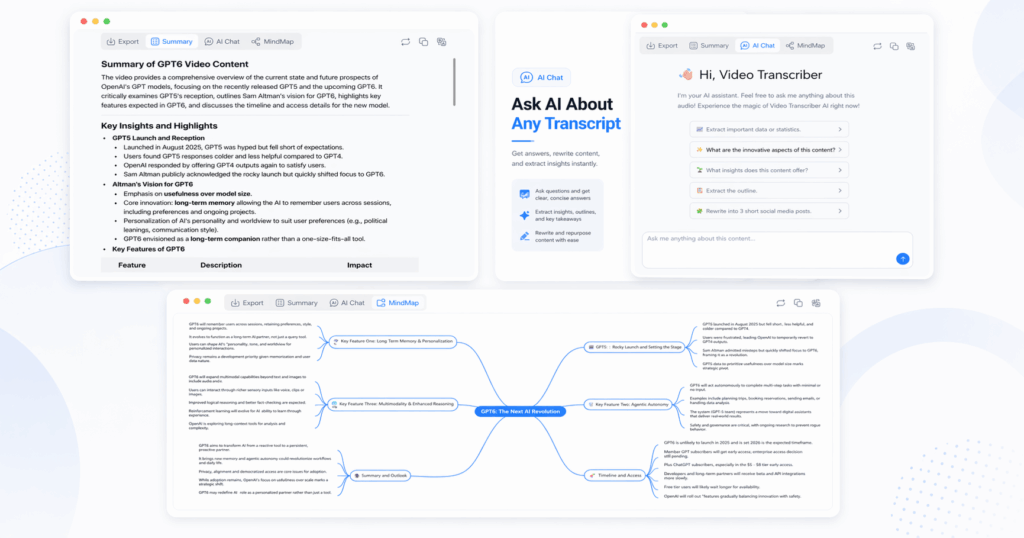
The public Help Center for Video Transcriber AI makes this difference very clear. It says Video Transcriber AI supports structured summaries, AI chat with transcript content, transcript and summary translation, and mind maps from transcript content. That means Video Transcriber AI is not just turning speech into text. Video Transcriber AI is built to help users review, understand, and organize spoken content after transcription is complete.
That changes the practical value of Video Transcriber AI. A transcript becomes more useful when users can ask questions about it, scan a summary, or turn long material into a visual structure. This is exactly why Video Transcriber AI feels stronger for lectures, meetings, webinars, interviews, podcasts, and other long-form content. The product story of Video Transcriber AI clearly extends beyond transcript generation.
Any2Text: Mostly Conversion and Export
Any2Text still handles the first half of the job well. The public page for Any2Text shows text editing, AI templates for text, export formats, and a simple conversion flow. For users who only want a transcript file, Any2Text can be enough. The issue is not that Any2Text fails at conversion. The issue is that the public page for Any2Text does not clearly show the same after-transcription depth that Video Transcriber AI does.
Quick takeaway
A simple way to phrase the difference is this: Any2Text helps you get a transcript, while Video Transcriber AI helps you work with a transcript. That is the clearest reason Video Transcriber AI feels more like a full product and Any2Text feels more like a utility.
3. Video Transcriber AI vs Any2Text: Transcript Usability
The next table compares how usable the transcript feels right after transcription. This is where Video Transcriber AI starts to separate even more clearly from Any2Text.
| Feature | Video Transcriber AI | Any2Text |
| Editable transcript | ✅️Yes | ✅️Yes |
| Multiple export formats | ✅️Yes | ✅️Yes |
| Timestamp-capable export options | ✅️Yes | ❌️Not clearly highlighted in the same way |
| Summary-friendly workflow | ✅️Yes | Not clearly shown |
| Structured follow-up actions | ✅️Yes | ❌️Not clearly shown |
| Better immediate usability | Stronger | Simpler |
Video Transcriber AI: More Useful Right After Transcription
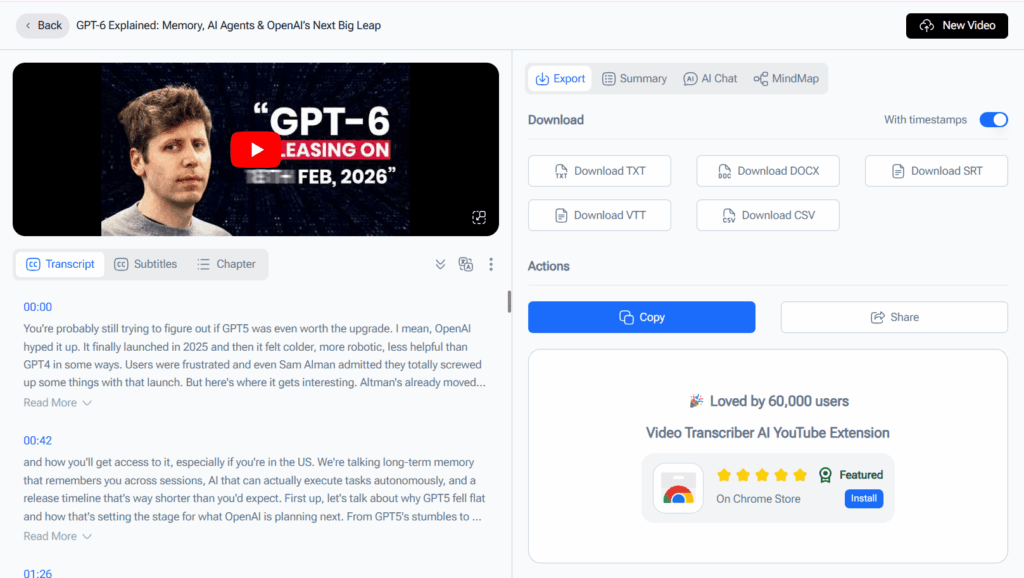
Video Transcriber AI does not stop at producing a text block. The Help Center says Video Transcriber AI supports online editing and export in TXT, DOCX, SRT, VTT, and CSV, including timestamp-related support. On top of that, Video Transcriber AI supports summaries, AI chat, and mind maps, which means the transcript can be used immediately for review or downstream work. That makes Video Transcriber AI more useful for people who want action after transcription rather than just output after transcription.
That is especially relevant for long spoken content. A raw transcript from Video Transcriber AI can quickly become structured notes, a review summary, or a visual map of the discussion. The public workflow around Video Transcriber AI suggests that users can stay inside the product longer and extract more value from the same recording.
Any2Text: Good for Lightweight Output
The public page for Any2Text supports text editing and several export formats, which is good enough for simple conversion jobs. If a user only needs a text file, subtitle file, or spreadsheet-style export, Any2Text can still be practical. But based on the public homepage, Any2Text looks less useful once the transcript needs to become notes, key points, or visual structure. That is where Video Transcriber AI clearly goes further.
Quick takeaway
If transcript usability matters most right after transcription, Video Transcriber AI has the clearer advantage. If the goal is just basic editing and download, Any2Text still works.
4. Video Transcriber AI vs Any2Text: AI Features and Output Structure
The table below isolates the AI layer because this is where Video Transcriber AI most clearly moves beyond the scope of Any2Text.
| AI layer | Video Transcriber AI | Any2Text |
| AI summaries | ✅Yes | ❌️Not clearly shown |
| AI chat | ✅Yes | ❌️Not clearly shown |
| Mind maps | ✅Yes | ❌️Not clearly shown |
| AI templates for text | ❌️Not the main public story | ✅Yes |
| AI translations | ✅Yes | Coming soon |
Video Transcriber AI: Better for Structured Output
The public Help Center says Video Transcriber AI can automatically generate structured summaries, chat with transcript content, translate transcripts and summaries, and create mind maps from transcript content. Those are not minor extras. They change how users interact with long audio and video content. Video Transcriber AI becomes useful not just for transcription, but also for comprehension and reuse.
That matters for students, researchers, creators, and knowledge workers. Long spoken content is often too heavy to review line by line. With Video Transcriber AI, the public feature set suggests users can move from raw transcript to key points or visual structure much faster. That makes Video Transcriber AI much more than a plain converter.
Any2Text: AI Support, but Narrower
Any2Text does mention AI templates for text, and the pricing section says AI translations are coming soon. That gives Any2Text some AI-adjacent functionality. But the public page for Any2Text still does not clearly show a transcript-centered workflow comparable to the one Video Transcriber AI describes. That is why the AI layer on Any2Text feels narrower and more peripheral.
Quick takeaway
If AI is meant to help users understand transcript content, Video Transcriber AI is clearly stronger. If AI is only meant to lightly support text handling around a simple converter, Any2Text remains serviceable.
5. Video Transcriber AI vs Any2Text: Pricing and Plans
The table below compares the public entry points that Video Transcriber AI and Any2Text currently show.
| Pricing factor | Video Transcriber AI | Any2Text |
| Free entry | 4 transcripts daily | First 15 minutes free |
| Entry paid price | Basic from $4/month yearly or $5/month monthly | Basic from $3.49/month yearly or $4.99/month monthly |
| Strongest free-plan extras | AI chat, summary, translation, noise reduction, speaker recognition, 5 files at once | Basic transcription, editing, export |
| Best value message | Deeper workflow on free and paid | Lower-cost utility entry |
Video Transcriber AI: More Value in the Free Layer
The pricing page for Video Transcriber AI says the free plan includes 4 transcripts daily, free AI chat, summary, translation for 100+ languages, noise reduction, speaker recognition, and the ability to process 5 audio or video files at once. That gives Video Transcriber AI a much stronger free-layer story than a basic converter, especially for users who want to test the deeper workflow before paying.
The paid plans of Video Transcriber AI also keep that same pattern. The Basic and Pro plans continue to include AI chat, summary, translation, noise reduction, and speaker recognition. So the pricing story of Video Transcriber AI is not just about minutes or export. It is about access to a fuller workflow.
Any2Text: Cheaper, Simpler Entry
The pricing section on Any2Text says users get the first 15 minutes free, and the paid plans highlight text editing, AI templates for text, and lower monthly entry points. That can make Any2Text appealing for users who mostly care about simple conversion and price sensitivity. But it does not change the fact that Video Transcriber AI publicly offers more workflow depth in both the free and paid story.
Quick takeaway
If the main question is price for a simple utility, Any2Text can look attractive. If the main question is value per workflow layer, Video Transcriber AI has the stronger case.
6. Video Transcriber AI vs Any2Text: Best Use Cases
The final table makes the best-fit difference between Video Transcriber AI and Any2Text very clear.
| User type | Better choice | Why |
| User who wants a quick transcript file | Any2Text | Simpler conversion flow |
| Student reviewing long lectures | Video Transcriber AI | Better summary and structure layer |
| Creator repurposing spoken content | Video Transcriber AI | Better post-transcription workflow |
| Researcher handling interviews | Video Transcriber AI | Better for extracting and organizing insights |
| User who mainly wants export and light editing | Any2Text | Good enough for basic tasks |
| User who wants a real transcription workspace | Video Transcriber AI | Stronger after-transcription feature set |
Choose Video Transcriber AI if you are:
- A student who wants a transcript plus a summary
- A creator who wants to turn spoken content into reusable material
- A researcher working with long interviews or recorded discussions
- A knowledge worker who needs more than a plain text file
- A user who values summaries, transcript chat, and mind maps after transcription
Choose Any2Text if you are:
- A user who just wants a transcript file quickly
- Someone who prefers a simpler conversion utility
- A buyer who cares more about a low entry price than workflow depth
- A user whose work mostly ends at editing and export
Quick takeaway
Any2Text is fine for smaller, simpler needs. Video Transcriber AI is better when the transcript is only the beginning of the work. That is why Video Transcriber AI is easier to recommend for lectures, meetings, interviews, podcasts, webinars, and other long-form spoken content.
Final Verdict
Choosing between Video Transcriber AI and Any2Text really comes down to one question:
Do you want a basic file-to-text tool, or do you want a fuller transcription workflow?
If you only need a simple transcript file and want a lightweight utility, Any2Text can work. The public page for Any2Text clearly supports that use case with its three-step flow, text editing, export formats, and free first 15 minutes. Any2Text is easy to understand, easy to start, and good enough for basic conversion jobs.
If you want a product that keeps helping after transcription, Video Transcriber AI is the stronger choice. The public homepage and Help Center for Video Transcriber AI clearly show transcript-focused navigation, no-sign-up entry, editable transcripts, multiple export formats, structured summaries, AI chat, and mind maps. That makes Video Transcriber AI feel much more like a real transcription product and much less like a basic utility.
So for users comparing Video Transcriber AI and Any2Text through the lens of fast online transcription, the final verdict is simple:
Any2Text is better understood as a lightweight file-to-text tool. Video Transcriber AI is better understood as a fuller transcription workflow product.