


Most people do not need the most advanced transcription tool on the market.
They need the one they can start using right now.
That is the real angle behind Video Transcriber AI vs TurboScribe. If you are a first-time user, a student, a casual creator, or someone who only needs transcription from time to time, the better free plan is usually not the one with the biggest power-user ceiling. It is the one with lower friction, more practical daily usage, and more value after the transcript is finished. On that standard, Video Transcriber AI is the better free starting point for most users, while TurboScribe makes more sense for heavier, longer, and more repeat-based transcription needs. Video Transcriber AI publicly says its free plan includes 4 transcripts daily, free AI chat and summary features, speaker recognition, noise reduction, support for 100+ languages, and the ability to process 5 audio or video files at once. TurboScribe publicly says its free tier includes 3 transcripts daily, 30-minute uploads, 1 file at a time, and lower priority processing.
Video Transcriber AI vs TurboScribe at a Glance
| Category | Video Transcriber AI | TurboScribe | Better for Most Users |
| Sign-up friction | ✅️“Free and no sign-up required.” | ❌ Free pages prominently push “Start Transcribing for Free” and “Sign up with email address.” | VideoTranscriber AI |
| Daily free usage | 4 transcripts daily. | 3 transcripts daily. | VideoTranscriber AI |
| Batch convenience | ✅️Process 5 audio/video files at once. | ❌ Upload 1 file at a time on free. | VideoTranscriber AI |
| Free file limit | Each audio/video up to 500MB on free. | Each file up to 30 minutes on free. | Depends on file type and workflow |
| Post-transcript value | ✅️Free AI chat, summary, speaker recognition, noise reduction. | ❌ Core public free-tier messaging centers on transcription, 30-minute uploads, and lower priority. | VideoTranscriber AI |
| Language support | 200+ languages. | 98+ transcription languages; 134+ translation languages. | Roughly similar for mainstream users |
| Accuracy claim | Up to 99.9% under suitable conditions. | 99.8% accuracy claim. | Slight edge on headline claim: TurboScribe |
| Best fit | First-time users, casual users, students, creators who want less friction. | Heavy repeat users and people who care more about long single uploads. | Video Transcriber AI for most users |
The table tells the story fast. TurboScribe has a stronger long-file and power-user positioning on paid plans, with 10-hour / 5GB uploads and up to 50 files at a time for Unlimited. But on the free-plan experience that most new users actually touch first, Video Transcriber AI is easier to frame as the more practical choice. It asks less from the user up front and gives more ways to get value from a free transcript once it is done.
For users comparing Video Transcriber AI and TurboScribe, the key difference is not whether TurboScribe can transcribe well. The key difference is whether TurboScribe feels practical for first-time users and casual daily use.
What Is VideoTranscriber AI?
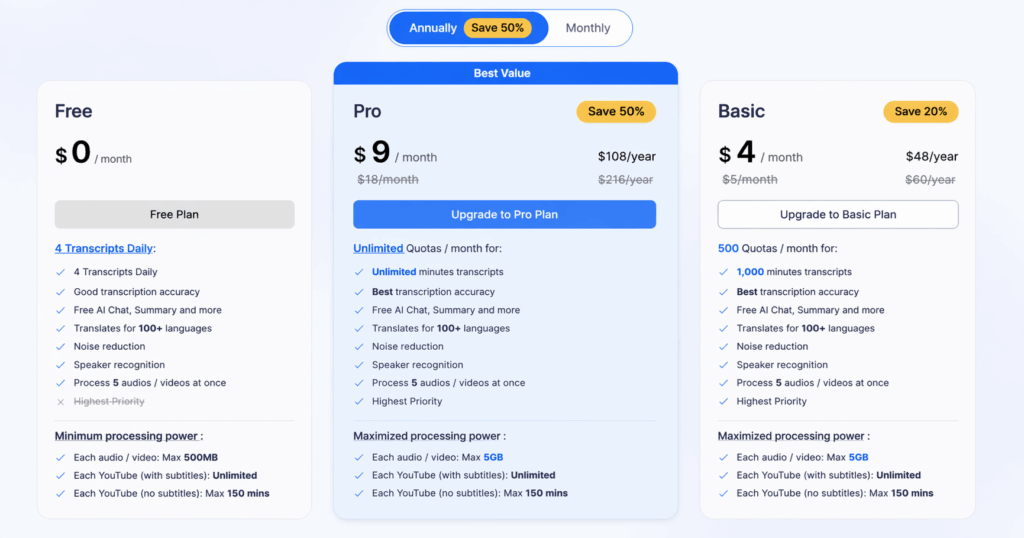
Video Transcriber AI is a browser-based transcription tool built around fast, direct use. Its public homepage emphasizes free online transcription, no sign-up, and a simple upload-first flow. Its pricing and help content reinforce that positioning by highlighting 4 daily free transcripts, AI chat and summary features, speaker recognition, noise reduction, and support for 200+ languages.
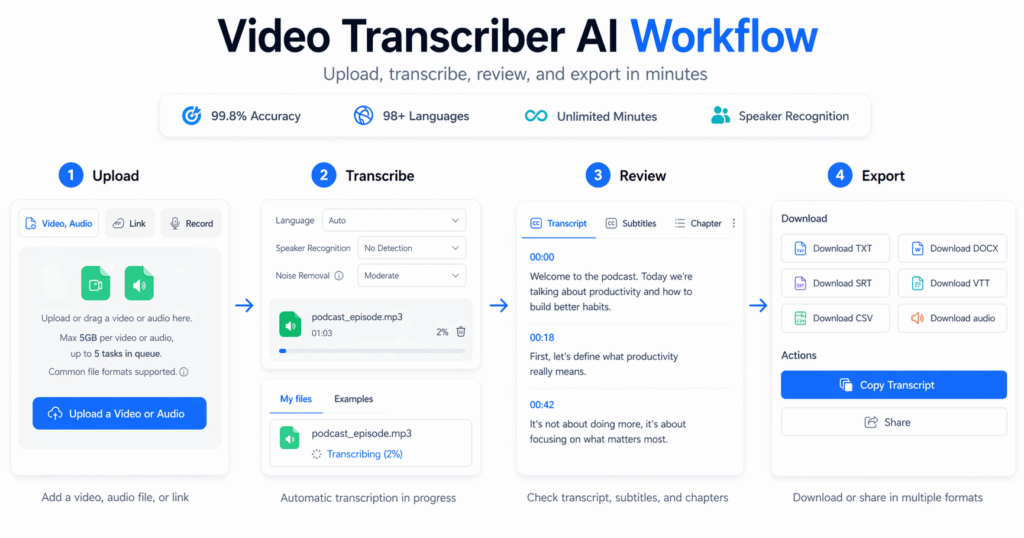
That matters because most users do not begin with a complex workflow. They begin with one file. One lecture. One interview. One meeting recording. One YouTube video. One short piece of content they want turned into text. In that moment, the best tool is often the one that lets them move from page load to upload as quickly as possible. Video Transcriber AI is easier to position around that kind of behavior. Its public workflow copy is simple: upload the file, let AI transcribe it, then review and reuse the transcript.
It also has a stronger “usable free plan” story than many tools in the category. A free plan becomes more valuable when it does more than let you test raw transcription. Video Transcriber AI's public free-plan page does not stop at the transcript itself. It also lists AI chat, summary, speaker recognition, noise reduction, and multi-file processing. That makes the tool feel less like a demo and more like a complete starter workflow.
Compared with TurboScribe, Video Transcriber AI feels more open to first-time users. Unlike TurboScribe, Video Transcriber AI presents more value on the free layer before users commit to a recurring workflow. For readers deciding between Video Transcriber AI and TurboScribe, this difference matters early.
Who Video Transcriber AI fits best
| User Type | Why It Fits |
| First-time users | Lower entry friction and faster first test. |
| Students | Useful for lectures, notes, summaries, and follow-up review. |
| Casual creators | Better for turning audio or video into reusable draft material fast. |
| One-off users | Stronger when you just need transcription done without account setup. |
| Users who hate registration walls | Publicly positioned as free and no sign-up required. |
What Is TurboScribe?
TurboScribe is also an AI transcription tool, but its public positioning feels different. Its homepage and free tools pages heavily promote “3 free transcripts daily,” “Start Transcribing for Free,” and “Sign up with email address.” Its broader product positioning leans more toward recurring transcription use, higher-volume workflows, and the appeal of its Unlimited plan. That plan promises unlimited transcriptions for one person, files up to 10 hours or 5GB, and uploads of up to 50 files at a time.
That does not make TurboScribe a bad option. It just makes it a different option. If someone already knows they will transcribe often, or they regularly work with long recordings, TurboScribe has a cleaner argument. Its 99.8% accuracy claim and 98+ language support also give it a strong top-line technical story on paper.
The catch is that this is not how most people enter the category. Most users do not start by asking, “Which tool will be best for my tenth hour of transcription this week?” They start by asking, “Can I try this now without friction?” On that question, TurboScribe feels more account-led. On its free tier, it also publicly limits users to 3 transcripts daily, 30-minute uploads, 1 file at a time, and lower priority. That combination is workable, but it is less forgiving for casual testing.
Who TurboScribe fits best
| User Type | Why It Fits |
| Heavy repeat users | Stronger recurring-use story, especially on Unlimited. |
| Users with long recordings | Paid plan supports files up to 10 hours / 5GB. |
| Users okay with account setup | Public onboarding pushes free start through sign-up. |
| Users comparing long-file capacity first | This is one of TurboScribe’s clearest strengths. |
Key Differences Between Video Transcriber AI and TurboScribe
1. Video Transcriber AI vs TurboScribe: Getting Started
The comparison below focuses on the first-use experience visible on the public product and pricing pages.
| Aspect | Video Transcriber AI | TurboScribe |
| First action | Upload file directly from a no-sign-up page | Start free flow tied more closely to sign-up |
| Account required? | No sign-up required | Public free flow pushes sign-up |
| Time to first transcript | Very fast, upload-first workflow | More gated by account-first framing |
| Friction level | Low | Moderate |
| Best for | One-off use, first tests, quick tasks | Repeat use after committing to the tool |
VideoTranscriber AI: Faster to Begin
From a UX perspective, Video Transcriber AI feels more immediate. The public homepage is built around one primary action: upload a file and start transcribing. The copy is plain. The first step is obvious. The user does not need to decide between multiple product paths or commit to an account before testing the core value. That simplicity is one of its strongest advantages for most users.
In practical terms, the startup flow feels like this:
- Open the page.
- Upload a video or audio file.
- Submit the task.
- Wait for transcription, then review, copy, or reuse the result.
Because there is less setup and the action path is visible immediately, Video Transcriber AI feels better suited to users who want fast online transcription without a heavier entry process.
TurboScribe: More Gated from the Start
TurboScribe feels more like entering a product you are expected to keep using. Its public free-plan pages are clear, but they also make the account step more visible. “Start Transcribing for Free” and “Sign up with email address” are part of the experience, which means the startup path feels slightly less direct for users who only want a quick test.
That structure is not a weakness for everyone. For users who already know they want a recurring transcription tool, it can feel normal. But for users whose first question is simply “How fast can I transcribe this file online?”, Video Transcriber AI feels more direct and easier to start.
Quick UX takeaway
If the goal is fast online transcription, Compared with TurboScribe, Video Transcriber AI has the lighter startup path: open, upload, submit, transcribe. TurboScribe feels more like a tool you enter through a sign-up step first and a free transcription workflow second. That makes Video Transcriber AI easier to understand at a glance and quicker to begin for users who care most about speed and low friction.
2. Video Transcriber AI vs TurboScribe: Free Plan Practicality
This is the most important section for your angle. The comparison below uses official free-plan claims from both products.
| Metric | VideoTranscriber AI | TurboScribe |
| Free daily usage | 4 transcripts daily | 3 transcripts daily |
| Free-plan handling | 5 files at once | 1 file at a time |
| Free-plan limit | 500MB per audio/video file | 30 minutes per file |
| Priority | Highest priority | Lower priority |
| Extras on free | AI chat, summary, noise reduction, speaker recognition | Core transcription-focused free messaging |
| Better fit | Most normal users | More cautious or limited free testing |
VideoTranscriber AI: Better Day-One Value
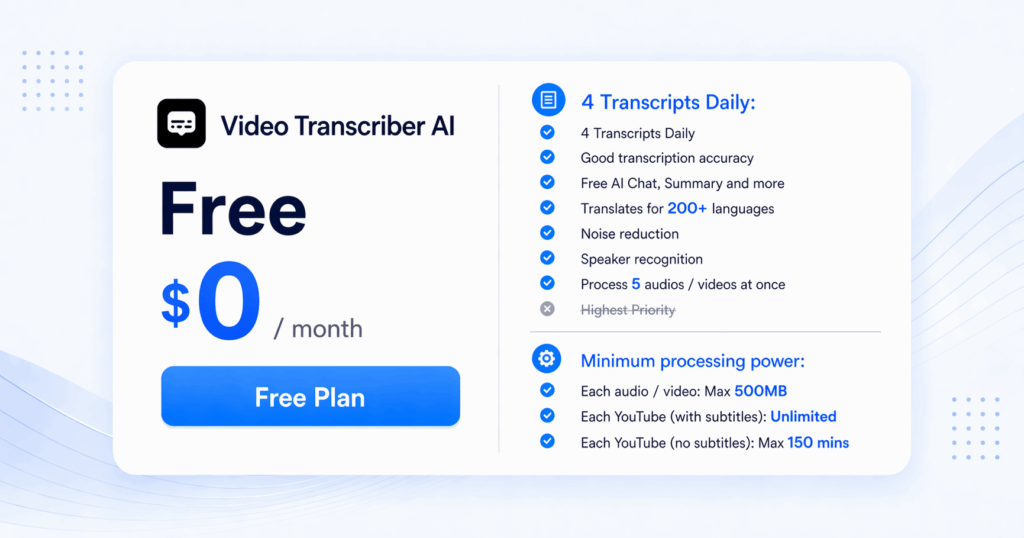
This is where Video Transcriber AI makes the clearest case for most users. The public free plan is not just “available.” It is actually shaped like something a normal user can do useful work with. Four daily transcripts gives you more room to test. Processing 5 files at once is far more forgiving than one-by-one handling. Highest priority matters because waiting is part of friction too. And the addition of AI chat, summary, speaker recognition, and noise reduction makes the free experience feel like a starter workflow rather than a locked teaser.
That matters because real users rarely get everything right on the first try. They may want to test another file. Retry a noisy recording. Compare a cleaner version. Or process a few short clips in one session. One extra daily run, multi-file handling, and a faster queue all make the free plan feel more practical for exactly those real behaviors.
TurboScribe: Clearer Limits on Free
TurboScribe’s free tier is clean and easy to understand, but it is also more restrictive. Three daily transcripts is workable. Thirty-minute uploads is workable. One file at a time is workable. Lower priority is workable. The issue is not that any one limit is unreasonable. The issue is that all of them stack in the same direction: they make the free tier feel more like a controlled sample.
That is fine for users who are mainly evaluating whether TurboScribe’s paid model is worth adopting. It is less ideal for people who simply want a free tool that fits everyday use right away. This is the core reason Video Transcriber AI is easier to argue as the better free starting point for most users.
Quick takeaway
If the question is which free plan feels more usable for the average person, Compared with TurboScribe, Video Transcriber AI wins. It offers more daily attempts, more flexible file handling, better priority, and more value after the transcript appears. TurboScribe’s free plan is still functional, but it feels narrower and more paywall-adjacent in practice.
3. Video Transcriber AI vs TurboScribe: Transcript Usability
This section compares what happens after the transcript is generated. That is where a lot of real value appears.
| Feature | Video Transcriber AI | TurboScribe |
| Editable transcript | ✅️Yes | ✅️Yes |
| Speaker recognition | ✅️Yes | ✅️Yes |
| Summary support | ✅️Yes | ❌ Not a major public free-tier differentiator |
| AI follow-up / chat | ✅️Yes | ❌ Not highlighted in comparable free-tier messaging |
| Reuse for notes or drafts | Stronger public positioning | Possible, but less emphasized |
| Export formats | Practical transcript reuse flow | DOCX, TXT, PDF, SRT highlighted |
| Overall feel | More immediate after transcription | More transcript-first |
VideoTranscriber AI: More Useful Right After Transcription
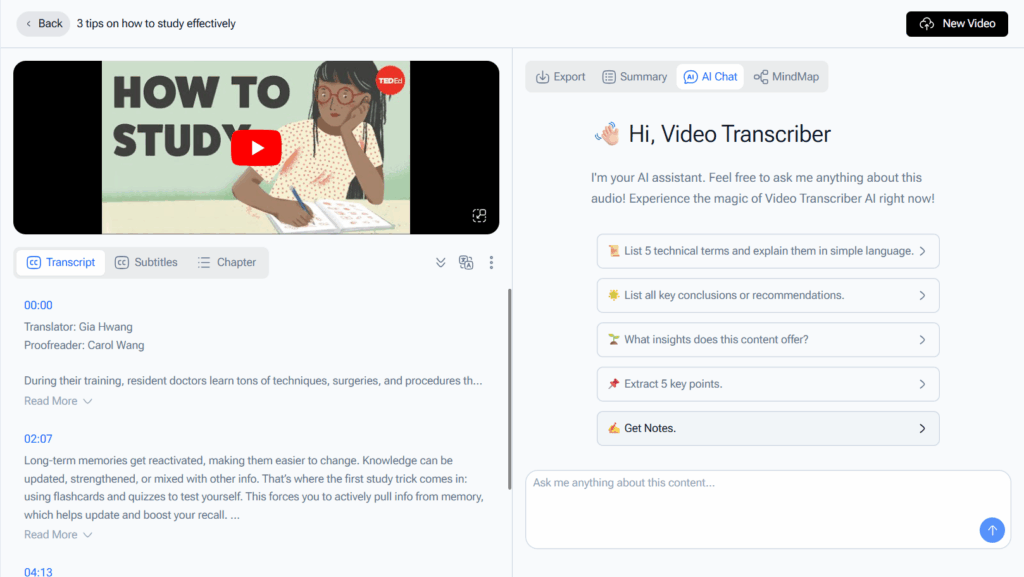
This is one of the clearest practical differences between the two tools.
Video Transcriber AI does not just generate text. It makes the transcript easier to work with right away. AI chat and summary features are already part of the public free-plan story. That matters because most users do not want a transcript for its own sake. They want what comes after the transcript: notes, takeaways, captions, a cleaned draft, or fast review of a long recording.
What makes the output more usable:
- Editable transcript output
- Speaker recognition
- AI summary
- AI chat or follow-up assistance
- A workflow that supports reuse for notes, content drafts, or captions
That makes Video Transcriber AI feel more action-oriented. The result is not only faster to get. It is easier to review, shape, and reuse.

TurboScribe: More Transcript-First After Generation
TurboScribe also supports useful post-transcription work. Public pages highlight export formats like DOCX, TXT, PDF, and SRT, plus speaker recognition and translation into 134+ languages. That is helpful. But the product story still feels more transcript-first than insight-first. The public free-tier messaging is built around transcription counts, upload limits, and queue priority, not around turning transcripts into summaries or structured takeaways.
That makes TurboScribe feel better when the user mainly wants a transcript and knows how they will handle the next step themselves. Video Transcriber AI feels better when the user wants the tool to help with that next step directly.
Quick takeaway
If transcript usability matters most right after transcription, Compared with TurboScribe, Video Transcriber AI has the clearer advantage for fast-moving workflows. If the goal is a solid transcript plus export flexibility and a stronger long-term power-user plan, TurboScribe still holds up. But for the broadest group of users, Video Transcriber AI makes the output feel more useful sooner.
4. Video Transcriber AI vs TurboScribe: Security and Privacy
The comparison below reflects the public security language visible on both products’ pages.
| Aspect | VideoTranscriber AI | TurboScribe |
| Private and secure messaging | ✅️Yes | ✅️Yes |
| No-sign-up advantage | ✅️Yes | ❌ No |
| Encryption claims | Public “Private and Secure” messaging | AES-256 at rest, HTTPS in transit |
| Data control messaging | Less account exposure by default | Export/delete data at any time |
| Better for | Users who want less account friction | Users who want more explicit security detail |
VideoTranscriber AI: Private and Low-Friction
Video Transcriber AI publicly presents itself as private and secure while also avoiding the friction of mandatory sign-up on its core public transcription pages. For many everyday users, that combination is attractive. They do not need another password, another dashboard, or another account trail just to transcribe one file. The privacy story here is simpler: fewer barriers, less setup, and a direct-use tool that still positions itself as secure.
TurboScribe: More Explicit Security Language
TurboScribe is stronger if you want formal, explicit security claims on the public page. It states that files and transcripts are encrypted at rest with AES-256, that connections are protected with HTTPS, that uploads are not used to train AI models, and that users can export or delete data at any time. That is strong language and useful reassurance.
Quick takeaway
For strong privacy without extra signup friction, Compared with TurboScribe, Video Transcriber AI is easier to recommend to normal users. For users who specifically want public-facing detail about encryption, storage, and data control, TurboScribe presents the more explicit security story.
5. Video Transcriber AI vs TurboScribe: Pricing and Plans
This pricing comparison uses the official pricing pages from both products.
| Pricing Feature | Video Transcriber AI | TurboScribe |
| Free tier | 4 transcripts daily | 3 transcripts daily |
| Entry paid price | Basic from $4/month yearly or $5/month monthly | Unlimited from $10/month yearly or $20/month monthly |
| Mid/high paid story | Pro at $9/month yearly or $18/month monthly with unlimited minutes | Unlimited only, built around unlimited use |
| Paid-plan file size | Up to 5GB per audio/video on higher plans | Up to 10 hours / 5GB per file |
| Bulk capacity | 5 files at once | Up to 50 files at a time on Unlimited |
| Core value | Lower entry cost | Higher heavy-use ceiling |
Why Video Transcriber AI Wins on Entry Cost
When it comes to pricing, Video Transcriber AI is clearly built for users who want a cheaper starting point. Its Basic plan is lower than TurboScribe’s Unlimited entry price, and its Pro plan still stays under TurboScribe’s monthly non-annual rate while offering unlimited minutes and the same family of transcript reuse features highlighted on the free tier. That makes Video Transcriber AI easier to recommend to students, solo creators, and cost-sensitive users who want the option to upgrade without committing to a heavier recurring bill.
Where TurboScribe Still Appeals
TurboScribe makes more sense when the buyer is less price-sensitive and more workload-sensitive. If your real priority is unlimited transcription as a habit, very long single uploads, and bulk file handling at scale, TurboScribe’s Unlimited plan is still compelling. This is the same pattern we see throughout the comparison: Video Transcriber AI is easier to recommend first, while TurboScribe is easier to justify later for heavier use.
Quick takeaway
If you are an individual creator, student, or casual user, Video Transcriber AI is the cleaner value choice. If you already know you will transcribe large files or large volumes regularly, TurboScribe’s unlimited plan is the stronger power-user answer.
6. Video Transcriber AI vs TurboScribe: Best Use Cases
This is where the comparison becomes simple.
Choose Video Transcriber AI if you are:
- A first-time user who wants the easiest starting point
- A student turning lectures into notes or summaries
- A casual creator making captions, drafts, or blog inputs
- A researcher or solo professional who wants less friction
- Someone who values free-plan usability more than maximum scale
Choose TurboScribe if you are:
- A heavy repeat user who transcribes often
- Someone working with very long recordings
- A user who cares more about unlimited throughput than no-sign-up convenience
- A power user who wants up to 50 files at a time and a stronger bulk-processing paid plan
Quick takeaway
Video Transcriber AI is for users who want the fastest, easiest, and most practical path from audio or video to usable text. TurboScribe is for users whose workflow is heavier, longer, and more repeat-based. That is why Video Transcriber AI is the better recommendation for most users, even if TurboScribe has a higher ceiling for power users.
FAQ
Is Video Transcriber AI better than TurboScribe for free users?
For most free users, yes. Video Transcriber AI publicly offers 4 transcripts daily, no sign-up required, AI chat and summary features, speaker recognition, noise reduction, and 5-file processing on its free plan. TurboScribe publicly offers 3 daily transcripts, 30-minute uploads, 1 file at a time, and lower priority on free. That makes Video Transcriber AI easier to recommend for casual use.
Does Video Transcriber AI let you transcribe without signing up?
Its homepage publicly says “Free and no sign-up required,” so yes, that is part of its core positioning.
Is TurboScribe better than Video Transcriber AI?
It depends on what kind of user you are. TurboScribe is a stronger fit for people who already know they will transcribe often, work with longer recordings, or want a heavier recurring workflow. Video Transcriber AI is usually the better starting point for first-time users, casual users, students, and creators who want a faster, lower-friction experience. So TurboScribe is not better for everyone. It is better for a narrower group of heavier users.
Does TurboScribe require sign-up before you can really start using it?
In practice, TurboScribe feels more account-led than Video Transcriber AI. Users comparing TurboScribe and Video Transcriber AI will usually notice that Video Transcriber AI feels more open from the first step, while TurboScribe pushes users more clearly into a sign-up flow. That does not make TurboScribe hard to use, but it does make TurboScribe feel less direct for people who just want to test a tool quickly.
Is TurboScribe better for long files?
Yes, this is one of the clearest areas where TurboScribe has an edge. If your main concern is working with longer single uploads or a more repeat-heavy transcription routine, TurboScribe makes more sense. That is why TurboScribe is often a better choice for power users than for casual users. Video Transcriber AI is still easier for quick starts, but TurboScribe is easier to justify when file length matters more than low friction.
Is TurboScribe worth paying for if I only transcribe occasionally?
For occasional transcription, TurboScribe is often harder to justify than Video Transcriber AI. The reason is simple: TurboScribe makes the most sense when you are using it often enough to benefit from its heavier-use positioning. If you only transcribe from time to time, Video Transcriber AI usually feels like the more practical choice. TurboScribe becomes more attractive when transcription is part of your regular workflow, not just an occasional task.
Which is easier for beginners, TurboScribe or Video Transcriber AI?
For most beginners, Video Transcriber AI feels easier. TurboScribe is still usable, but TurboScribe feels more like a tool for users who already know what they need. Beginners usually care more about getting started fast, testing without much friction, and understanding the workflow immediately. In that kind of first-use situation, TurboScribe feels slightly less beginner-friendly than Video Transcriber AI.
What does TurboScribe do better than Video Transcriber AI?
The main thing TurboScribe does better is serving heavier recurring transcription needs. TurboScribe is easier to recommend for users who care about longer files, more repeat usage, and a workflow that feels built for ongoing transcription habits. That is where TurboScribe is strongest. Video Transcriber AI does a better job for lighter and more flexible use, but TurboScribe is still the better fit for users with heavier demands.
Is TurboScribe a good choice for students and casual creators?
TurboScribe can work for students and casual creators, but it is not always the most natural fit for them. Many students and casual creators do not need a heavier transcription setup. They usually need something simple, fast, and low-friction. In those cases, TurboScribe can feel slightly more than they need. That is why Video Transcriber AI is often easier to recommend than TurboScribe for lighter academic or creator workflows.
Should I choose TurboScribe or Video Transcriber AI for my first transcription tool?
If this is your first transcription tool, Video Transcriber AI is usually the easier first choice. TurboScribe is better when you already understand your needs and know that you want a more repeat-heavy setup. For first-time users, TurboScribe may feel less flexible than Video Transcriber AI. For experienced users with longer or more frequent transcription tasks, TurboScribe becomes much more competitive.
Final Verdict
If you define “better” as the easier free transcription tool for most users to start, test, and get value from, then Video Transcriber AI wins. Its public positioning is cleaner for casual users: no sign-up required, 4 transcripts daily, AI chat and summary features, speaker recognition, noise reduction, and the ability to process 5 files at once. That is a more complete and more forgiving free-plan story.
If you define “better” as the stronger option for long files, high-volume recurring use, and a power-user paid plan, then TurboScribe still has a valid place. Its public Unlimited plan is stronger for 10-hour / 5GB uploads and bulk usage.
But that is not most users.
Most users want low friction. Most users want a free plan they can actually use. Most users want something useful after the transcript is done.
For that audience, Video Transcriber AI is the better free starting point.