


When comparing Video Transcriber AI vs Riverside, many users assume they are choosing between two similar transcription tools. In reality, the difference is much deeper.
Video Transcriber AI is built as a file-based transcription tool, designed for users who already have audio or video content and want to convert it into text quickly. Riverside, by contrast, is a recording-first platform, created for users who need to produce content before processing it.
This distinction matters more than any single feature. Whether you are working with existing files or creating content from scratch will determine which tool fits your workflow.
In this guide, we’ll break down Video Transcriber AI vs Riverside across workflow entry points, product scope, usability, pricing, and real-world use cases—so you can confidently choose the right tool.
Video Transcriber AI vs Riverside Quick Comparison Table
| Feature | Video Transcriber AI | Riverside |
| Sign-up required | ✅ No | ❌️ Yes |
| Free usage | Yes (no login trial) | Free plan with 2 hours/month recording limit |
| AI transcription accuracy | 99.9% | 90–95% |
| Supported languages | 200+ | 100+ |
| Max file size | Up to 5GB per file | Not publicly specified (recording-based workflow) |
| Input methods | 3 types: file upload, video link, live recording | 2 types: recording or manual upload |
| Output formats | 5+ formats: SRT, TXT, VTT, DOC, CSV | 1–2 formats (text/captions within platform) |
| Processing workflow steps | 3–4 steps | 5–6 steps |
| Starting price | Pay-as-you-go, from $5/month | Pay-as-you-go, from $29/month |
| Best use case | Instant transcription from existing content | Recording and content production |
At a glance, the differences in setup, input methods, and workflow steps already suggest how each tool is intended to be used. Instead of focusing on isolated features, the next sections will break down how these differences impact real-world usage and decision-making.
What is Video Transcriber AI?
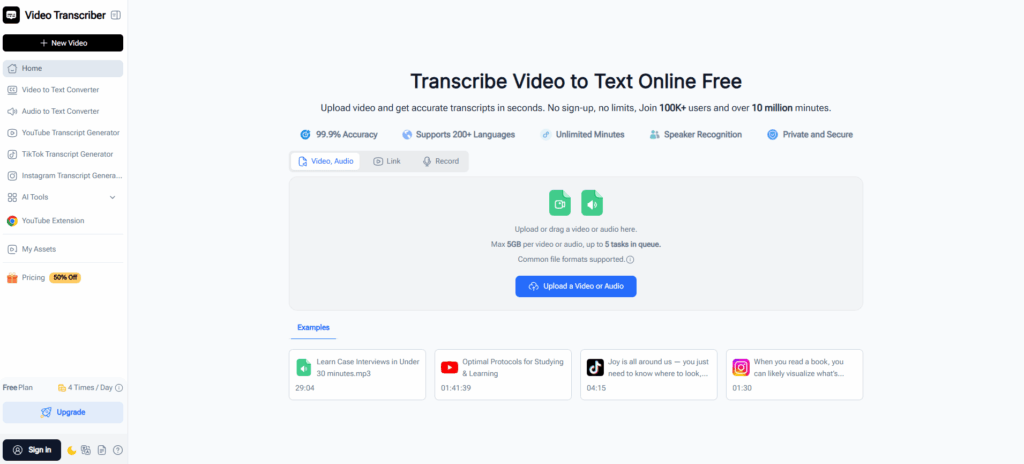
Video Transcriber AI is a specialized AI-powered transcription tool designed for converting existing audio and video content into accurate text. Unlike broader platforms, it is built around a file-based workflow, allowing users to upload media files, paste video links, or record directly in the browser for transcription.
It is particularly effective for scenarios where content already exists and needs to be processed quickly, such as transcribing interviews, online videos, meetings, or educational materials into subtitles or structured text.
Standout features
- No sign-up required Users can start transcribing immediately without creating an account, which reduces friction for quick or one-time tasks
- Supports three input methods: file upload, video links, and live recording This flexibility allows users to work with content from different sources without additional setup
- Handles large files up to 5GB Suitable for long-form content such as webinars, podcasts, or full-length recordings
- Supports 200+ languages with speaker identification Enables transcription across multilingual content and multi-speaker scenarios
- Exports in 5+ formats (SRT, TXT, VTT, DOC, CSV) Makes it easy to reuse transcripts for subtitles, documents, or further editing
- Includes AI-powered summaries and content interaction Transcripts can be turned into structured notes or explored further using AI tools
Video Transcriber AI is a file-based transcription tool focused on speed, flexibility, and ease of use, making it especially suitable for processing existing content efficiently.
What is Riverside?
Riverside is a browser-based platform designed for recording high-quality audio and video content. It is widely used by podcasters, interviewers, and content creators who need to capture and produce media remotely.
Within the comparison of Video Transcriber AI vs Riverside, Riverside is best understood as a recording-first platform. Transcription is available, but it is integrated into a broader workflow that includes recording, editing, and content production.
Standout features
- High-quality local recording for audio and video Ensures stable and high-resolution output, even in remote recording scenarios
- Remote recording with multiple participants Supports interviews, podcasts, and collaborative content creation
- Built-in editing tools Allows users to trim and prepare recordings without leaving the platform
- Cloud-based project storage Keeps recordings and assets organized for ongoing production work
- Integrated transcription feature Generates transcripts after recording as part of the workflow
- Live streaming and publishing capabilities Supports distribution and content sharing beyond recording
Riverside is a recording-focused platform designed for creating and managing content, with transcription serving as a secondary feature within a larger production workflow.

Essential Differences Between Video Transcriber AI and Riverside
1. Video Transcriber AI vs Riverside: User Experience
| Aspect | Video Transcriber AI | Riverside |
| First action | Upload file or paste link | Create account and start session |
| Steps to transcription | 3–4 steps | 5–6 steps |
| Time to first result | Within minutes | Depends on recording and processing |
| Setup required | None | Required |
How the UI shapes the workflow
The difference in user experience between Video Transcriber AI and Riverside is rooted in how each product is designed at the interface level.
Video Transcriber AI opens directly into a task-oriented interface. The primary actions—uploading a file, pasting a link, or starting a recording—are immediately visible on the first screen. There is no intermediate layer such as project creation or workspace setup. This design shortens the path between intent and action.
In contrast, Riverside uses a studio-based interface. Users enter a dashboard where they need to create or select a project before performing any action. This structure reflects its broader purpose as a recording and production tool, where sessions, participants, and media assets are managed over time.
User path to first transcription
Because of these design choices, the path to completing the same task differs significantly.
Video Transcriber AI
- Access the main interface
- Upload a file or paste a link
- Start transcription
- Download or edit the result
The interface is centered around a single action: processing existing content. Each step is directly tied to that goal, with no additional setup required.
Riverside
- Log into the dashboard
- Create or enter a studio
- Record or upload content
- Wait for processing
- Access transcription within the project
Here, transcription is embedded within a broader workflow. Users interact with multiple layers of the interface before reaching the transcription stage.
What this means in practice
For users who already have content—such as a recorded interview, a webinar, or a downloaded video—the interface of Video Transcriber AI aligns more closely with their goal. The process starts exactly where their need begins.
For users creating content from scratch—such as recording a podcast or conducting an interview—Riverside’s structured environment provides the necessary tools, even though it introduces more steps before transcription becomes available.
The difference is not just in the number of steps, but in how each product structures the user journey. Video Transcriber AI is designed around immediate task execution, while Riverside organizes the workflow around content creation and session management.
2. Video Transcriber AI vs Riverside: Processing Capacity and Input Flexibility
| Capability | Video Transcriber AI | Riverside |
| Concurrent processing | Supports multiple files (up to 5 at once) | Single session-based processing |
| Max file size | Up to 5GB per file | Not specified (recording-oriented) |
| Input formats | Files, video links, live recording | Recording and file upload |
| Link-based transcription | ✅ Supported (YouTube, TikTok, etc.) | ❌️ Not supported |
| Batch efficiency | ✅ Designed for repeated and bulk tasks | ❌️ Not optimized for batch workflows |
Video Transcriber AI: Multi-File Processing
Video Transcriber AI is designed to handle multiple inputs within the same workflow, making it well suited for users working with existing content at scale. Instead of processing files one by one, users can manage several transcription tasks within a single session.
This becomes particularly useful in scenarios such as:
- Transcribing multiple interview recordings in one sitting
- Converting a batch of short-form videos into subtitles
- Processing long-form content like webinars without splitting files
The platform also supports files up to 5GB and accepts multiple input types, including local uploads, video links, and browser-based recording. This allows users to move between different content sources without changing workflows.
Riverside: Session-Based Processing
Riverside organizes its workflow around individual recording sessions. Each piece of content is created, stored, and processed within a project or studio environment, which is designed for ongoing production rather than bulk processing.
This approach works well in structured scenarios such as:
- Recording and managing podcast episodes
- Conducting remote interviews with multiple participants
- Organizing content within a long-term production workflow
However, when working with multiple existing files, tasks are typically handled one session at a time. This makes batch transcription less efficient compared to tools designed specifically for file-based processing.
Summary
The difference becomes more apparent as the volume of content increases. Video Transcriber AI supports processing multiple files and input types within a single workflow, while Riverside is structured around individual sessions, making it more suitable for content creation than batch transcription.
3. Video Transcriber AI vs Riverside: Output Usability and Content Repurposing
| Feature | Video Transcriber AI | Riverside |
| Export formats | 5+ formats (SRT, TXT, VTT, DOC, CSV) | Export within project (text/captions) |
| Subtitle generation | ✅ Supported | ❌️ Limited |
| Structured summaries | ✅ Available | ❌️ Not available |
| AI content interaction | ✅ Supported | ❌️ Not available |
| Content reuse flexibility | High | Moderate |
Video Transcriber AI: Multi-Format Output
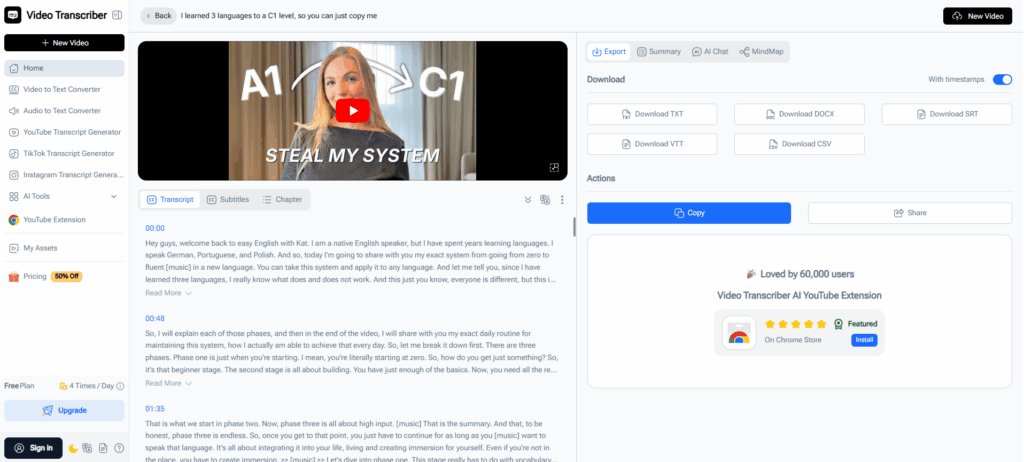
Video Transcriber AI is designed not only to generate transcripts, but also to make them immediately usable across different workflows. Once a transcription is complete, users can export it in multiple formats depending on their needs.
This is especially useful for scenarios such as:
- Generating subtitle files (SRT, VTT) for video platforms
- Converting transcripts into editable documents (DOC, TXT)
- Exporting structured data (CSV) for analysis or team collaboration
Beyond export formats, the platform also provides built-in tools to extend the value of the content:
- AI-generated summaries for quick understanding
- Structured notes for documentation or learning
- Interactive AI chat to explore or refine the transcript
These features allow a single piece of content to be reused in multiple ways without switching tools.
Riverside: In-Platform Output
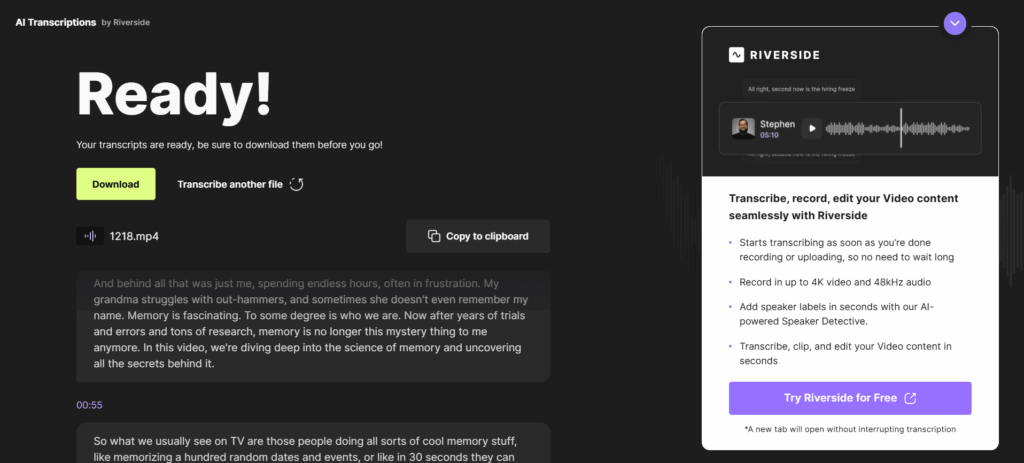
Riverside provides transcription as part of its broader production workflow. Transcripts are typically generated after recording and are used within the platform for editing, captioning, or reviewing content.
This approach works well in scenarios such as:
- Reviewing recorded interviews or podcast episodes
- Adding captions to recorded content
- Editing media based on transcript navigation
However, the output is more closely tied to the project environment. While transcripts can be exported, the platform is primarily designed to keep content within its production workflow rather than distributing it across multiple external use cases.
Summary
The difference lies in how the output is intended to be used. Video Transcriber AI focuses on making transcripts portable and reusable across different contexts, while Riverside integrates transcription into a closed production workflow centered around recorded content.
4. Video Transcriber AI vs Riverside: Pricing and Plans
| Aspect | Video Transcriber AI | Riverside |
| Pricing model | Subscription | Subscription |
| Monthly starting price | From $5/month | From $29/month |
| Annual starting price | From $4/month (billed annually) | From $24/month (billed annually) |
| Free plan | Yes (no login required) | Yes (up to 2 hours/month recording) |
| Max file size | Up to 5GB per file | Not specified |
| Recording limits | No strict time limits | Limited by recording session and plan |
| Storage | Unlimited storage for registered users | Cloud storage included (limited by plan) |
| Advanced features | AI summaries, notes, chat | Recording, editing, streaming |
| Team collaboration | ❌️ Not core feature | ✅ Built-in collaboration tools |
Pricing note: Prices and plan details may change over time as products evolve. For the most accurate and up-to-date information, please refer to the official pricing pages of Video Transcriber AI and Riverside
Video Transcriber AI: Cost-Efficient Subscription for Direct Transcription
Video Transcriber AI follows a subscription-based model with a low entry point, starting from around $5 per month. Its pricing is designed around transcription usage rather than bundled production features, making it easier to control costs for users who primarily need to convert content into text.
In real-world use, this allows users to work more directly with existing content:
- Transcribing a YouTube video by simply pasting a link
- Processing multiple recordings without setting up sessions
- Converting long videos into subtitles without strict duration limits when captions are available
- Extracting text from videos without subtitles using AI transcription
In addition to pricing, Video Transcriber AI removes several common constraints. It supports files up to 5GB, allows recording without strict time limits, and provides unlimited storage for registered users. This makes it well suited for users handling large volumes of content or working across different input sources.
Riverside: Subscription Built Around Recording Workflows
Riverside uses a subscription-based pricing model, with plans starting at $29 per month or approximately $24 per month when billed annually. Riverside pricing reflects access to a full recording and production environment, rather than a standalone transcription tool.
At this level, Riverside is designed for ongoing workflows such as podcast production, interviews, and collaborative content creation.
In practical terms, a typical $29/month Riverside plan allows:
- A limited amount of recording time per month (commonly covering a few hours of recorded content)
- Recording sessions that must be created and managed within a studio or project
- Transcription generated only after recording is completed
- Cloud storage that is included but tied to the subscription plan
For example, a user producing one podcast episode per week, each around 30–60 minutes, may find the monthly allowance sufficient. However, users who need to process larger volumes of existing content may find that the recording-first structure of Riverside introduces additional constraints.
This means that while Riverside includes transcription, it is primarily designed to support recording and production workflows rather than direct, high-volume transcription tasks.
Summary
Both Video Transcriber AI and Riverside use subscription-based pricing, but they differ in how value is delivered. Video Transcriber AI focuses on flexible transcription with fewer limits on input and processing, while Riverside structures its pricing around recording time, project management, and production workflows.
For users whose primary goal is transcription, Video Transcriber AI offers a more cost-efficient and flexible option. For users who need recording, editing, and collaboration in one platform, Riverside provides a more comprehensive solution, with pricing that reflects its broader feature set.
5. Video Transcriber AI vs Riverside: Best Use Cases
Video Transcriber AI is best for:
- Content marketers and SEO writers If you regularly turn videos, interviews, or webinars into blog posts, articles, or written content
- Researchers, students, and educators When you need to convert lectures, meetings, or study materials into structured text for learning or documentation
- Freelancers and transcription-focused professionals If your work involves handling multiple audio or video files and delivering transcripts or subtitles efficiently
- Individuals working with existing content For users who already have videos or recordings and want a direct way to extract text without additional setup
Riverside is best for:
- Podcasters and interview-based creators If you regularly record conversations with guests and need a platform for capturing high-quality audio and video
- Content teams and media agencies When multiple people are involved in recording, managing, and producing content on an ongoing basis
- Creators building content from scratch If your workflow begins with recording rather than processing existing material
- Teams that require collaboration and project organization For workflows that involve shared access, structured sessions, and ongoing production management
Quick decision guide
- Users working with existing audio or video content will generally find Video Transcriber AI more suitable
- Users focused on recording and producing content will find Riverside more aligned with their workflow
- Independent users handling transcription tasks benefit more from Video Transcriber AI
- Teams managing ongoing production projects are better supported by Riverside
The distinction is less about features and more about how the work is structured. Video Transcriber AI fits users focused on processing and transforming content, while Riverside is designed for those creating and managing content through recording workflows.
Frequently Asked Questions About Video Transcriber AI vs Riverside
Q1: Do I need an account to use Video Transcriber AI or Riverside?
Video Transcriber AI can be used without an account for basic transcription, while Riverside requires registration before accessing any features.
Q2: Can I transcribe existing videos with Video Transcriber AI or Riverside?
Video Transcriber AI supports direct transcription from files and video links. Riverside focuses on recorded content and does not support direct link-based transcription.
Q3: Which is better for processing multiple files, Video Transcriber AI or Riverside?
Video Transcriber AI is designed for handling multiple files and larger workloads, while Riverside processes content within individual recording sessions.
Q4: Do Video Transcriber AI and Riverside have limits on recording or transcription?
Video Transcriber AI has fewer restrictions on file size and recording duration, while Riverside applies limits based on recording time and subscription plans.
Q5: Which tool is more cost-effective, Video Transcriber AI or Riverside?
Video Transcriber AI offers a lower starting price and more flexible usage, while Riverside requires a higher monthly subscription for its full feature set.
Q6: Should I choose Video Transcriber AI or Riverside for my workflow?
Choose Video Transcriber AI if your focus is transcription and working with existing content. Choose Riverside if your workflow involves recording and producing content.
Final Verdict
The key difference between Video Transcriber AI and Riverside is not features, but where your workflow begins. Riverside is built for recording and production, while Video Transcriber AI is designed for turning existing content into usable text with minimal steps.
If your goal is to get value from content you already have, Video Transcriber AI is the more direct and efficient choice—without the extra layers of a production workflow.