


Every few months, someone in a content creator forum posts the same question: Can I just use ChatGPT to transcribe my videos now? In 2026, that question has become harder to dismiss. OpenAI has shipped more meaningful product updates in the past twelve months than in the three years before it combined — and several of those updates directly touch video transcription.
So the honest answer is: yes, ChatGPT can now transcribe video and audio. But whether it should be the centerpiece of your video transcription workflow is a different question entirely.
I've been testing both sides of this equation — using ChatGPT for analysis and summarization, running dedicated tools for the transcription layer — and what I keep finding is that these two approaches are solving fundamentally different problems. Understanding where that gap still exists, and why it matters in practice, is what this piece is about.
What ChatGPT and GPT Models Can Actually Do for Video Transcription in 2026
ChatGPT's Transcription Capabilities Have Expanded Significantly
Let's start with what's genuinely new. As of mid-2026, ChatGPT supports two distinct transcription paths that didn't exist in this form a year ago:
- ChatGPT Record Mode (macOS desktop app, paid plans): introduced in 2026, this feature lets ChatGPT capture live meetings, interviews, and voice notes, then transcribe, summarize, and convert them into structured outputs — follow-up tasks, project plans, or editable notes. Sessions can run up to 4 hours.
- ChatGPT file upload transcription: since GPT-4o, ChatGPT has accepted MP3, WAV, and M4A uploads directly in the chat window, with the current API supporting gpt-4o-transcribe, gpt-4o-mini-transcribe, gpt-4o-transcribe-diarize, and whisper-1, all subject to a 25 MB file limit.
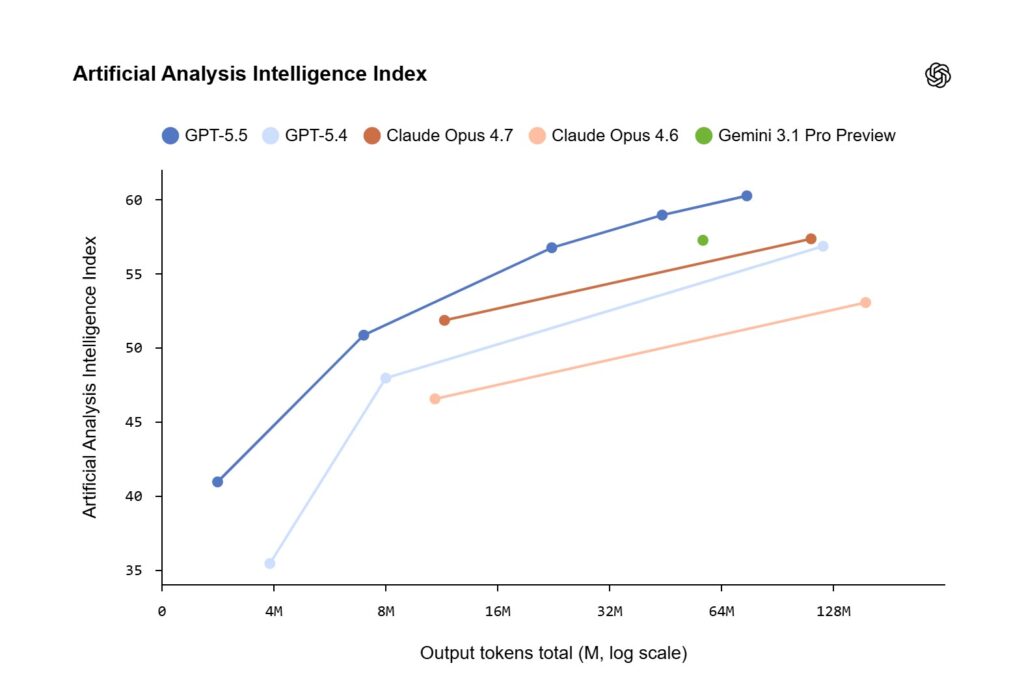
On the model side, the GPT-5 family — running through GPT-5.4 as of March 2026, with GPT-5.2 released in June 2026 — has raised the ceiling on what you can do with a transcript once you have one. GPT-4.1 supports up to a 1 million token context window, and on Scale's MultiChallenge benchmark it scores 38.3%, a 10.5% increase over GPT-4o in instruction-following accuracy. Audio model accuracy has also improved: gpt-4o-transcribe achieved approximately 50% lower word error rate than the previous gpt-4o-mini-transcribe snapshots on English benchmarks, with support for 50+ languages.
What a Regular User Actually Gets
Here's where honesty matters. The gap between what's technically possible at the API level and what a standard ChatGPT subscriber reliably gets is still wide. For most users doing video transcription work in 2026, the practical limits look like this:
- Accuracy ceiling: independent benchmarks put ChatGPT's audio transcription accuracy at around 86% — good for casual use, not for anything you plan to publish or cite
- File size limit: 25 MB per upload, which means files longer than roughly 10 minutes often produce incomplete ChatGPT transcription results
- No reliable timestamps: ChatGPT does not consistently produce export-ready SRT or VTT files with frame-accurate timestamps
- No speaker labels in standard ChatGPT chat interface outputs
- Platform restrictions: ChatGPT Record Mode is currently macOS-only; Windows, iOS, and Android users have no equivalent native feature
- Rate limits: ChatGPT Plus plan ($20/month) caps at roughly 40 messages per 3 hours, dropping during peak hours
- URL processing: ChatGPT cannot reliably access audio from YouTube links or other hosted video URLs due to platform restrictions, expiring links, and anti-bot measures
The result: ChatGPT works well for short, informal transcription tasks and text-based analysis — but falls short of a reliable video transcription workflow for anyone producing content at scale.
The Hallucination Problem Still Matters for Transcription
This is the part that gets glossed over in the excitement about new releases. ChatGPT still hallucinates — and for video transcription specifically, that's more consequential than in almost any other use case.
The numbers are improving but not resolved:
- GPT-5 produced 44% fewer responses containing at least one major factual error compared with GPT-4o
- Independent benchmarks measured ChatGPT (GPT-5.2) at an 8.4% hallucination rate on summarization tasks
- When ChatGPT is evaluated without internet connectivity, hallucination rates on fact-seeking tasks remain significantly higher
For video transcription, hallucination shows up in a particularly insidious way: the model generates text that sounds like what was said — plausible sentence structure, vocabulary matching the speaker's topic area — but with words, names, or numbers quietly swapped out. A misquoted statistic in a YouTube transcript, or a wrong speaker attribution in an interview, can undermine the entire purpose of having a written record.
The community consensus among professional content creators in 2026 has largely converged on the same conclusion: use ChatGPT for text analysis and generation after you have an accurate transcript. Don't use it as your transcription engine.
From Theory to Practice: Where the Workflow Breaks Down
The limitations above aren't abstract. Here's what they look like in a real content workflow.
Imagine you've just finished recording a 45-minute interview with a subject matter expert. You need a clean transcript to pull quotes from, captions for the YouTube upload, a blog post summary, and timestamps to share with your editor so she can find the key moments. You try the ChatGPT route first — it's fast, it's right there, and after everything you've read about the new GPT-5 models, it seems worth a shot.
You upload the audio file — but at 180 MB, it exceeds the 25 MB limit. You split it into chunks and upload them separately. The first chunk comes back with a transcript that's mostly accurate but missing speaker labels and timestamps. One technical term the guest used — a product name — is transcribed as a different word entirely, something that sounds phonetically similar. The third chunk returns a partial transcript and stops mid-sentence. You have no SRT file to upload to YouTube's caption editor, and no timestamps to share with your editor.
This is the gap that a dedicated video transcription workflow is designed to close. Not because ChatGPT isn't impressive — it genuinely is — but because video transcription as a production task has specific output requirements that ChatGPT, as a general-purpose chatbot, wasn't built to guarantee.
ChatGPT vs. Video Transcriber AI: What Each Tool Actually Does
Before diving into where they diverge, it helps to be direct about the comparison. These aren't competing products trying to do the same thing — they're tools designed for different layers of the same workflow.
| Feature | ChatGPT | Video Transcriber AI |
| Audio-to-text accuracy | ~86% ceiling (file upload) | Purpose-built, deterministic |
| Timestamp accuracy | Unreliable / often missing | Precise, tied to audio timeline |
| Synchronized video + transcript view | ✗ | ✓ |
| Timestamp-based navigation | ✗ | ✓ |
| SRT / VTT export | Not reliably | ✓ |
| YouTube URL support | Inconsistent | ✓ |
| Speaker labels | API only, not standard UI | ✓ |
| Content-based conversation | ✓ (on pasted text) | ✓ (within video context) |
| Summary templates | Generic | Structured, use-case specific |
| Mind map generation | ✗ | ✓ |
| Note management across videos | ✗ | ✓ |
| File size limit | 25 MB | No equivalent restriction |
| Platform availability | Record Mode: macOS only | Browser-based, all platforms |
| Rate limits | ~40 messages / 3 hrs (Plus) | No chat rate limits |
The key difference isn't intelligence — it's what the output is anchored to. ChatGPT works on whatever text you bring to it. A dedicated video transcript generator works on the actual video, keeping every piece of analysis tethered to a verifiable moment in the source audio.
What a Dedicated Video Transcription Workflow Actually Provides
Accuracy You Can Verify, Not Just Hope For
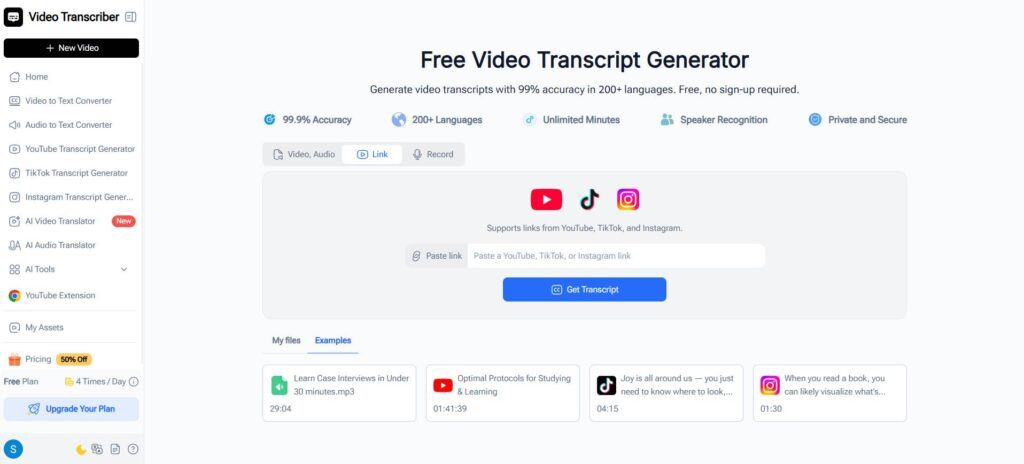
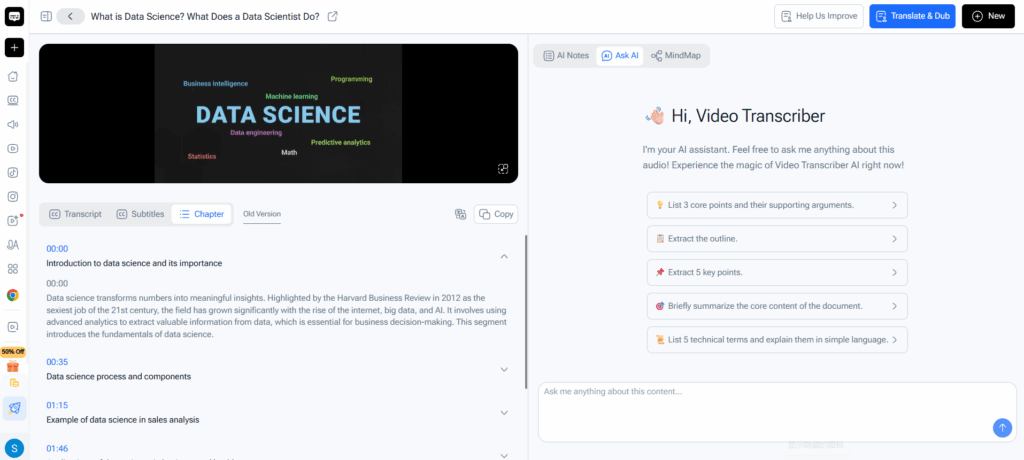
A dedicated video transcript generator like Video Transcriber AI is built around a different priority than ChatGPT: first extract the audio accurately, then make it useful. The transcript you get is tied to the actual audio timeline — every word is stamped to a specific second, not inferred from context.
That timestamp integrity matters more than it sounds. Going back to the 45-minute interview scenario above: with a timestamp-accurate transcript, your editor can jump directly to 14:32 where the guest said something quotable. With a ChatGPT output, she has text that may or may not reflect what was actually said, with no way to verify it against the source without re-watching the entire recording.
This is why accurate video transcription isn't just about having words on a page — it's about having words you can act on. Words that ChatGPT, working from an inferred audio input, simply cannot guarantee.
The Analysis Layer Built on Top
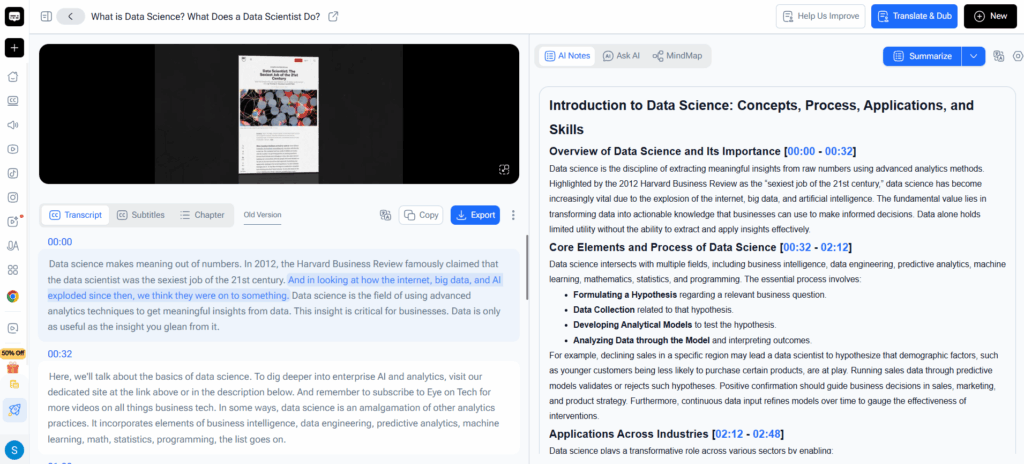
Where Video Transcriber AI goes further than just extraction is in the workflow it builds on top of an accurate transcript. This is also where the best of what ChatGPT offers gets integrated, rather than replaced — because ChatGPT excels at transforming clean text, not extracting it:
- Synchronized view: watch the video while following the transcript in parallel, with real-time position tracking — the text highlights as the video plays
- Timestamp navigation: click any word in the transcript to jump to that exact moment in the video
- Content-specific conversation: ask questions about what was said in this specific video, not a pasted text block — the AI's answers stay tied to the source
- Structured summary templates: choose the output format that matches your goal — study notes, podcast show notes, content brief, research summary — rather than prompting a generic chatbot
- Mind map generation: turn a long video into a visual knowledge structure you can navigate and export
- Export formats: TXT, SRT, and VTT files that plug directly into caption editors, subtitle tools, and content pipelines
This is the workflow that the 45-minute interview scenario actually needed. Not a series of chunked uploads into a rate-limited chat window, but a single process that starts with extraction and builds toward a finished, usable output.
For Content Creators and Researchers
The use cases I hear most from other creators follow a consistent pattern: long recordings — interviews, webinars, lectures, tutorials — that need to become multiple types of content quickly. The ai video transcription step is rarely the final product. It's the raw material for clips, captions, blog posts, show notes, and social content.
That workflow requires accuracy at the source. A hallucinated word in the raw transcript cascades into a wrong caption, a misattributed quote in a newsletter, a subtitle that doesn't match the speaker's lips. The further downstream you go, the more expensive the error becomes.
The mind map and summarization features in Video Transcriber AI are designed precisely for this extraction-to-repurposing workflow. Instead of copying a video transcript into ChatGPT and prompting ChatGPT to find the key themes, the platform does that analysis within the context of the video — keeping the timestamps attached, keeping the source verifiable, keeping the transcription workflow in one place.
ChatGPT and Video Transcription: Better Together, Not Interchangeable
The most accurate framing isn't "ChatGPT vs. dedicated video transcription." It's a sequencing question.
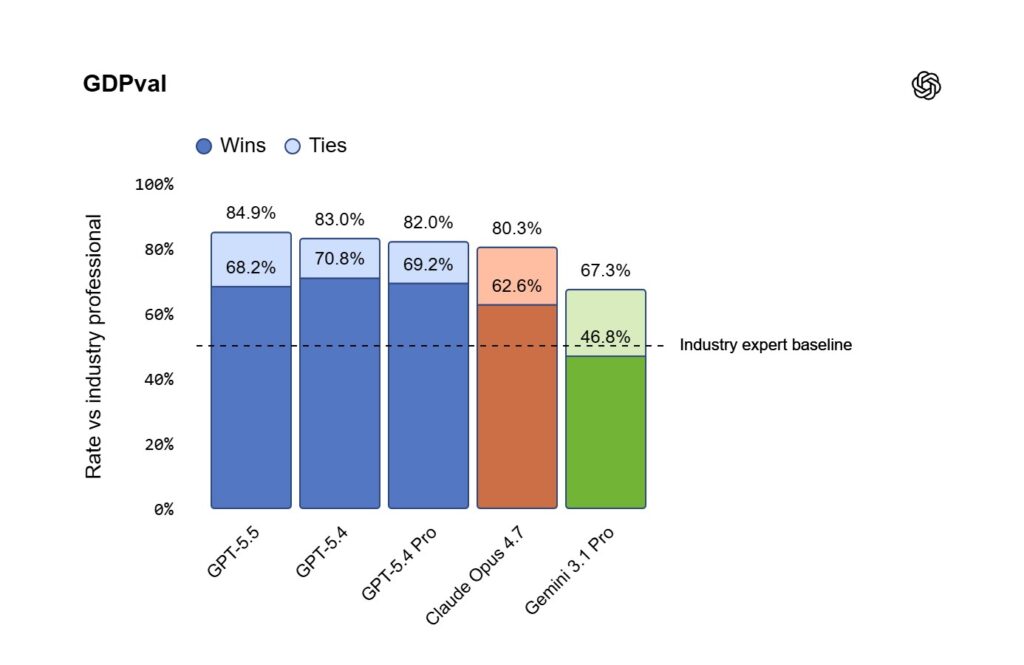
GPT models have made the analysis layer dramatically more powerful than it was even a year ago. A 1 million token context window means you can feed an entire multi-hour conference transcript into a single ChatGPT session and ask it anything. ChatGPT's Record Mode can transcribe live meetings and immediately generate structured summaries — genuinely useful for knowledge workers. GPT-5.2's improvements in information synthesis mean the summaries ChatGPT produces are more accurate and more specific than before.
But all of that depends on having clean, accurate text to work with. Getting that clean text — with timestamps, speaker labels, and export formats — is exactly what a purpose-built video transcript generator handles that ChatGPT does not.
The reliable production workflow in 2026: use a dedicated tool to extract the transcript, then bring ChatGPT in for summarization, rewriting, and repurposing. That pipeline is deterministic. The "paste a YouTube link into ChatGPT and ask for a transcript" workflow still isn't.
Frequently Asked Questions
Q1: Can ChatGPT transcribe a YouTube video if I paste the link?
Not reliably. ChatGPT cannot consistently access the audio behind a YouTube URL due to platform restrictions, expiring tokens, and anti-bot measures. Even when it can access the video, the output may be partial, inaccurate, or missing timestamps. For a dependable video transcript, use a dedicated tool that's built for YouTube URL processing, then bring the output text into ChatGPT for any further analysis.
Q2: Is ChatGPT's audio transcription accurate enough for professional use?
Independent benchmarks in 2026 put ChatGPT's audio transcription accuracy at around 86% — which works for casual use but carries meaningful risk for anything you plan to publish or cite. Combined with an 8.4% hallucination rate on summarization tasks and no reliable timestamp output, it's not the right tool to anchor a professional video transcription workflow.
Q3: What's the difference between a video transcript generator and ChatGPT?
A video transcript generator is an extraction tool — it converts audio from a video into accurate, timestamped text and exports it in formats like SRT, VTT, or TXT that work directly in captioning and editing tools. ChatGPT is a language model — it analyzes, summarizes, and rewrites text, but ChatGPT wasn't designed to reliably extract and timestamp audio from arbitrary video files. The best workflows use both, in sequence: video transcript generator first, ChatGPT second.
Q4: Does ChatGPT's Record Mode replace a dedicated transcription tool?
For live meeting transcription on macOS, ChatGPT Record Mode is genuinely useful. For transcribing pre-recorded videos, YouTube content, long-form interviews, or anything requiring SRT/VTT export, ChatGPT doesn't cover those needs. Record Mode is also currently limited to macOS, which leaves Windows and mobile users without the feature entirely.
Q5: What video sources does Video Transcriber AI support?
Video Transcriber AI supports transcription from YouTube links, uploaded video files, and audio files. You can paste a YouTube URL directly and get a timestamped transcript without downloading anything. The platform works across all major browsers and operating systems, with no equivalent of ChatGPT's macOS-only limitation for its core transcription features.
Q6: Which is better for learning from video — ChatGPT or a dedicated transcript tool?
For learning from video content, a dedicated tool has a clear structural advantage. Being able to read the transcript while the video plays, click any word to jump to that moment, and generate structured study notes or mind maps from the content is a fundamentally more immersive experience than copying text into a chat window. ChatGPT can summarize notes you bring to it; Video Transcriber AI helps you extract and organize those notes directly from the source video.
Conclusion
ChatGPT is meaningfully better at video transcription in 2026 than it was a year ago. ChatGPT's Record Mode, improved audio models, and a 1 million token context window have each moved the needle. For quick, informal transcription of short clips, or for live meeting notes on macOS, ChatGPT now handles those use cases in ways it simply couldn't before.
But the video transcription workflow that holds up in production still starts the same way: with an accurate, timestamped transcript extracted from the actual video. ChatGPT was built to think with text, not to reliably produce it from arbitrary video sources — and the 86% accuracy ceiling, 25 MB file limit, missing timestamps, and macOS-only Record Mode all reflect that.
The tools aren't in competition. They're in sequence. Get the video-to-text extraction right first with Video Transcriber AI — accurate timestamps, synchronized view, SRT and VTT export, and a complete analysis workflow built on top — and everything ChatGPT does with that text afterward gets better. Because the foundation it's working from is solid.