


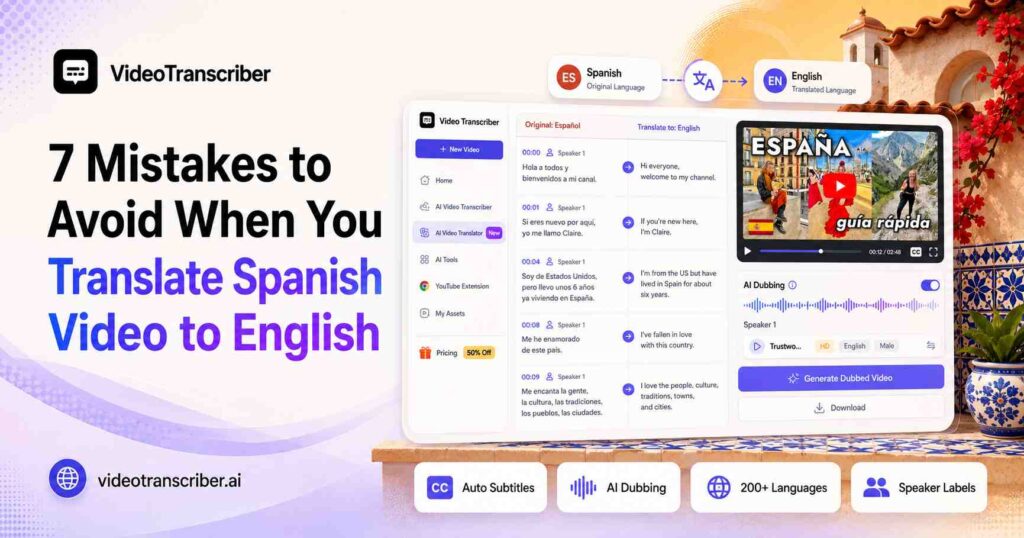
Translating a Spanish video into English may seem simple: upload the file, select English, and wait for the result. But when you do translate Spanish video to English, the output can look complete and still contain confusing subtitles, incorrect names, unnatural expressions, or poorly timed English dubbing.
When you translate Spanish video to English, the problem does not always start with the translation step itself. Errors can appear during speech recognition, grow worse through literal translation, and become even more visible once subtitles or AI voices are added.
To translate Spanish video to English accurately, you need to protect the original meaning through the entire workflow, from the first Spanish transcript to the final English video.
This matters most when you translate Spanish video to English for YouTube videos, Instagram Reels, online courses, interviews, podcasts, business presentations, and training materials. A weak translation can make professional content feel careless, while a well-localized effort to translate Spanish video to English helps content reach a much wider English-speaking audience.
Before you translate Spanish video to English, avoid these seven common mistakes that show up again and again in real projects.
Why It's Harder Than It Looks to Translate Spanish Video to English
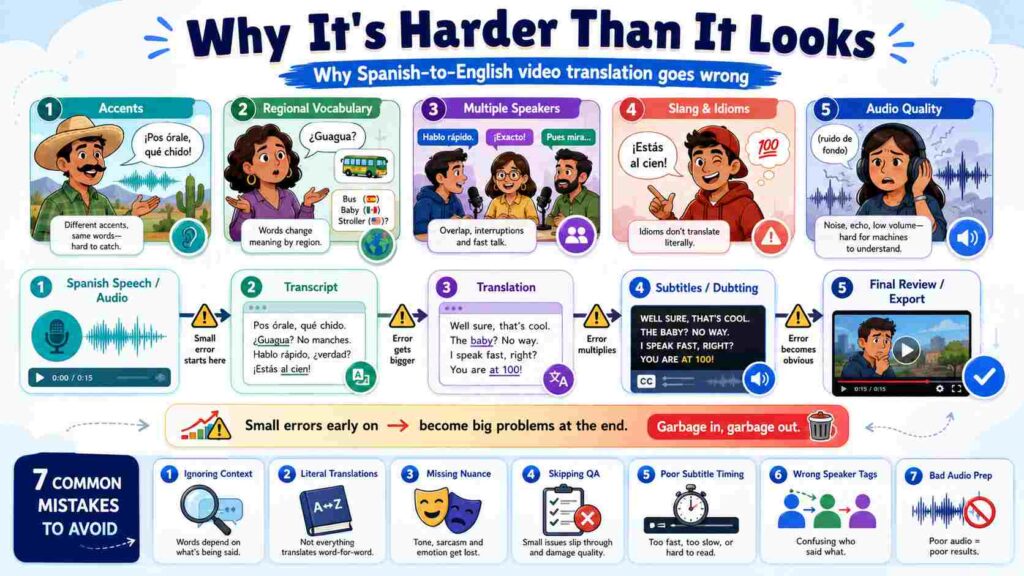
Anyone who wants to translate Spanish video to English should know that Spanish video content is not a single, uniform source. It includes different accents, regional vocabulary, multiple speakers, informal slang, and audio quality that varies from a clean studio recording to a noisy street interview. Every one of these variables can change how well an AI tool is able to translate Spanish video to English, which is why each mistake below deserves its own fix.
The seven mistakes below cover the full pipeline: recognition, translation, subtitle formatting, dubbing, and final review. Fixing each stage is what separates a rough attempt to translate Spanish video to English from a video that feels like it was made for an English-speaking audience from the start.
1. Treating Every Type of Spanish as the Same When You Translate Spanish Video to English
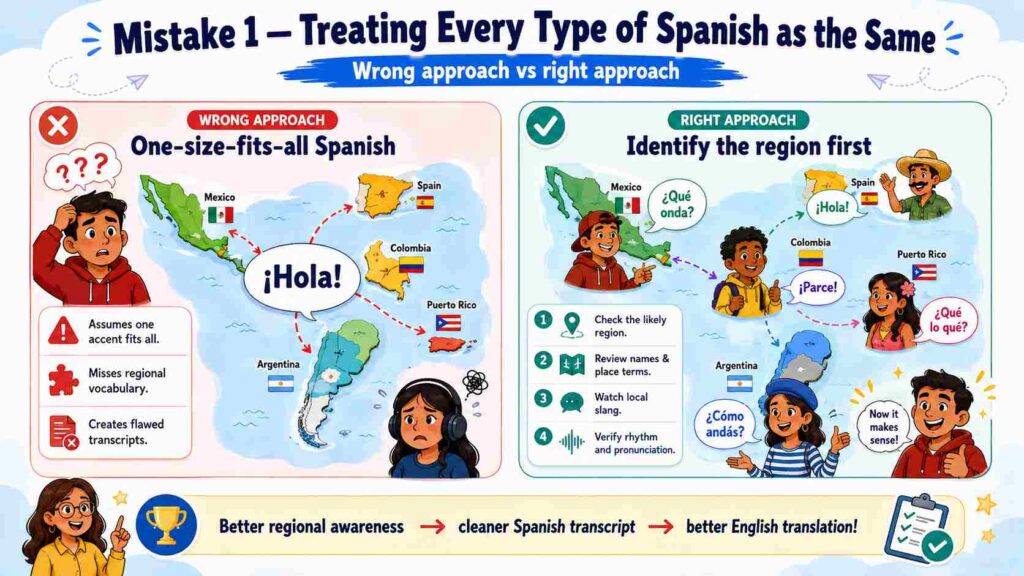
Spanish is spoken across many countries and regions, but it does not sound the same everywhere. Spanish from Spain can differ significantly from the Spanish spoken in Mexico, Argentina, Colombia, Puerto Rico, or other parts of Latin America.
Pronunciation, vocabulary, rhythm, sentence structure, and slang all shift depending on the speaker's location and background, and this directly affects how well a tool can translate Spanish video to English.
Why Regional Spanish Creates Translation Problems
A word that is common in one country may be rare, or carry a different meaning, somewhere else. Speakers may also shorten words, drop certain sounds, or use local expressions that are difficult for automatic speech recognition systems to identify.
For example, conversational Spanish from the Caribbean may include fast speech and shortened endings, while Argentine Spanish may use distinctive pronunciation and vocabulary. A transcription system that misreads the source speech produces an incorrect Spanish transcript, which then affects the English translation.
When you translate Spanish video to English, the quality of the final result depends heavily on how accurately the original Spanish was recognized in the first place.
How to Avoid This Mistake
Before you translate Spanish video to English, identify the likely country or region of the speaker. Review the Spanish transcript for words that do not fit the surrounding sentence.
When you translate Spanish video to English, pay particular attention to:
- Regional vocabulary
- Place names
- Personal names
- Company and product names
- Local slang
- Repeated phrases
- Words that appear out of context
This step matters most for street interviews, travel videos, podcasts, livestreams, informal conversations, and social media clips.
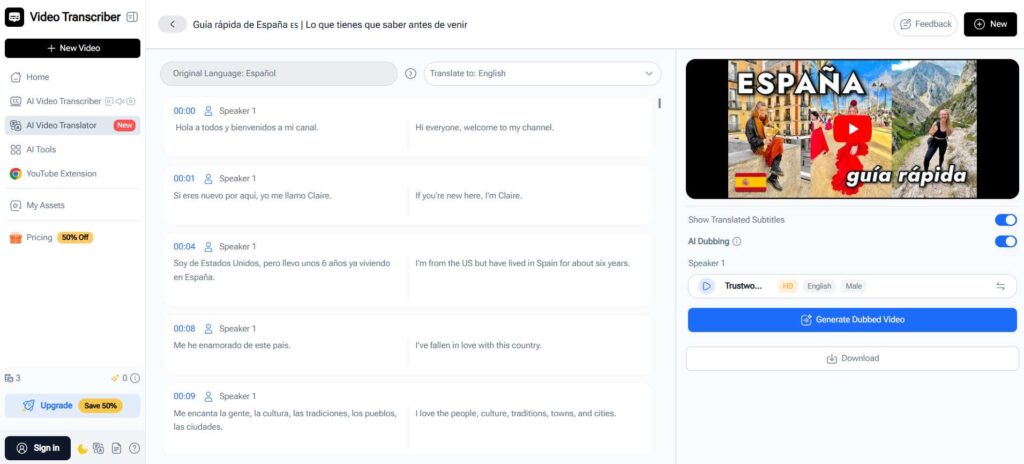
A reliable workflow to translate Spanish video to English should start with a reviewed Spanish transcript rather than jumping straight to the English version. Video Transcriber AI's AI Video Translator gives you editable transcripts, which makes it easier to correct recognition errors before they carry over when you translate Spanish video to English.
2. Translating Before You Correct the Spanish Transcript
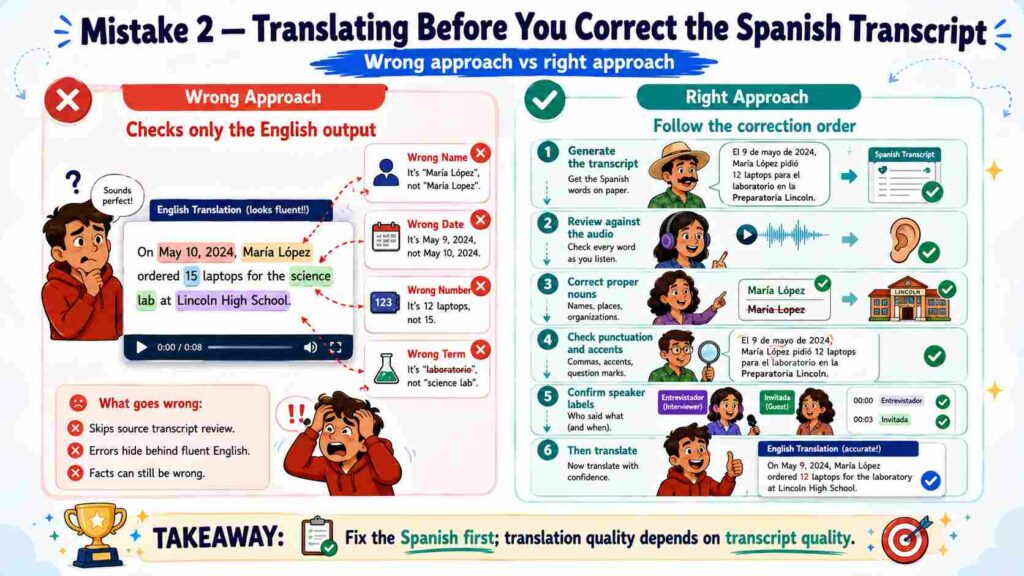
One of the biggest mistakes people make is checking only the English output while ignoring the original Spanish transcript. To translate Spanish video to English accurately, the source transcript has to be correct first.
Why Transcript Errors Spread into the Translation
AI video translation usually starts with speech recognition. The tool listens to the Spanish audio and converts it into written text, which is then translated into English.
If the Spanish transcript contains an incorrect name, date, number, technical term, or sentence break, the English translation will be based on faulty information, and it may still read as grammatically correct, which makes the error harder to catch.
When you translate Spanish video to English, a product name may be recognized as an ordinary Spanish phrase instead. The translation system may then replace the product name with unrelated English words. When you translate Spanish video to English, similar problems can occur with:
- Prices
- Dates
- Measurements
- Medical terms
- Legal language
- Academic vocabulary
- Brand names
- Personal names
- Locations
How to Avoid This Mistake
Use this order every time you translate Spanish video to English:
- Generate the Spanish transcript.
- Play the original video while reading the transcript.
- Correct names, numbers, brands, and specialist terms.
- Check punctuation and sentence breaks.
- Confirm the speaker labels.
- Translate the corrected transcript into English.
This order stops small recognition errors from spreading through the entire project whenever you translate Spanish video to English.
A video translation platform with timestamps and click-to-jump editing makes this process much faster. Instead of replaying the entire video, you can jump directly to a questionable sentence, listen again, and fix the source text before translation.
3. Translating Spanish Slang and Idioms Word for Word Instead of by Meaning
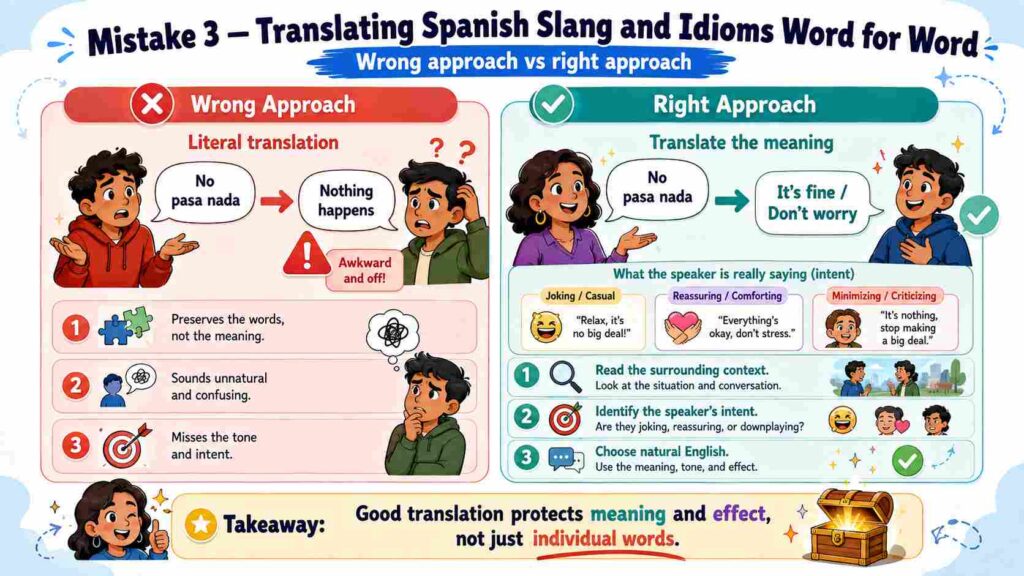
Literal translation can preserve individual words while completely losing the speaker's intended meaning. Spanish contains many idioms, informal expressions, and regional phrases that need to be translated by context rather than by dictionary definition.
| Spanish phrase | Weak literal translation | Natural English meaning |
| No pasa nada | Nothing happens | It is fine / Do not worry |
| Estar en las nubes | To be in the clouds | To be distracted |
| Vale | It is worth | Okay / All right |
| Qué padre | What a father | That is cool / That is great |
| Tomar el pelo | To take the hair | To joke with someone |
| Costar un ojo de la cara | To cost an eye from the face | To be extremely expensive |
Why Literal Translation Sounds Unnatural
The meaning of an expression depends on the situation, the speaker's tone, and the surrounding conversation. "No pasa nada," for instance, can reassure someone, dismiss a small problem, or signal that no apology is needed. Translating it as "Nothing happens" would sound odd in almost any English conversation.
When you translate Spanish video to English, the goal is not to reproduce every word. The goal is to communicate the same idea, intention, and emotional effect.
How to Avoid This Mistake
Read the sentences before and after an informal expression. Consider what the speaker is trying to accomplish. Ask yourself what the speaker is doing before you translate Spanish video to English. Are they:
- Making a joke?
- Reassuring someone?
- Expressing frustration?
- Giving advice?
- Criticizing an idea?
- Promoting a product?
- Speaking sarcastically?
Choose English wording that creates a similar effect for the target audience, since this is the real work of translating Spanish video to English well. This matters most when you translate Spanish video to English for comedy, reaction videos, gaming content, interviews, advertisements, and creator-led social media videos.
A subtitle can be technically correct and still sound robotic if you translate Spanish video to English too literally. Good localization protects the speaker's intent, not just the original vocabulary.
4. Ignoring Multiple Speakers When You Translate Spanish Video to English
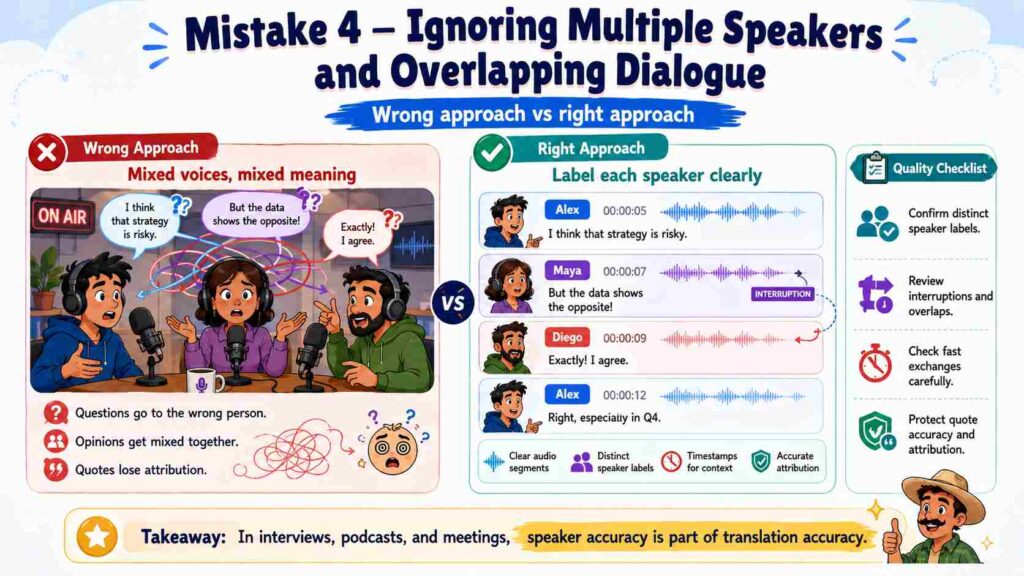
A video with one narrator is relatively simple. A podcast, interview, meeting, panel discussion, documentary, or customer research video is harder, because the meaning also depends on who is speaking. When you translate Spanish video to English, incorrect speaker separation can change the meaning of an entire conversation.
Why Speaker Detection Matters
If two speakers are combined into one transcript block, the English translation may fail to translate Spanish video to English correctly in these ways:
- Assign a question to the wrong person
- Connect unrelated sentences
- Mix different opinions
- Confuse first-person and third-person references
- Attribute a quote to the wrong participant
- Remove the natural question-and-answer structure
Overlapping speech creates additional problems. Short interruptions, agreement phrases, names, and numbers may be missed or placed in the wrong sentence. This is especially serious when you translate Spanish video to English for research interviews, focus groups, legal discussions, business meetings, and journalistic content, where accurate attribution matters.
How to Avoid This Mistake
Before you translate Spanish video to English, confirm that each speaker has a separate label. Review the moments where the conversation changes quickly or multiple people speak at once.
Before you translate Spanish video to English, check whether:
- Each question belongs to the correct speaker
- Each answer is clearly separated
- Interruptions are assigned correctly
- Pronouns still make sense
- Speaker names remain consistent
- Important quotations are attributed properly
Speaker accuracy can matter just as much as word accuracy when you translate Spanish video to English for interviews or team discussions. Video Transcriber AI supports speaker recognition, timestamps, and editable speaker labels, which help preserve the original conversation structure before subtitles or English AI voices are generated.
5. Creating English Subtitles That Are Too Long to Read
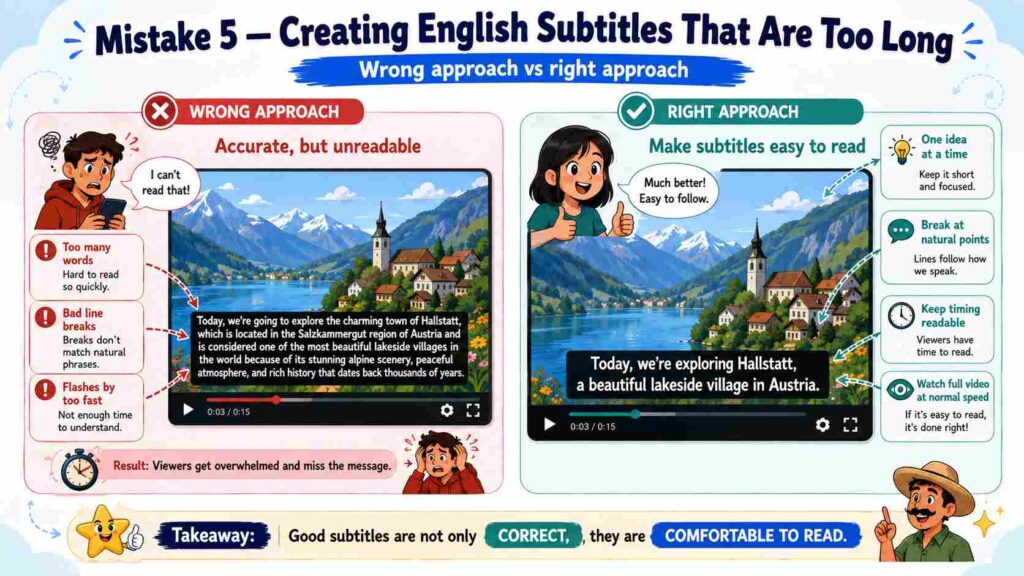
A translation can be correct and still fail as a subtitle. Viewers need enough time to read the English text while watching the video. Long sentences, poor line breaks, and rapidly changing captions all create unnecessary effort.
Why Spanish and English Subtitles Need Different Formatting
Spanish and English do not always share the same sentence length or word order. A Spanish sentence may need fewer or more words once it is translated naturally into English, so copying the original Spanish subtitle segmentation can produce awkward English captions.
One Spanish sentence may need to be split into two shorter English subtitles. Several short Spanish phrases may work better as a single complete English sentence. When you translate Spanish video to English subtitles, review them as part of the visual experience, not only as translated text.
Signs That English Subtitles Need Editing
When you translate Spanish video to English, look for the following problems:
- The subtitle disappears before viewers can read it.
- One subtitle contains too many words.
- A line breaks in the middle of a name or phrase.
- The subtitle changes before the speaker finishes.
- Punctuation does not match the speaking rhythm.
- Captions cover important text or visual elements.
- Two connected ideas are separated awkwardly.
- Several speakers appear in the same subtitle block.
How to Avoid This Mistake
When you translate Spanish video to English into subtitles, keep each subtitle focused on one clear idea. Remove unnecessary repetition when a shorter English version preserves the meaning. Break lines at natural points, such as after a complete phrase, rather than splitting names, verbs, or important expressions.
After you translate Spanish video to English, watch the entire video at normal speed rather than reviewing subtitles only in a text editor.
For educational or language-learning content, using dual subtitles to translate Spanish video to English helps viewers compare the two languages. For marketing, entertainment, and social media content, English-only subtitles often give a cleaner viewing experience. Video Transcriber AI's AI Video Translator lets you edit both single-language and dual-language subtitles directly in the browser, so you can adjust wording and line breaks without starting over.
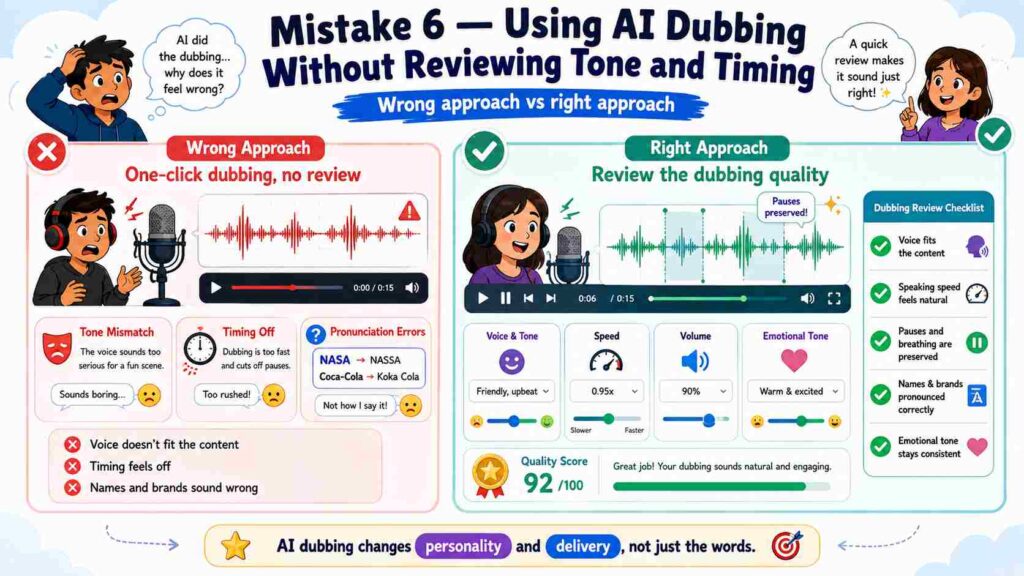
6. Using AI Dubbing Without Reviewing Tone and Timing First
AI dubbing affects more than the words. It changes how the audience experiences the speaker's personality, emotion, and energy. A translation may be accurate, but the video can still feel unnatural if the English voice does not match the original delivery.
Why Voice Selection Matters
Imagine a Spanish creator giving an energetic product review. If the English version uses a slow, formal voice, the translated video may feel less engaging. The opposite can also happen: a serious training video may sound unprofessional if the English voice is overly cheerful or dramatic.
When you translate Spanish video to English with AI dubbing, the voice should match the purpose and mood of the original content, since tone is part of the translation, not an extra step.
What to Review Before Publishing AI Dubbing
Voice fit.
Choose a voice that matches the speaker's role, energy, age range, and communication style. The English voice does not need to imitate the original speaker exactly, but it should feel appropriate for the content.
Speaking speed.
The English audio should finish close to the original segment. If it runs too long, it may overlap the next scene; if it runs too short, the video may contain unnatural silence.
Pauses.
Preserve useful pauses around instructions, lists, emotional moments, punchlines, and transitions. Removing every pause can make the English voice sound rushed and artificial.
Pronunciation.
Check the pronunciation of personal names, brand names, product names, cities and countries, acronyms, technical vocabulary, and any Spanish terms retained in English.
Emotional consistency.
A serious message should not sound playful, and a casual vlog should not sound like a formal corporate presentation.
When you translate Spanish video to English, review the dubbed version from beginning to end. Do not assume that a natural-sounding voice automatically matches the original context. Video Transcriber AI's AI Video Translator includes AI dubbing with a range of voice options, so you can preview and swap voices before exporting the final video.
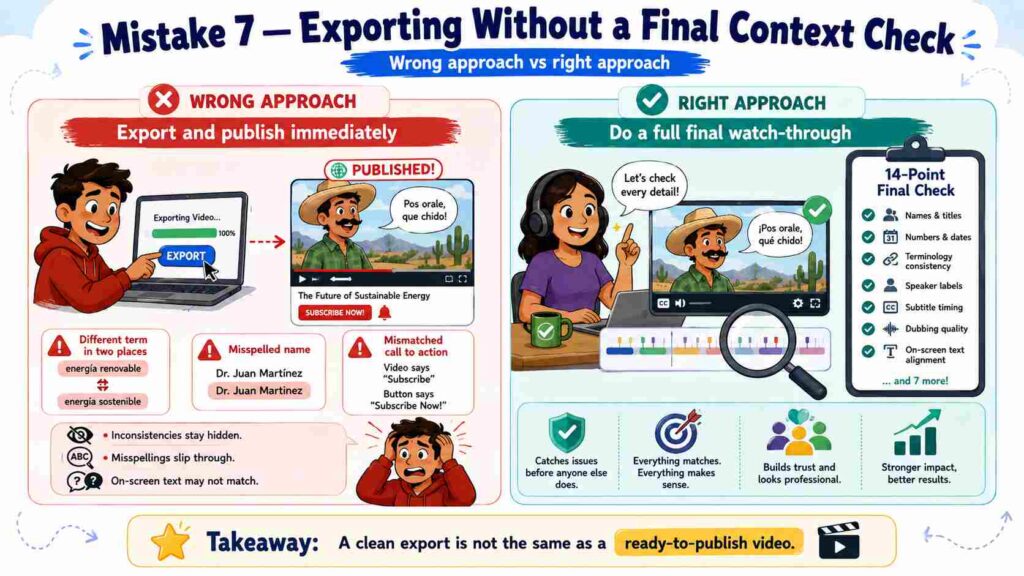
7. Exporting the Video Without a Final Context Check
A successful export does not mean the video is ready to publish. Many translation problems only become noticeable once the complete English version is viewed from beginning to end.
Why Final Review Is Necessary
When you translate Spanish video to English, a term may be handled correctly in one section but differently later. A speaker's name may change spelling. A call to action may no longer match the button or text shown on screen. These problems are difficult to catch when reviewing isolated subtitle lines. Before publishing, watch the translated video as an English-speaking viewer would, since this is the last chance to catch mistakes before you finish the process to translate Spanish video to English.
Final Checklist for Spanish-to-English Video Translation
Use this checklist every time you translate Spanish video to English, since it covers the full result, not just the wording:
- Names and job titles are correct.
- Numbers, dates, prices, and measurements match the source.
- Brand terminology remains consistent.
- Regional expressions sound natural in English.
- Speaker labels are accurate.
- Quotes are assigned to the right people.
- Subtitle timing matches the speech.
- Captions do not hide important visuals.
- Line breaks are easy to read.
- Dubbed voices remain consistent.
- Product names are pronounced correctly.
- Calls to action still make sense.
- On-screen text matches the spoken translation.
- The final video plays correctly after export.
Also confirm the correct output format for the video you translate from Spanish to English. SRT and VTT files work well when subtitles will be uploaded separately to YouTube, learning platforms, or media players. A translated video file is more practical when the English voice or subtitles need to be embedded directly into the video.
A Better Workflow to Translate Spanish Video to English
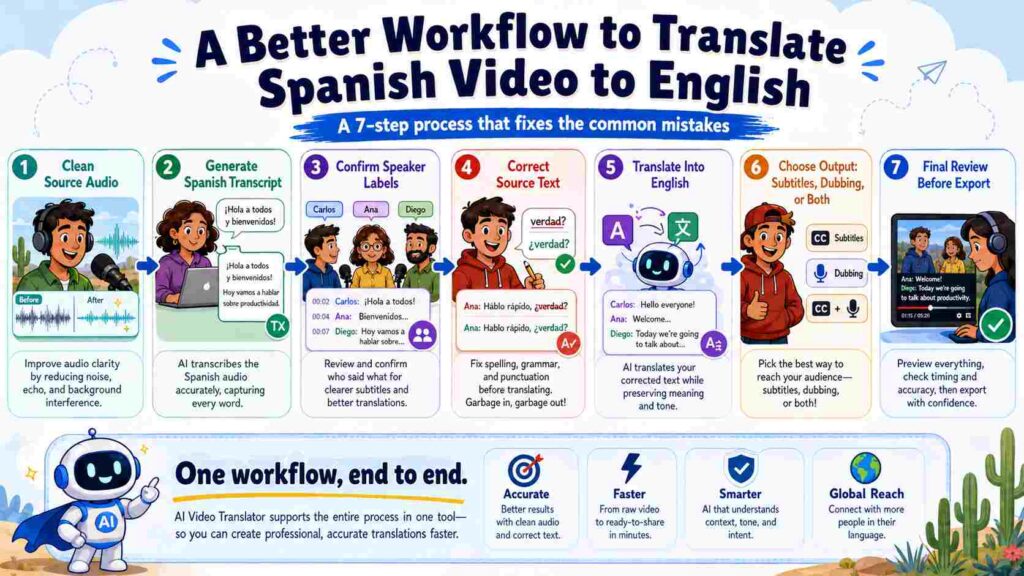
Avoiding these mistakes becomes easier when you follow a clear process to translate Spanish video to English.
Step 1: Prepare the source video before you translate Spanish video to English.
Use the clearest version of the video available and make sure the audio is understandable. When possible, reduce background music, wind, echoes, and unnecessary noise before uploading. Clear source audio makes it much easier to translate Spanish video to English accurately, since noisy input is the most common cause of recognition errors.
Step 2: Generate the Spanish transcript before you translate Spanish video to English.
Create a transcript of the original Spanish speech before translating it. Review the transcript for names, numbers, technical terms, regional vocabulary, and unclear sentences.
Step 3: Confirm the speakers.
For interviews, podcasts, meetings, and group discussions, check that each speaker has the correct label before generating English subtitles or dubbing.
Step 4: Correct the source text.
Fix recognition errors in the Spanish transcript, paying special attention to sentences that sound fluent but do not fit the surrounding context. A corrected source transcript is what allows you to translate Spanish video to English with confidence.
Step 5: Translate Spanish video to English.
Select English as the target language and generate the translated text. Review the English for meaning, tone, and context, not only grammar.
Step 6: Decide how to translate Spanish video to English, with subtitles, dubbing, or both.
Use English subtitles when the original Spanish voice should remain audible. Use English AI dubbing when the audience needs a voice-led viewing experience. Use both when accessibility and comprehension are priorities, since this covers the widest range of viewers when you translate Spanish video to English. Video Transcriber AI's AI Video Translator supports both options in a single simple interface, along with more than 200 languages if you plan to localize beyond English.
Step 7: Do a final review after you translate Spanish video to English.
Play the final result at normal speed and check subtitles, voices, timing, names, and on-screen information. Only export the video once the English version feels clear and natural from beginning to end, since this final pass is what separates a rushed attempt to translate Spanish video to English from a polished one.
You can complete this entire workflow to translate Spanish video to English with Video Transcriber AI's AI Video Translator, which combines transcription, translation, speaker detection, editable subtitles, AI dubbing, and export in over 200 languages, all in one simple, browser-based interface.
English Subtitles or AI Dubbing: Which Should You Choose?
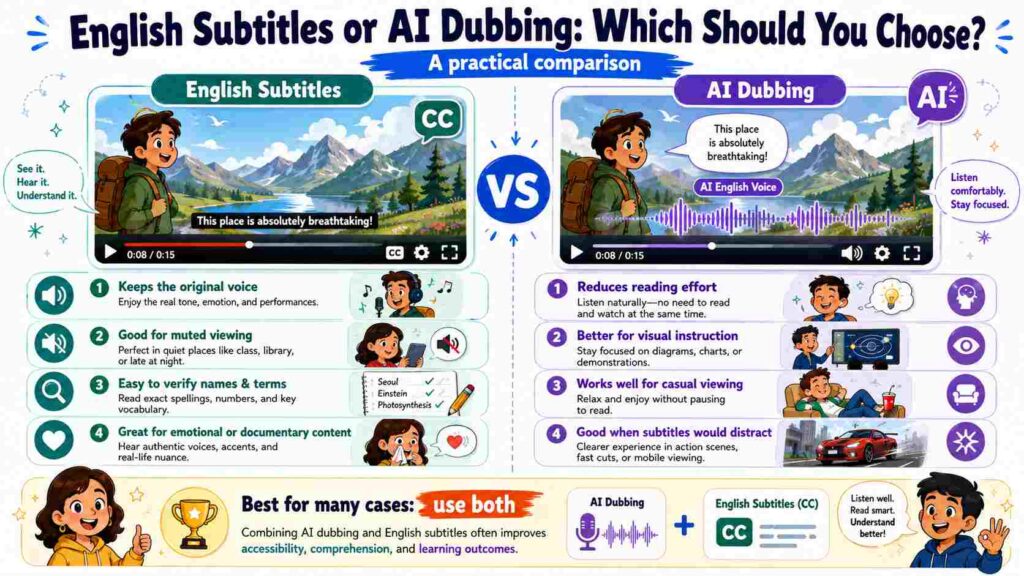
The right format depends on the video, the audience, and the distribution platform whenever you translate Spanish video to English.
Translate Spanish Video to English with Subtitles When
- The original Spanish voice has emotional or documentary value.
- Viewers may watch the video without sound.
- The audience needs to verify names or technical terms.
- The video is used for language learning.
- You need a faster localization workflow.
- The original speaker's identity should remain clear.
Subtitles can also be easier to update when small translation changes are needed after you translate Spanish video to English.
Translate Spanish Video to English with AI Dubbing When
- Reading subtitles would distract from demonstrations.
- The video contains important visual instructions.
- The audience expects voice-led content.
- The content is designed for casual viewing.
- You are localizing tutorials, product videos, courses, or social clips.
- You want the English version to feel more direct and accessible.
Use Dubbing and Subtitles Together When
In many cases, the strongest way to translate Spanish video to English combines dubbing with optional subtitles. The voice lets viewers follow the content without constantly reading, while subtitles improve accessibility and help clarify names, accents, and unfamiliar vocabulary.
When you translate Spanish video to English, think about how and where the audience will watch before choosing the final format.
Frequently Asked Questions About Translating Spanish Video to English
How can I translate Spanish video to English online?
To translate Spanish video to English online, upload the Spanish video to an AI video translation tool, generate the Spanish transcript, correct recognition errors, and select English as the target language. You can then generate English subtitles, AI dubbing, or both, and review the complete video before downloading or publishing it.
Can I translate Spanish video to English subtitles?
Yes. You can translate Spanish video to English subtitles and export English-only captions or dual Spanish-English subtitles, and this remains one of the fastest ways to translate Spanish video to English. Before export, review subtitle timing, line length, punctuation, names, and regional expressions.
Can AI translate Spanish audio to English accurately?
AI can translate Spanish video to English with accurate results when the Spanish audio is clear and the speakers are easy to understand. Accuracy may drop when the video contains background noise, overlapping dialogue, strong regional accents, fast speech, or specialist vocabulary. Reviewing the Spanish transcript before translation can significantly improve the English result.
Should I correct the Spanish transcript before translating it?
Yes. Correcting the Spanish transcript prevents recognition errors from carrying over into the English translation. Names, numbers, dates, brands, and technical terms should always be checked before you translate Spanish video to English, since this is the step most people skip.
Can I translate a video from Spanish to English with multiple speakers?
Yes, but the translation tool should support speaker detection and speaker labels. Review the transcript to make sure each sentence belongs to the correct person, especially when speakers interrupt each other or talk at the same time.
Is English dubbing better than English subtitles?
Neither option is always the better way to translate Spanish video to English. English subtitles preserve the original Spanish voice and are easier to verify, while English dubbing provides a more direct viewing experience and lets the audience focus on the visuals. The best way to translate Spanish video to English depends on the content type and viewing environment.
What is the biggest mistake when translating Spanish video to English?
The biggest mistake is trying to translate Spanish video to English as a fully automatic, one-click process. A strong result requires an accurate Spanish transcript, context-aware English wording, correct speaker labels, readable subtitles, suitable AI voices, and a final quality review.
Can I translate Spanish video to English online without installing software?
Yes. Browser-based tools let you translate Spanish video to English by uploading a video, editing subtitles, generating English voices, and exporting the result without installing desktop software. Video Transcriber AI's AI Video Translator provides this kind of online workflow, with subtitle editing, AI dubbing, and support for more than 200 languages in one simple interface.
Conclusion
AI has made it faster than ever to translate Spanish video to English, but speed should not replace careful review. The strongest English version begins with an accurate Spanish transcript, recognizes regional language differences, preserves the meaning of slang and idioms, separates multiple speakers correctly, and presents the translation through readable subtitles or natural dubbing.
Avoiding these seven mistakes will help you create English videos that are clearer, more professional, and easier for viewers to understand. When you are ready to translate Spanish video to English, Video Transcriber AI's AI Video Translator lets you generate, edit, dub, and export the result in over 200 languages, all through one simple interface.