


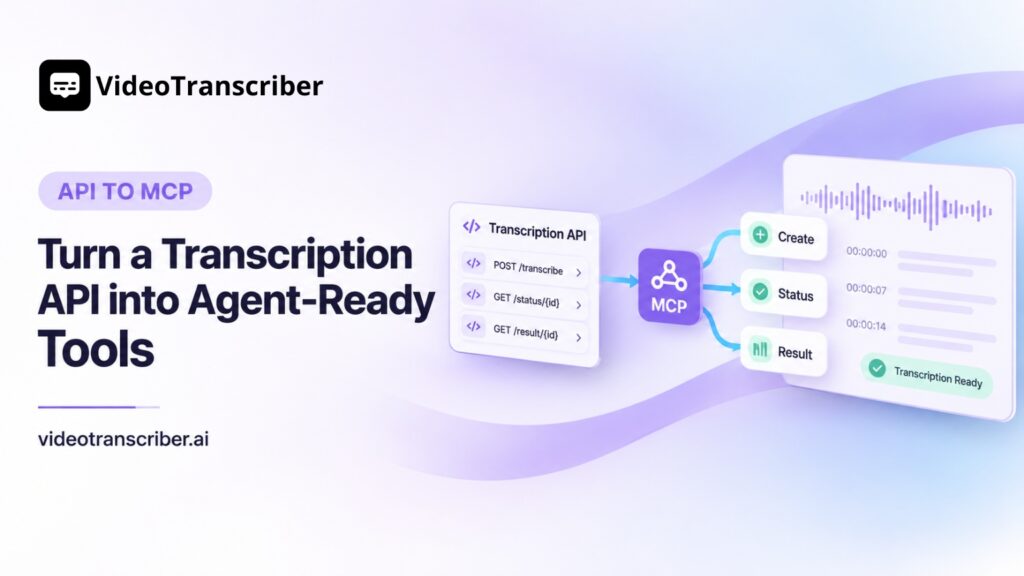
Turning an API to MCP means placing a Model Context Protocol server in front of an existing API and exposing a small set of tools that an AI agent can discover and call. The API still performs the work. MCP gives the model a standardized, descriptive interface for choosing that work.
The difficult part is not converting HTTP requests into tool calls. It is deciding which capabilities deserve to become tools, how much context each tool should expose, and how the agent should handle authentication, asynchronous jobs, errors, and results.
A transcription API is a useful real-world example. One request can start a job, another checks its status, and a third retrieves the transcript. A good MCP layer turns that lifecycle into a small, predictable tool surface instead of exposing every backend endpoint and parameter.
What Does API to MCP Mean?
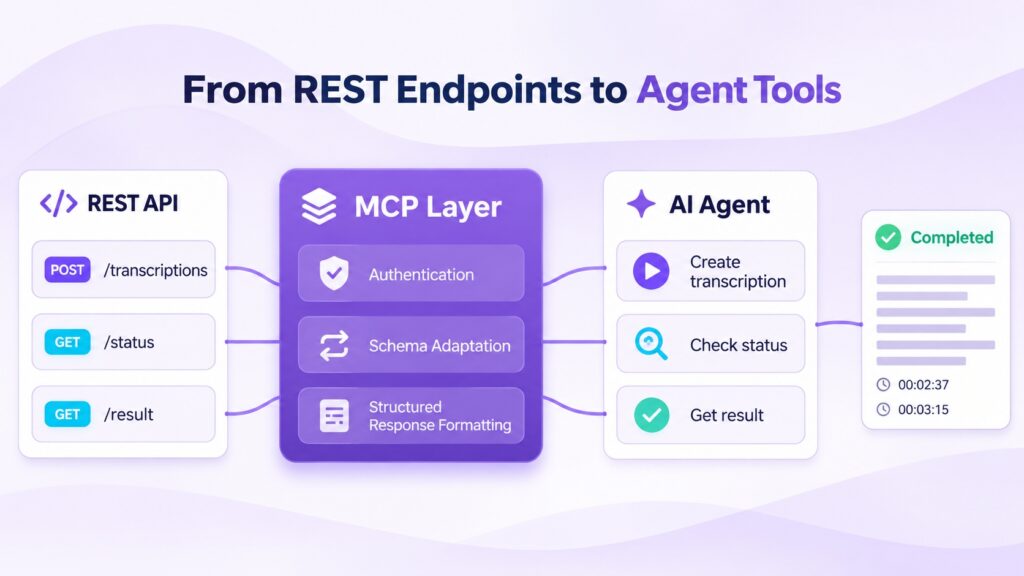
API to MCP is the process of exposing selected API capabilities through a Model Context Protocol server so an AI application can discover and call them as tools. The MCP server translates agent-friendly tool inputs into API requests, then turns API responses and errors into structured results the model can use safely.
The usual architecture looks like this:
User
  ↓ natural-language request
AI assistant or coding agent
  ↓ MCP tool discovery and tool call
MCP server
  ↓ authenticated HTTP request
Existing REST API
  ↓
Database, queue, model, or processing service
The official Model Context Protocol TypeScript SDK describes MCP as an open standard that connects AI applications to the systems where data and tools live. An MCP server can expose tools without requiring the model to understand the API’s URLs, headers, SDK, or internal resource structure.
This separation is important: the API remains the stable service contract for applications, while MCP becomes a purpose-built interface for AI clients.
API vs MCP: What Changes?
| Factor | REST API | MCP server |
| Primary caller | Application code | AI application or agent |
| Discovery | Developer reads documentation | Client lists tools and schemas |
| Interface | Endpoints, methods, headers, bodies | Named tools with typed arguments |
| Control flow | Written explicitly in code | Selected dynamically by the model and host |
| Authentication | HTTP client configuration | MCP client/server configuration and downstream API auth |
| Errors | HTTP status plus response body | Tool-level error with actionable model-facing context |
| Best use | Products, backends, batch jobs, fixed automations | Agent workflows, conversational tasks, tool-using assistants |
An API is optimized for deterministic software. MCP is optimized for a model that must first decide which capability to use. That makes tool names, descriptions, schemas, and failure messages part of the product interface—not just implementation details.
Why Direct OpenAPI-to-MCP Conversion Is Not Enough
An OpenAPI document is an excellent starting point. It already describes paths, operations, parameters, schemas, responses, and security requirements. The OpenAPI Specification also provides operationId, a unique identifier tooling can use for each operation.
However, an operation identifier is not automatically a good agent tool. A large API may contain internal CRUD operations, administrative endpoints, legacy versions, and low-level parameters that a model should never see.
The official Model Context Protocol roadmap identifies the same scaling problem: connecting to a server with a very large tool set increases the context cost before the user asks a question, while tool selection becomes less reliable.
Common problems with one-tool-per-endpoint conversion
- Context overload. Every tool name, description, and schema may occupy model context even when only one capability is relevant.
- Weak tool selection. Similar endpoints such as
getJob,getJobResult, andlistJobOutputscan be difficult for a model to distinguish. - Backend concepts leak into the conversation. UUIDs, pagination cursors, storage keys, and provider-specific states become the agent’s problem.
- Unsafe operations look ordinary. A delete or publish endpoint can appear beside read-only tools without an appropriate approval boundary.
- Raw errors do not help recovery. A model needs to know whether to fix an argument, wait, retry, request access, or stop.
Three API-to-MCP Mapping Strategies
| Strategy | How it works | Advantage | Main limitation | Best fit |
| Direct mapping | Convert every eligible API operation into one MCP tool | Fastest initial implementation | Large, noisy tool surface | Small internal APIs and prototypes |
| Curated mapping | Allowlist a focused subset of operations and improve their names and descriptions | Better selection and lower context use | Requires product judgment | Existing APIs with clear agent use cases |
| Composite tools | Combine several API calls behind one task-oriented tool | Simplest experience for the agent | More adapter logic and testing | Multi-step workflows and complex APIs |
For most production integrations, curated mapping is the safest default. Composite tools are valuable when a single user intention always requires the same sequence of calls. Direct mapping is useful for exploration, but it should be treated as a draft tool catalog rather than a finished interface.
This recommendation is also reflected in current implementation guidance. Tyk's REST API to MCP documentation includes allowlists and overrides for agent-facing names and descriptions, while Stainless's API-to-MCP guide distinguishes direct endpoint exposure, selected subsets, and composite tools.
How to Design Agent-Ready MCP Tools
1. Start with user intentions
List the tasks a user will ask the agent to complete. “Transcribe this interview,” “check whether the transcript is ready,” and “download subtitles” are better design inputs than POST /transcriptions or GET /jobs/{id}.
Each tool should have one recognizable outcome. If two tools sound interchangeable in natural language, their boundaries need more work.
2. Give tools explicit names and descriptions
A strong tool description answers three questions:
- When should the agent call this tool?
- Which information must it provide?
- What will the tool return?
Avoid names such as execute, process, or run. Prefer verbs and objects that describe the result, such as create_transcription, get_transcription, and get_transcription_result.
3. Keep input schemas narrow
Do not expose a parameter merely because it exists in the API. Required fields should be genuinely necessary, optional fields should have safe defaults, and related options should be grouped logically.
For a transcription tool, the public media URL is essential. Language selection, speaker diarization, chapters, and translation can remain optional. Provider-specific model names and internal queue settings generally should not be agent-facing.
4. Return structured, decision-ready results
The result should help the agent choose its next action. A create tool should return the request ID, current status, and retry guidance. A status tool should state whether the job is still active or terminal. A result tool should expose the transcript and available output formats without returning irrelevant provider metadata.
5. Make failure modes actionable
Replace opaque upstream errors with stable categories. For example:
invalid_request: fix an input before retrying.unauthorized: check the configured credential.rate_limited: wait for the supplied retry interval.processing: the job is valid but not finished.failed: stop polling and explain the failure.
Preserve a request or trace identifier for debugging, but never include a secret in the error returned to the model.
Practical Example: Transcription API to MCP
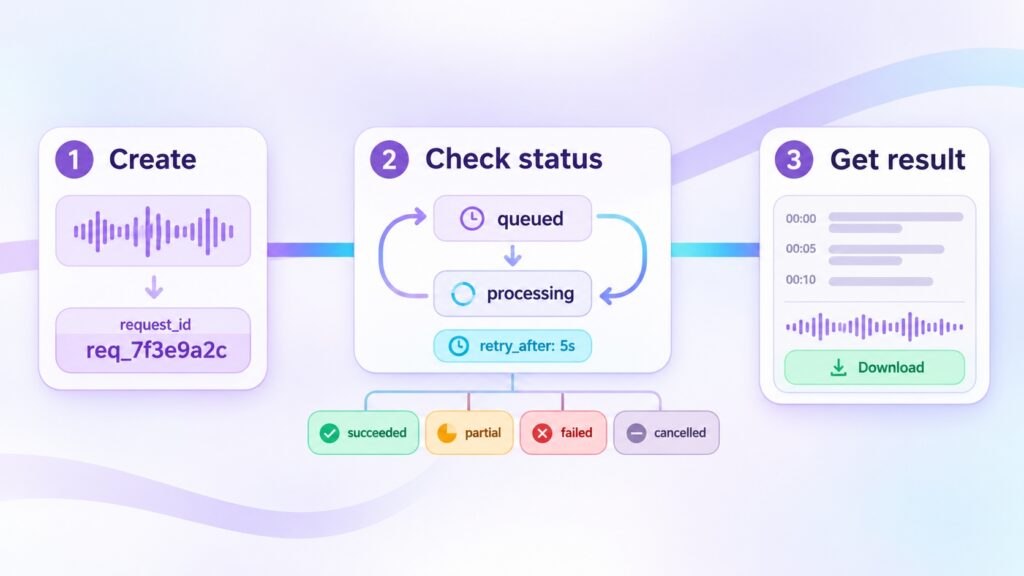
The Video Transcriber AI Transcript API accepts public audio, video, and supported platform URLs. Its documented REST workflow has three calls:
POST /transcriptionscreates an asynchronous task.GET /transcriptions/{request_id}returns task status.GET /transcriptions/{request_id}/resultreturns successful results and subtitle download URLs.
The API uses Bearer authentication. A create request also uses an Idempotency-Key, and polling clients are instructed to honor retry_after or the Retry-After header. The complete contract is available in the Transcript API documentation.
Map the lifecycle to three MCP tools
| Agent intention | MCP tool | Essential input | Decision-ready output |
| Start a transcript | create_transcription | Public source_url | request_id, status, retry guidance |
| Check progress | get_transcription | request_id | Current status, feature status, error details, retry guidance |
| Use the finished transcript | get_transcription_result | request_id | Full text, timed segments, speakers when available, chapters, translations, SRT/VTT links |
This three-tool design preserves the asynchronous lifecycle instead of pretending every transcription can finish inside one tool call.
The 2026-07-28 Model Context Protocol release also introduced a Tasks extension for reliable long-running agent work. A request-ID and status-tool pattern remains useful when the downstream API already has its own task lifecycle or when the connected MCP client does not use that extension.
Step 1: Create the task
The create tool should accept a public HTTP or HTTPS media URL and a focused set of optional transcription features. A concise conceptual schema looks like this:
{
  \"source_url\": \"https://example.com/interview.mp4\",
  \"language\": \"auto\",
  \"speaker_diarization\": true,
  \"chapters\": true,
  \"translation_target\": \"es\"
}
The tool should return immediately with a request ID rather than hold the connection open for the full media-processing time.
{
  \"request_id\": \"tr_01JEXAMPLE\",
  \"status\": \"queued\",
  \"retry_after\": 5,
  \"next_action\": \"Call get_transcription after the retry interval.\"
}
The values above illustrate the documented response shape. Production clients should use the actual status and retry guidance returned by the service.
Step 2: Check status without tight polling
An agent needs a clear set of terminal and non-terminal states. The documented Transcript API lifecycle includes queued, processing, succeeded, partial_succeeded, failed, and cancelled.
The MCP tool description should tell the agent to:
- Store the
request_idfrom the create call. - Wait for the returned retry interval.
- Call the status tool again only while the task is non-terminal.
- Retrieve results after
succeededorpartial_succeeded. - Stop and report the error after
failedorcancelled.
Treating partial_succeeded as a distinct outcome matters. The transcript may be available even when an optional chapter or translation feature did not complete.
Step 3: Retrieve only completed outputs
The result tool should return successful features in a stable structure. Video Transcriber AI documents full text, detected language, timed segments, optional speaker labels, chapters, translations, and signed SRT/VTT download URLs.
Its documentation states that results remain available for 30 days, while signed download URLs are valid for up to one hour. An agent should therefore use or save the result promptly and request a fresh result response when an old signed URL has expired.
Why this tool mapping works
- The agent sees three clearly different decisions rather than a large API surface.
- Long-running work remains observable instead of being hidden behind a timeout.
- The result call is not attempted until the status indicates usable output.
- Partial success can be reported accurately.
- The same REST backend continues to serve conventional applications and batch jobs.
Video Transcriber AI also provides a hosted remote MCP endpoint at:
https://videotranscriber.ai/mcp
It uses HTTP transport with Bearer authentication, so compatible MCP clients can use the agent-facing tools without requiring teams to deploy a separate transcription adapter.
A Seven-Step API-to-MCP Implementation Workflow
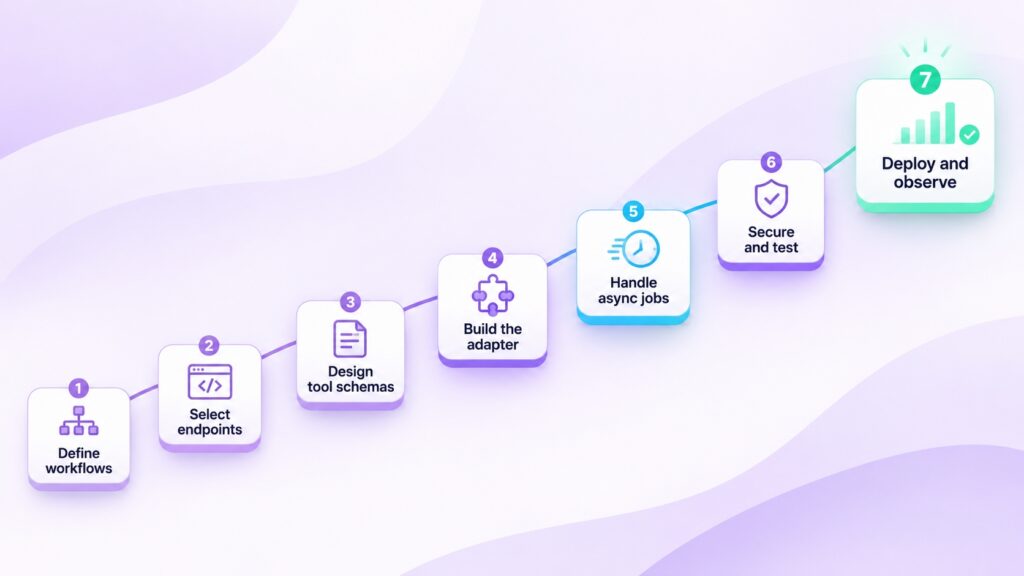
Step 1: Inventory the API
Document the endpoints, authentication methods, side effects, rate limits, asynchronous states, error codes, and sensitive fields. Mark operations that must never be exposed to an autonomous model.
Step 2: Write the agent task list
Collect the natural-language requests the integration must support. Group requests that share one outcome. This becomes the initial tool catalog.
Step 3: Choose a mapping strategy
Use direct mapping only for a small, controlled API. Use an allowlist when the existing API is broad. Add composite tools when several calls always form one user task.
Step 4: Define tool contracts
For every tool, specify:
- Name and “use when” description
- Required and optional arguments
- Defaults and validation rules
- Success response
- Recoverable and terminal failures
- Approval requirements for side effects
Step 5: Implement the adapter
The MCP handler validates tool arguments, adds credentials outside model context, calls the API, and transforms the response. Keep the adapter thin: business rules should normally stay in the API service rather than being duplicated in the MCP layer.
Step 6: Test tool selection and recovery
Test with natural-language requests, not only direct tool calls. The model should select the correct tool, supply valid arguments, wait when instructed, and stop on terminal errors.
Step 7: Monitor and version the tool surface
Log tool name, duration, outcome, error category, and trace ID while redacting secrets and sensitive media URLs. Review which tools are confused, unused, or repeatedly retried. Version breaking schema changes instead of silently changing a tool contract.
Security Checklist for an API-to-MCP Integration
- Store API keys in the MCP client configuration, server environment, or secret manager.
- Never place credentials in prompts, tool descriptions, logs, screenshots, or returned error messages.
- Apply least privilege to the downstream API credential.
- Allowlist the operations and destination hosts the MCP server may call.
- Separate read-only tools from tools with financial, destructive, or publishing side effects.
- Validate URLs and structured arguments before sending requests downstream.
- Set timeouts, rate limits, and maximum response sizes.
- Redact authorization headers, signed URLs, and credential-bearing source URLs from logs.
- Return stable error codes plus a safe, actionable explanation.
- Preserve trace IDs so developers can investigate failures without exposing secrets.
How to Test Agent-Ready Tools
Use a test set that covers successful work, ambiguous requests, invalid inputs, and failure recovery.
| Test prompt | Expected behavior |
| “Transcribe this interview and identify the speakers.” | Calls create with the URL and diarization enabled |
| “Is the transcript ready yet?” | Uses the saved request ID and calls the status tool |
| “Give me the SRT file.” | Checks completion, then obtains the result and subtitle URL |
| “Translate it into Spanish too.” | Requests translation or explains that a new task is required |
| “Transcribe this private intranet URL.” | Rejects or explains that a publicly reachable URL is required |
| “Keep checking every second.” | Follows server retry guidance instead of tight polling |
| “The optional chapters failed—discard everything.” | Preserves usable output when the task is partially successful |
Before release, verify at least these five conditions:
- The correct tool is selected for each user intention.
- Required arguments are collected without exposing unnecessary parameters.
- Secrets never enter model-visible content.
- Retry and terminal-state behavior is deterministic.
- Results are concise enough for the model but complete enough for the next task.
When Should You Use an API, MCP, or Both?
| Choose | When it is the better interface |
| REST API | Your application has a fixed workflow, needs high-throughput batch processing, or controls every request in code |
| MCP | Users work through an AI assistant that must discover and select tools dynamically |
| Both | You serve conventional software and AI clients from the same backend |
For most API providers, both is the durable architecture. The REST API remains the reusable system interface. The MCP server presents a smaller, safer, agent-oriented view of the same capabilities.
Common API-to-MCP Mistakes
Exposing every endpoint
Start with the smallest tool catalog that completes the target workflows. Add tools in response to demonstrated needs, not merely because another endpoint exists.
Writing vague tool descriptions
Descriptions such as “processes data” do not support reliable selection. State the trigger, expected input, result, and when another tool should be used instead.
Returning the raw API response
Raw responses often contain internal metadata, duplicated fields, and implementation details. Return the fields that affect the agent’s next decision, while preserving a trace identifier for debugging.
Hiding asynchronous state
A tool that waits indefinitely is difficult to cancel, retry, and observe. Return a task handle and make progress explicit.
Treating every failure as retryable
Invalid input, authentication failure, quota exhaustion, and temporary provider errors require different responses. A stable error taxonomy prevents wasteful retry loops.
Frequently Asked Questions
What is API to MCP?
API to MCP is the process of exposing selected API capabilities as discoverable Model Context Protocol tools. An MCP server validates tool inputs, adds authentication, calls the existing API, and returns structured results. The API still performs the business operation; MCP supplies the interface an AI agent can understand and use.
Can OpenAPI generate an MCP server automatically?
Yes. OpenAPI can generate an initial MCP tool catalog because it describes operations, parameters, schemas, responses, and security. Production teams should still review the generated tools, remove irrelevant operations, rewrite names and descriptions, simplify schemas, and add safe handling for authentication, errors, side effects, and asynchronous jobs.
Does MCP replace a REST API?
No. MCP usually sits in front of an existing REST API. The REST API remains useful for applications, integrations, and deterministic batch jobs. MCP adds discovery and agent-oriented tool contracts, allowing AI clients to select and call a curated subset of those capabilities through a standardized protocol.
Should every API endpoint become an MCP tool?
Usually not. Expose only operations required by the agent’s target workflows. Large tool catalogs consume context and make tool selection harder. Administrative, destructive, legacy, and low-level CRUD operations should be hidden, guarded by approval, or combined behind clearer task-oriented tools.
How should MCP handle a long-running API job?
Return a stable task or request ID, the current state, and retry guidance. Provide a separate status tool and a result tool, define terminal states, and stop polling after failure or cancellation. This pattern keeps long-running work observable and avoids holding one tool call open until processing finishes.
How should API keys be handled in MCP?
Store API keys in client configuration, environment variables, or a secret manager. The MCP server should attach the credential to downstream API requests without exposing it to the model. Never place complete keys or authorization headers in prompts, tool output, logs, public repositories, or support messages.
Can an AI agent use a transcription API through MCP?
Yes. A transcription API can be presented as tools for creating a task, checking its status, and retrieving the finished transcript. This gives an agent access to timed text, speaker labels, chapters, translations, or subtitle files while keeping authentication and low-level HTTP details outside the conversation.