


A YouTube video stops when the timeline ends. Its subtitle file does not.
The moment you download youtube subtitles, a video turns into something far more flexible: text you can scan, quote, translate, trim, reorganize, and reuse. What looks like a small layer under the video player is often the fastest route to notes, scripts, content briefs, closed captions, study material, and searchable archives.
That is why more people now download youtube subtitles instead of relying on playback alone. Sometimes they want a clean text version for research. Sometimes they want an SRT file they can edit. Sometimes they need to fix rough auto-captions and make closed captions look more polished before uploading them elsewhere. And sometimes they simply want the useful part of the video without scrubbing the timeline again and again.
The good news is that you no longer need heavyweight software to download youtube subtitles. Today, you can download youtube subtitles online, save them as text or SRT, tidy up the messy parts, and turn them into cleaner caption files in a few minutes. YouTube itself supports caption workflows with subtitle files such as SRT, and it also lets creators review and edit automatic captions inside YouTube Studio.
In this guide, you will learn how to download youtube subtitles, how to edit them online, how to turn subtitle text into better closed captions, and which tools are actually worth trying right now.
Why People Download YouTube Subtitles Instead of Just Watching
To download youtube subtitles is rarely only about saving captions.
Most users who download youtube subtitles are trying to make video content more usable. A subtitle file can become a transcript, a summary, a script draft, a quote bank, a translation base, or a clean caption file for another platform. When the spoken content matters more than the visuals, subtitles are often the quickest way to get to the core information.
There is also a quality reason. Auto-generated captions are helpful, but they are not always clean enough to publish as-is. Product names, speaker names, acronyms, numbers, and punctuation often need human review. That is one reason YouTube gives creators tools to review subtitle tracks and work with caption files directly.
There is a workflow reason too. Once you download youtube subtitles, you can stop treating the video as a locked format. You can turn it into something editable. That is especially useful for:
Study and note-taking
Students and researchers often download youtube subtitles to pull key explanations from lectures, interviews, tutorials, and webinars without replaying the same section ten times.
Content repurposing
Writers, marketers, and creators download youtube subtitles to turn spoken content into blog outlines, newsletters, social copy, FAQs, and article drafts.
Accessibility and closed captions
If you want to improve readability or publish on multiple platforms, it makes sense to download youtube subtitles, clean them up, and turn them into stronger closed captions.
Translation and localization
A subtitle file gives you a starting point for multilingual reuse. Instead of rebuilding everything from scratch, you can download youtube subtitles and adapt the text into another language or format.
Subtitle vs Transcript vs Closed Captions
Before you download youtube subtitles, it helps to know what you actually need.
Subtitles
Subtitles are timed text lines that appear on screen. If you download youtube subtitles as SRT, you usually get timestamps plus subtitle segments.
Transcript
A transcript is the spoken content in readable text form. If you download youtube subtitles as TXT, the result is often easier to read, quote, summarize, and search.
Closed captions
Closed captions can include not only spoken dialogue, but also speaker labels and sound cues. YouTube’s caption file guidance explains that subtitle and caption files include the spoken text and time codes, while some formats may also support extra display details.
That distinction matters because people who download youtube subtitles usually fall into one of these groups:
- They want TXT for reading and writing
- They want SRT for editing and re-uploading
- They want cleaner closed captions for accessibility or publishing
How to Download YouTube Subtitles Online
If your goal is to download youtube subtitles quickly, the workflow is simpler than most people expect.
Step 1: Copy the video URL
Open the YouTube video and copy its link.
Step 2: Paste it into an online subtitle tool
Use a web-based service that lets you download youtube subtitles without installation.
Step 3: Choose the output format
Most people who download youtube subtitles choose between:
- TXT, if they want readable text
- SRT, if they want timestamps and subtitle segments
- sometimes VTT, if they need compatibility with a specific player or workflow
Step 4: Review the output
After you download youtube subtitles, do not assume the file is finished. Check line breaks, punctuation, names, timing, repeated filler words, and obvious recognition errors.
Step 5: Save an editable version
A smart workflow is to download youtube subtitles once and keep both:
- a clean TXT version for reading and repurposing
- an SRT version for caption editing and uploads
That is the difference between merely saving a subtitle file and turning it into a useful content asset.
How to Edit YouTube Subtitles After Downloading Them
The real value starts after you download youtube subtitles.
A raw subtitle file can feel like a rough draft. With a few edits, it becomes cleaner, easier to read, and more useful across platforms.
Fix recognition errors first
Whenever you download youtube subtitles, start by checking proper nouns, brand names, technical terms, dates, and numbers. These are common trouble spots in auto-generated captions.
Break long lines into readable chunks
If you download youtube subtitles as SRT, some segments may be too long. Shorter subtitle lines are easier to read and look more natural on screen.
Remove filler words in text versions
If your goal is to create a readable transcript, you can download youtube subtitles as text and trim repeated words, false starts, and verbal clutter.
Add context for closed captions
If you are making closed captions, add speaker names or sound indicators where useful. This makes the file more accessible and more publication-ready.
Check punctuation and rhythm
Small edits make a big difference. Once you download youtube subtitles, adding punctuation and smoothing sentence flow can turn robotic-looking text into something people actually want to read.
Best Tools to Edit and Download YouTube Subtitles Online
If you want to download youtube subtitles and then clean them up online, these are some of the most practical tools to look at right now. I kept the structure consistent so you can compare them faster.
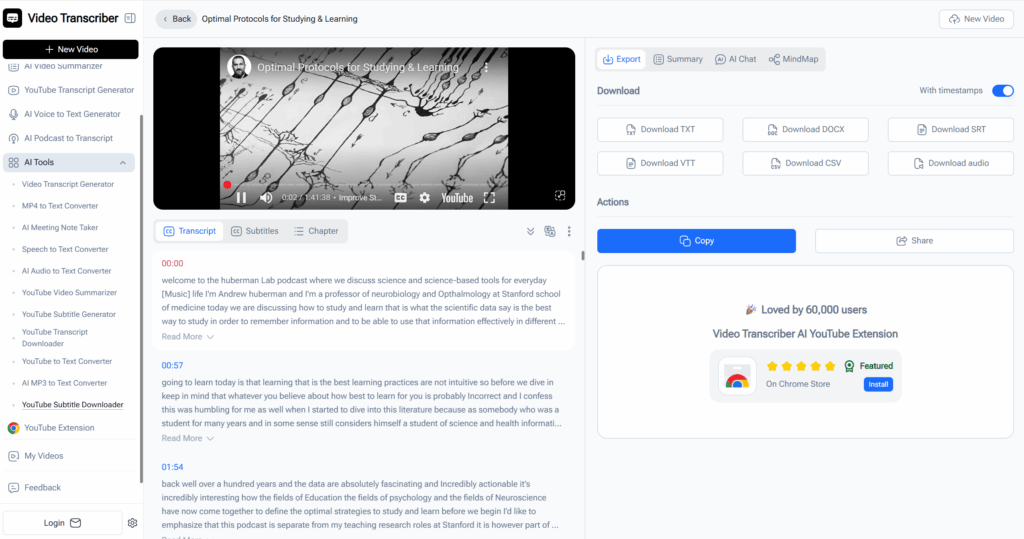
1. Video Transcriber AI: Best for Fast Subtitle Download and Online Editing
For users who want to download youtube subtitles quickly and improve them in the same workflow, Video Transcriber AI is one of the most practical options. Its YouTube Subtitle Downloader supports subtitle export in formats like TXT and SRT, works online without sign-up, and is especially useful for people who want to download youtube subtitles and move straight into cleanup, reuse, or publishing. A key advantage is that it also supports online subtitle editing, which makes it easier to fix caption text, refine lines, and prepare cleaner subtitles or closed captions without switching between multiple tools.
Best for
- users who want to download youtube subtitles in a few clicks
- turning subtitle tracks into TXT or SRT quickly
- editing subtitles online after download
- simple browser-based workflows without account creation
Why it stands out
- no-sign-up access
- practical export formats
- supports online subtitle editing
- useful for study, writing, repurposing, and caption cleanup
2. DownSub: Best for Pulling Subtitles From Many Video Platforms
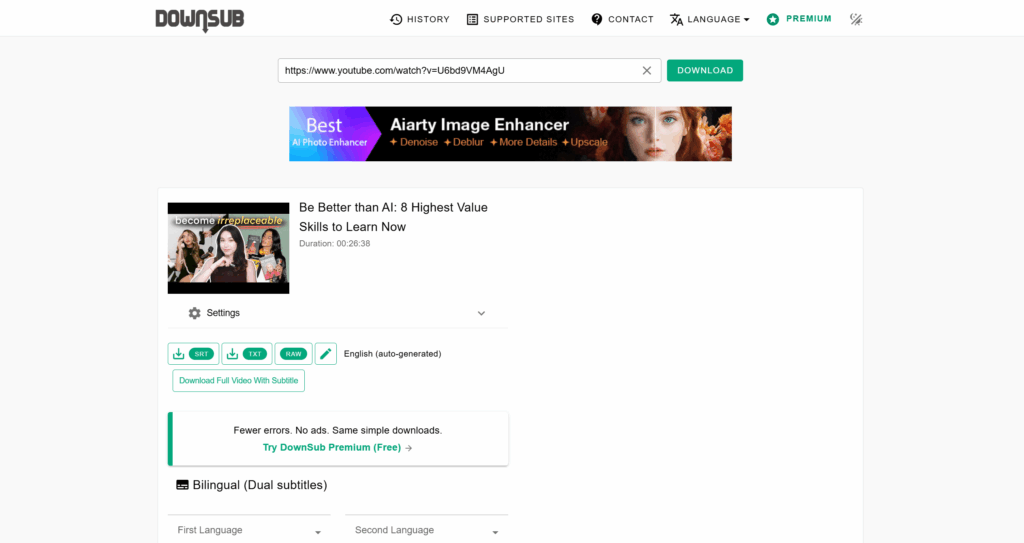
DownSub is a familiar choice for users who want to download youtube subtitles but are not working with YouTube alone. Its site says it supports YouTube plus 50+ other sites, with subtitle downloads available in formats such as SRT, VTT, and TXT. That makes it attractive when your workflow spans multiple sources, not just a single video platform.
Best for
- users who want to download youtube subtitles from a straightforward URL box
- people working across more than one video platform
- quick one-off subtitle extraction
Why it stands out
- broad site coverage
- multiple common subtitle formats
- simple downloader-style workflow
3. SaveSubs: Best for Lightweight Free Use Across Devices
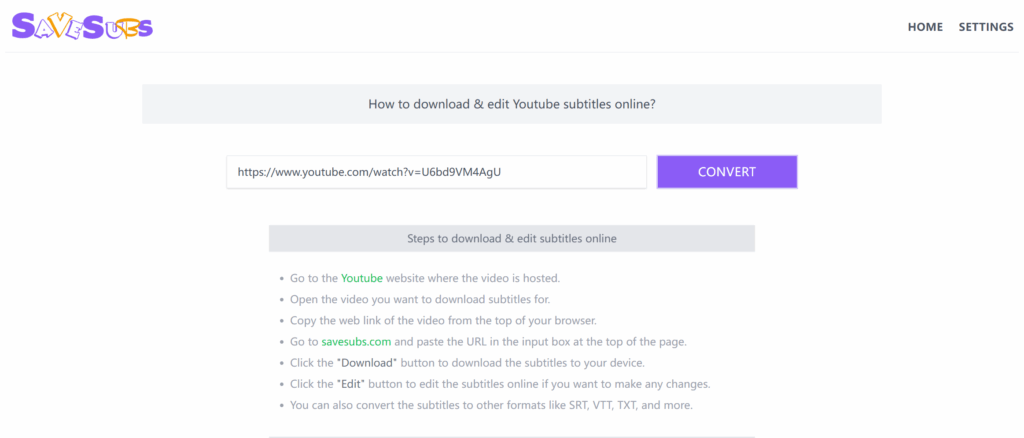
SaveSubs is built for users who want to download youtube subtitles without installing anything and without creating an account. Its YouTube subtitle page emphasizes free use, no registration, no software installation, and compatibility across devices, which makes it a good fit for casual or mobile-heavy workflows.
Best for
- users who want to download youtube subtitles on desktop, tablet, or mobile
- people who prefer a very lightweight online tool
- fast subtitle access without setup
Why it stands out
- no install required
- no registration required
- easy cross-device use
4. Kapwing: Best for Cleaning Up SRT Files and Reshaping Subtitle Text
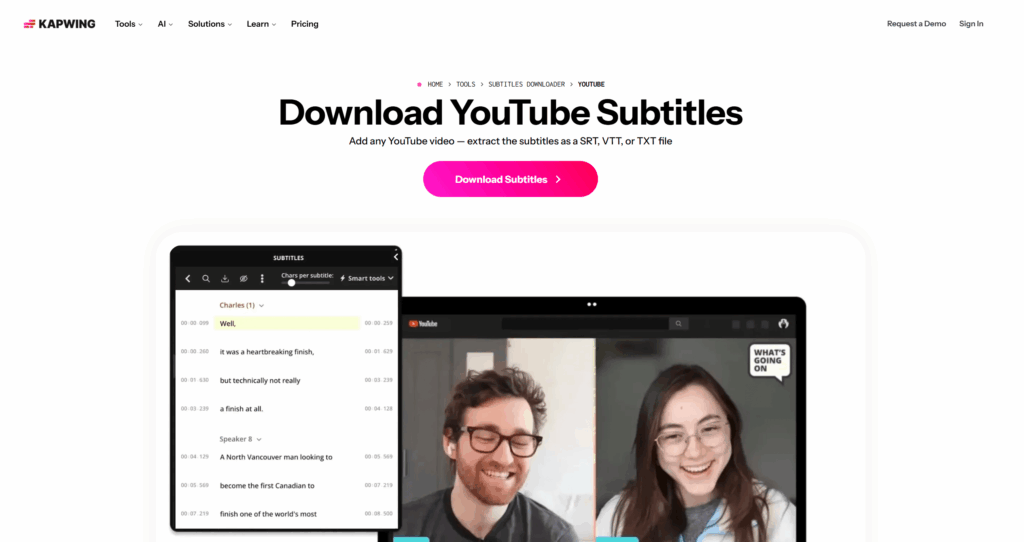
Kapwing becomes more useful after you download youtube subtitles. Its subtitle editor and SRT editor focus on the editing stage, with features like search and replace, line merging, line insertion, and export options including SRT, TXT, and VTT. That makes it one of the stronger choices when the subtitle file exists, but still needs real cleanup before publication.
Best for
- users who download youtube subtitles and then need to polish them
- editing subtitle structure, line length, and wording
- converting subtitle files across common formats
Why it stands out
- editing-focused workflow
- search and replace for recurring errors
- helpful for turning rough captions into cleaner deliverables
5. VEED: Best for Subtitle Editing Inside a Broader Video Workflow
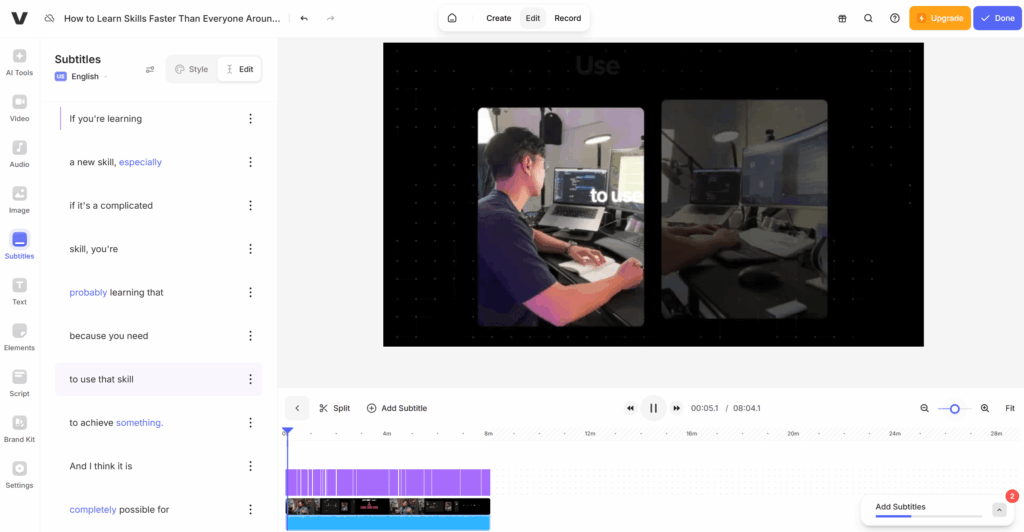
VEED is a good option when you do not only want to download youtube subtitles, but also want to style, translate, or integrate them into video editing. Its subtitle tools support online editing and subtitle export formats such as SRT and text, making it more of a creator workflow tool than a pure downloader.
Best for
- users who download youtube subtitles and want richer visual editing afterward
- creators making captions for publishing, social clips, or multilingual content
- people who prefer subtitles inside a larger video editing environment
Why it stands out
- combines caption editing with video workflow needs
- supports practical subtitle export formats
- useful when styling or multilingual editing matters
Tips to Get Better Results After You Download YouTube Subtitles
Once you download youtube subtitles, a few small adjustments can make the file much more useful.
Save both TXT and SRT when possible
If you want readable text for notes, summaries, or writing, TXT is often the better choice. If you need timestamps for editing or re-uploading, SRT is more practical. Many users download youtube subtitles in both formats so they can read one version and edit the other.
Do not treat the raw output as final
Even if you can download youtube subtitles in one click, the file may still need review. Auto-generated subtitles often contain issues with names, numbers, punctuation, and line breaks.
Fix the highest-impact errors first
The fastest way to improve subtitle quality is to check proper nouns, dates, figures, and missing punctuation before making smaller edits.
Shorten long subtitle lines for readability
If you download youtube subtitles as SRT, some subtitle lines may be too long or split awkwardly. Cleaner line breaks make the subtitles easier to read on screen.
Use online subtitle editing when available
A tool that lets you download youtube subtitles and edit them online in one workflow can save time, especially when you need to clean up captions quickly and prepare better closed captions.
Check reuse rights before republishing
If you download youtube subtitles from a video you do not own, be careful with redistribution or commercial reuse. Accessing subtitles does not always mean you have permission to republish them.
Frequently Asked Questions About How to Edit and Download YouTube Subtitles Online
Q1: Can I download youtube subtitles for free?
Yes. Many tools let you download youtube subtitles for free, especially in TXT or SRT format. If you want a simple browser-based option, Video Transcriber AI is one practical choice.
Q2: Can I edit youtube subtitles online after downloading them?
Yes. After you download youtube subtitles, you can fix text errors, improve punctuation, and clean up subtitle lines. Some tools, including Video Transcriber AI, also support online subtitle editing.
Q3: Do I need to install software to download youtube subtitles?
No. In most cases, you can download youtube subtitles directly in your browser by pasting the video link into an online subtitle downloader.
Q4: Should I download youtube subtitles as TXT or SRT?
Choose TXT if you want readable text for notes or summaries. Choose SRT if you need timestamps for editing, uploads, or closed captions. Many users download youtube subtitles in both formats.
Q5: What is the easiest tool to download youtube subtitles online?
A browser-based subtitle downloader is usually the easiest option. If you want to download youtube subtitles and edit them online in one workflow, Video Transcriber AI is a strong choice.
Conclusion
To download youtube subtitles is no longer a niche task. It has become one of the simplest ways to turn video into editable text, cleaner captions, reusable notes, and publish-ready assets.
That is the real shift behind this workflow. When you download youtube subtitles, you are not just saving words from the screen. You are unlocking a faster way to work with video content. A long video becomes something you can scan. A rough caption track becomes something you can polish. A one-time watch becomes something you can search, quote, and reuse.
If your goal is speed, simplicity, and practical formats, a lightweight online tool is usually the best starting point. That is why Video Transcriber AI’s YouTube Subtitle Downloader stands out for this use case: it gives users a direct way to download youtube subtitles online, save them in useful formats, and move straight into editing without extra friction.
The most practical workflow is also the simplest one: download youtube subtitles, save both TXT and SRT, clean up the parts that matter, and reuse the text wherever the content needs to go next.