


AI transcription tools are cutting one of law's most overlooked operational costs. Here is the honest breakdown, including where AI genuinely helps, and where it does not.
The $52.50 Invoice That Arrives Every Week
A litigation attorney wraps up a 30-minute client call on Thursday afternoon. She hits stop recording on her phone, emails the audio file to her transcription service, and gets back to her case notes.
Forty-eight hours later, a clean transcript arrives. So does an invoice for $52.50.
This happens three times a week. That is $157.50 per week, $630 per month, and $7,560 per year, for one attorney, doing one routine task. No one flags it at partner meetings. It is a line item in the administrative budget, absorbed without question because it has always been there.
The question in 2026 is whether it still has to be.
What This Article Is — and Is Not — About
Before the breakdown, one distinction needs to be stated clearly: this article is about transcription of recorded audio files, not real-time voice-to-text dictation tools like Wispr Flow or Dragon.
Real-time dictation converts speech to text as you speak. Uploading an existing recording and receiving a transcript is a different workflow, competing with different alternatives, primarily human transcription services and secretarial time. Most coverage of legal dictation software focuses on the first workflow and ignores the second entirely. But for recorded audio and video files, purpose-built platforms like Video Transcriber are where that $5,000 savings actually lives.
Section 1: The Hidden Invoice — What Legal Transcription Actually Costs
External Transcription Services
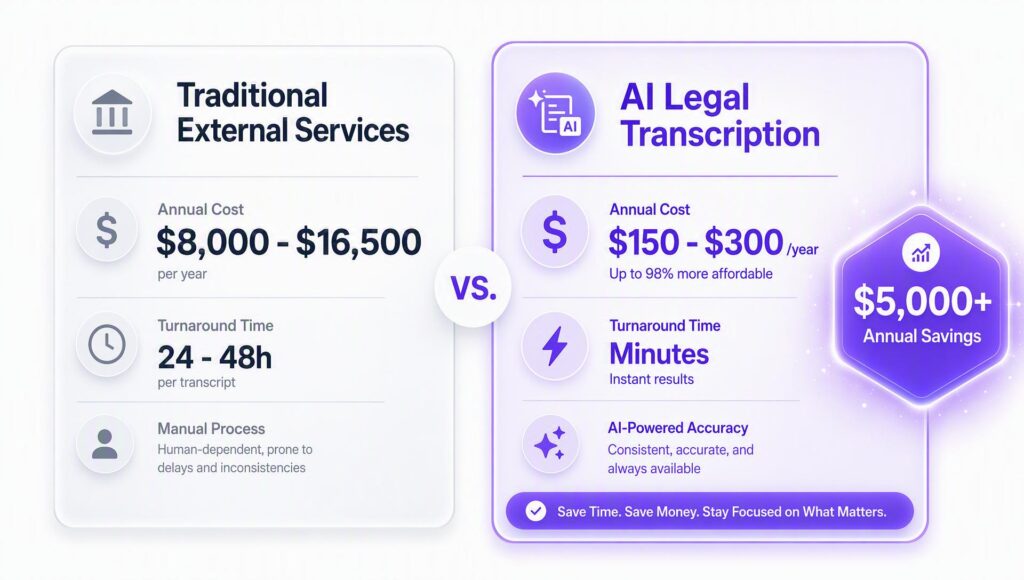
Human transcription rates for legal content range from $1.50 to $3.00 per audio minute, with rates toward the higher end for complex legal terminology, multi-speaker recordings, and rush delivery. These figures reflect publicly listed rates from services including Rev.com and TranscribeMe's legal transcription tiers; verify current rates at each provider's pricing page before quoting.
A typical active attorney generates roughly 20–30 minutes of dictation and recorded calls per working day. At 220 working days per year, that is approximately 4,400–6,600 audio minutes annually.
Table 1: Annual External Transcription Cost by Volume and Rate
| Annual Audio Volume | At $1.50/min | At $2.00/min | At $3.00/min |
| Low (4,400 min) | $6,600 | $8,800 | $13,200 |
| Mid (5,500 min) | $8,250 | $11,000 | $16,500 |
| High (6,600 min) | $9,900 | $13,200 | $19,800 |
Source: Pricing benchmarks from legal transcription service providers. Verify current rates before use.
Enterprise Dictation Systems
Firms that have invested in enterprise workflow platforms, routing attorney audio to secretaries or transcription pools, face a different cost structure. Practitioner-reported figures place these systems at $3,000–$4,000 per attorney per year for full deployments, before IT overhead and support. For a twelve-attorney firm, the annual renewal can approach $47,000.
Full Cost Comparison
Table 2: Transcription Method Cost Comparison
| Method | Estimated Annual Cost | Turnaround | Primary Use Case |
| External transcription service | $8,000–$16,500/attorney | 24–48 hours | Recorded audio files |
| Enterprise workflow system | $3,000–$4,000/attorney | Near real-time | Large firm full workflow |
| Dragon Legal (legacy) | $500–$700 one-time | Real-time only | Windows, dictation only |
| AI transcription tool | $150–$300/year | Minutes | Uploaded audio/video |
| OS built-in dictation | Free | Real-time only | Short informal use |
The gap between traditional services and modern AI legal dictation software like Video Transcriber AI is where the headline savings figure originates, and the $5,000 estimate is conservative.
Section 2: Why Legal Transcription Is Harder Than Generic AI Handles
Transcription accuracy is measured by Word Error Rate (WER), the percentage of words a system transcribes incorrectly. General-purpose speech recognition achieves WER rates of roughly 5–10% on clean audio in standard English, based on benchmarks published annually by the NIST Speech Group. In legal contexts, error rates are substantially higher for three compounding reasons.
1. Terminology Where Errors Have Legal Consequences
Legal language is dense with terms that sound nothing like they are spelled and where an error does not merely require an edit, it changes the legal meaning of the document.
Consider the following distinctions:
- "shall" vs. "may" , mandatory obligation versus permissive authority; determinative in contract interpretation disputes
- "negligence" vs. "gross negligence" , different standards of proof, different damages exposure
- "termination" vs. "rescission" , different remedies available under contract law
- "res ipsa loquitur" , routinely mangled by general-purpose systems unfamiliar with Latin legal phrases
- "voir dire," "habeas corpus," "promissory estoppel," "quantum meruit" , each a transcription risk on a system without legal domain training
Under ABA Model Rules of Professional Conduct Rule 1.1, attorneys have a duty of competence that extends to the technology they use in practice. A transcript containing material errors that goes into a filing, correspondence, or case record without adequate review raises a professional responsibility concern, not merely a quality-control issue.
2. Multi-Speaker Recordings Are the Norm
Client meetings, three-way conference calls, recorded expert witness interviews, Zoom depositions, legal recordings routinely involve multiple speakers. The attribution of who said what is not a formatting preference; it is often a legally significant fact.
Standard transcription tools struggle with speaker diarization (the technical term for identifying and labeling distinct speakers in a recording). This is precisely why human court reporters have historically commanded premium rates: they simultaneously transcribe, attribute, and certify the record. For internal working documents, not official court records, AI-assisted transcription with speaker identification has improved substantially, but capability varies significantly between tools and must be tested with representative sample recordings before workflow adoption.
3. The Real Cost of a 5% Error Rate
A 5% WER sounds small. In a 500-word transcript, it means approximately 25 words are wrong. In a 2,000-word client meeting summary, that is 100 errors requiring human review. When the review time approaches the time saved by AI transcription, the efficiency gain disappears entirely.
This is why legal transcription tools must be evaluated on domain-specific accuracy, tested against recordings from your actual practice area, rather than general benchmark performance.
Section 3: Attorney-Client Privilege in the Age of Cloud Transcription
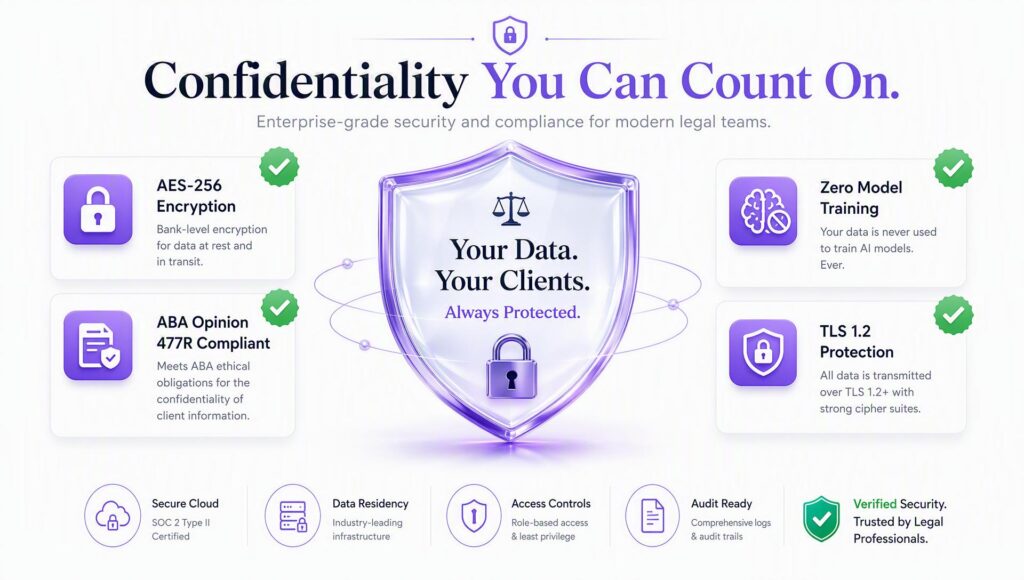
The most common reason lawyers cite for not adopting AI transcription is not cost or accuracy. It is concern about confidentiality.
The concern is legitimate. The question is whether it is being applied with precision.
The Governing Standard
ABA Formal Ethics Opinion 477R (2017) is the clearest federal guidance on attorney use of cloud-based services for client-confidential information. The Opinion does not prohibit cloud use. It requires attorneys to apply "reasonable efforts" to prevent unauthorized disclosure and to conduct due diligence on the security practices of any vendor handling client data.
The key factors identified in Opinion 477R include:
- The sensitivity of the client information
- The attorney's understanding of the technology being used
- The technology's available security measures
- The legal landscape governing the vendor
The operative question is not whether cloud transcription is permitted. It is whether a specific tool meets the reasonable efforts standard for the specific type of information being processed.
State Bar Guidance
Several state bars have issued ethics opinions on cloud-based legal services. New York, California, North Carolina, and others have published guidance that generally aligns with ABA 477R, permitting cloud use with appropriate due diligence, while noting that particularly sensitive matters may warrant additional precautions. Attorneys should consult their state bar's technology ethics opinions before using any cloud tool with client-confidential recordings.
Compliance Evaluation Table
Table 3: Confidentiality Factors to Verify Before Adopting Any Transcription Tool
| Compliance Factor | Why It Matters | What to Ask the Vendor |
| Encryption in transit | Protects audio during upload | TLS 1.2 minimum? |
| Encryption at rest | Protects stored files | AES-256 standard? |
| Server location | Jurisdiction and regulatory exposure | Where is audio processed and stored? |
| Data retention policy | How long does audio remain? | Deletion timeline and controls? |
| Training data policy | Client audio must not train the model | Explicit contractual prohibition? |
| SOC 2 Type II certification | Independent security audit | Current report available? |
| Business Associate Agreement | Required for healthcare-adjacent work | Available for health law practices? |
Section 4: Where AI Transcription Fits — and Where It Does Not
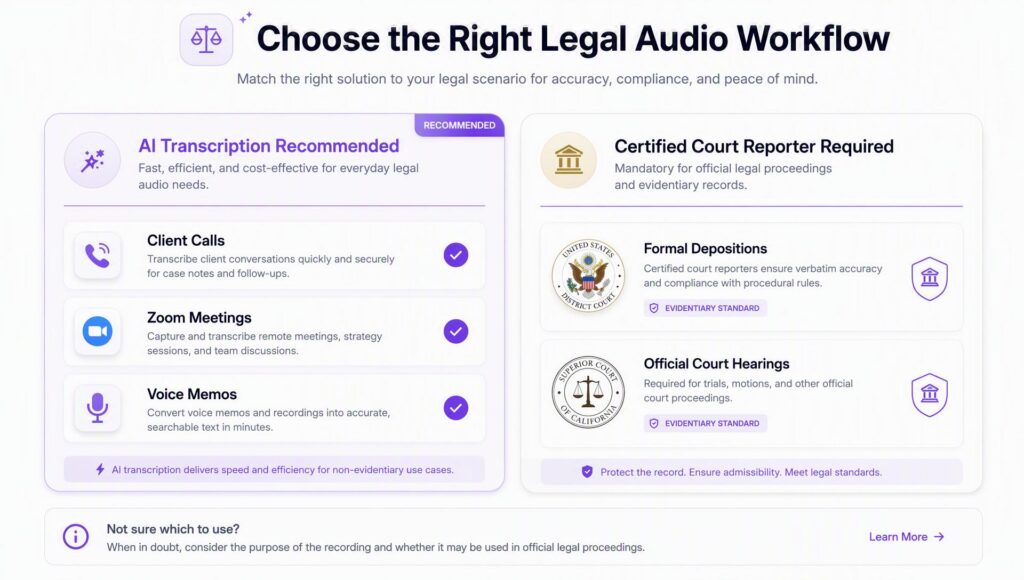
This section carries the most weight for attorneys evaluating AI transcription tools. The boundary must be stated clearly and without qualification.
What AI Transcription Cannot Replace
In most U.S. jurisdictions, official deposition transcripts must be prepared and certified by a licensed court reporter. This is a statutory requirement in most states, not a convention. The National Court Reporters Association (NCRA) and state court reporting licensing statutes govern this. An AI-generated transcript of a deposition does not constitute a certified record and cannot be used as one in litigation.
Similarly, official court proceeding transcripts, trial testimony, hearing records, appellate argument, require certified court reporters or official court transcription services under applicable court rules.
AI transcription is not a substitute for certified legal records. No current tool changes this.
Where AI Transcription Adds Genuine Value
Table 4: AI Transcription Applicability by Legal Use Case
| Use Case | AI Transcription | Certified Reporter Required | Notes |
| Client phone call recordings | Yes | Not required | Internal working document |
| Zoom / video conference notes | Yes | Not required | Internal use |
| Attorney voice memo dictation | Yes | Not required | Replaces transcription service |
| Expert witness interviews | Yes | Not required | Research and preparation |
| Field investigation voice notes | Yes | Not required | Factual documentation |
| CLE and legal education video | Yes | Not required | Study and reference |
| Internal strategy meeting notes | Yes | Not required | Firm internal use |
| Formal deposition transcript | No | Required | Statutory requirement |
| Official court hearing record | No | Required | Court rules |
| Certified arbitration record | No | Usually required | Varies by arbitration rules |
The legitimate scope for AI transcription in legal practice is substantial. It simply does not include the certified record use case, a distinction that most attorneys already understand but that rarely appears clearly stated in software marketing materials.
Section 5: The Real Numbers — How Much Can a Firm Actually Save?
Table 5: Annual Savings by Attorney Profile
| Attorney Profile | Current Annual Spend | AI Tool Annual Cost | Net Annual Saving |
| Solo, outsourcing to transcription service | $8,000–$10,000 | $150–$300 | $7,700–$9,700 |
| Small firm on enterprise system | $3,000–$4,000/attorney | $150–$300 | $2,700–$3,700/attorney |
| Mixed model (partial outsourcing) | $5,000–$7,000 | $150–$300 | $4,700–$6,700 |
| Conservative mid-point | ~$5,000/year |
Methodology note: These figures represent direct transcription service cost replacement only. They exclude the value of attorney time freed from administrative coordination, secretarial time redirected to higher-value work, and accelerated billing cycles. Those are real but difficult to verify individually. The table above shows only the line items directly comparable between an external service invoice and a software subscription, the most honest basis for the comparison.
For a solo practitioner currently paying a transcription service at $1.75–$2.00 per minute with consistent recording volume, the annual savings will likely exceed the $5,000 headline figure. For an attorney at a large firm where the enterprise system cost is absorbed into overhead, the direct savings calculation looks different, though the workflow efficiency argument still applies.
Section 6: The Audio Graveyard — Recordings That Never Become Documents
There is a pattern in most legal practices that rarely gets named: the accumulation of audio files that were recorded with the intention of transcription and never transcribed.
Attorneys record constantly. Phone calls captured for reference. Zoom calls with auto-record enabled. Voice memos dictated between meetings. Field notes from site visits. Expert witness interviews on a phone. These files end up in camera rolls, email attachments, cloud storage folders, and Zoom archives, and most of them stay there indefinitely.
The reason is not laziness. The workflow from "I have an audio file" to "I have a usable document" has historically required either a meaningful block of time for manual review, or the friction of uploading to a service, waiting 24–48 hours, retrieving the file, and reformatting the output. For any recording that is not immediately pressing, that friction is sufficient to leave it archived and unactioned.
The Clio Legal Trends Report consistently documents that attorneys spend significant non-billable hours on administrative work that does not require legal judgment, work that falls into the category of "necessary but not billable." Transcription coordination is squarely in this category and is among the most directly automatable.
AI transcription tools reduce the complete workflow to: upload file, wait a few minutes, receive transcript. That friction reduction is what converts the audio archive from a graveyard of good intentions into a working information resource.
Section 7: Evaluating a Legal Transcription Tool — What Actually Matters
Not all AI transcription tools are appropriate for legal use. The following criteria should be applied when evaluating any tool for use with recordings that may contain client-sensitive information.
Table 6: Legal Transcription Tool Evaluation Criteria
| Criterion | Why It Matters | Minimum Standard |
| Legal terminology accuracy | Terminology errors create professional risk | Test with domain-specific sample audio before adoption |
| Speaker diarization | Attribution of statements is legally significant | Must support labeling of distinct speakers |
| Supported file formats | Recordings come from varied sources | MP3, MP4, M4A, WAV, Zoom exports at minimum |
| Processing speed | Workflow efficiency | Under 10 minutes per hour of audio |
| Encryption standard | Confidentiality compliance per ABA 477R | AES-256 at rest; TLS in transit |
| Training data policy | Client audio must not improve the model | Explicit contractual prohibition on training use |
| Deletion controls | Attorney must control data retention | Manual deletion available; automatic expiry option |
| SOC 2 Type II | Independent third-party security verification | Request current audit report |
| Export formats | Integration with document management systems | DOCX, PDF, TXT at minimum |
The single most important item on this list is the training data policy. Many AI tools improve their models using uploaded audio. For client-confidential recordings, this is not acceptable. Look for an explicit statement in the vendor's data processing agreement, not just a privacy policy summary page, before uploading any recording that contains client-identifying information.
Section 8: A Practical Workflow for Getting Started
Adopting AI transcription does not require restructuring an entire practice. The most effective approach is to begin with low-stakes recordings and build confidence in accuracy before applying the tool to sensitive client matters.
Step 1: Start with internal recordings only
Begin with voice memos, internal strategy calls, and team meeting recordings. These carry no client confidentiality risk and give direct experience with the tool's accuracy on your speaking patterns, vocabulary, and practice area terminology.
Step 2: Establish a review protocol
AI transcripts require review before use, particularly for legal terminology. Build a standard that all transcripts are reviewed before filing, sending, or entering into a case management system. If accuracy is adequate, this review should take minutes, not hours.
Step 3: Test multi-speaker performance
Run a sample two-speaker or three-speaker recording through the tool before using it for client call summaries. Verify that speaker attribution is consistent and that speaker transitions are correctly identified. This single test will reveal more about real-world suitability than any benchmark figure.
Step 4: Audit the privacy policy before client-matter use
Read the vendor's data processing agreement before uploading any recording that contains client-identifying information. Confirm the training data policy, server location, and deletion controls meet the reasonable efforts standard under ABA Formal Opinion 477R and your state bar's guidance.
Step 5: Integrate with existing case management
AI transcription does not require replacing a document management system. Most tools export to standard formats, DOCX, TXT, PDF, that can be filed directly into Clio, MyCase, NetDocuments, or equivalent platforms. The transcription step inserts into the existing workflow rather than replacing it.
Realistic timeline: A two-week test on internal recordings is usually sufficient to evaluate accuracy for a specific practice area and speaking style. If transcripts consistently require heavy editing after two weeks, the tool is not the right fit and a different one should be tested.
Conclusion
The $5,000 annual savings figure in the headline is conservative, and it comes from a single calculation: the gap between what external transcription services charge per audio minute and what AI transcription tools cost per year. No attorney time value is included. No estimates of improved productivity. Just the direct cost comparison, verified against market rates.
For attorneys currently paying transcription services at standard legal rates, the real savings will likely exceed $5,000, closer to $8,000–$10,000 for a solo practitioner with consistent recording volume.
What AI transcription does not do: it does not replace certified court reporters for official deposition records or court transcripts. It does not eliminate the need for attorney review of output. And it does not automatically comply with confidentiality obligations, that requires evaluating the specific tool against ABA Formal Opinion 477R and applicable state bar guidance.
What it does do: it converts the recordings already sitting in a phone, email inbox, and Zoom archive into working documents, in minutes, at a fraction of the cost of the services most firms are currently paying for.
The audio already exists. The only question is whether it is doing any work.