


Taking meeting minutes sounds simple until you have to listen, participate, remember decisions, identify speakers, and write everything down at the same time. In 2026, a more practical workflow is to record and transcribe the conversation first, then turn the transcript into structured meeting minutes.
Instead of depending on memory or fragmented notes, you can record and transcribe what was actually said, review the text, confirm key decisions, and create a cleaner record afterward. This guide explains how to record and transcribe meeting minutes free, what to look for in a meeting recorder and transcriber, and how to turn raw conversations into useful AI meeting notes.
What Does “Record and Transcribe” Mean?
To record and transcribe means capturing spoken audio and converting that speech into written text. Older workflows separated these tasks, while modern AI tools can combine recording, transcription, speaker labels, timestamps, search, and note generation in one workflow.
For meeting minutes, the goal is not simply to create a word-for-word transcript. A useful record and transcribe workflow should help you answer practical questions:
- What was discussed?
- Who made each point?
- What decisions were made?
- What actions were assigned?
- What needs follow-up?
- Where in the conversation can a statement be verified?
This is why a voice record and transcribe workflow is increasingly useful. The transcript becomes the source material, while the final meeting minutes become the organized version people actually read.
Why Record and Transcribe Meeting Minutes Instead of Taking Notes Manually?
Manual note-taking still works for short or informal meetings, but it becomes difficult when the discussion moves quickly or several people speak.
When you record and transcribe a meeting, you do not need to choose between listening and typing every sentence. You can focus on the conversation and review the transcript later.
1. You Keep More Context
A handwritten note might say, “Launch delayed two weeks.”
A transcript can show why the delay happened, who raised the issue, what dependencies were discussed, and what the team decided next.
That context matters when you record and transcribe project meetings, interviews, research discussions, client calls, or product reviews.
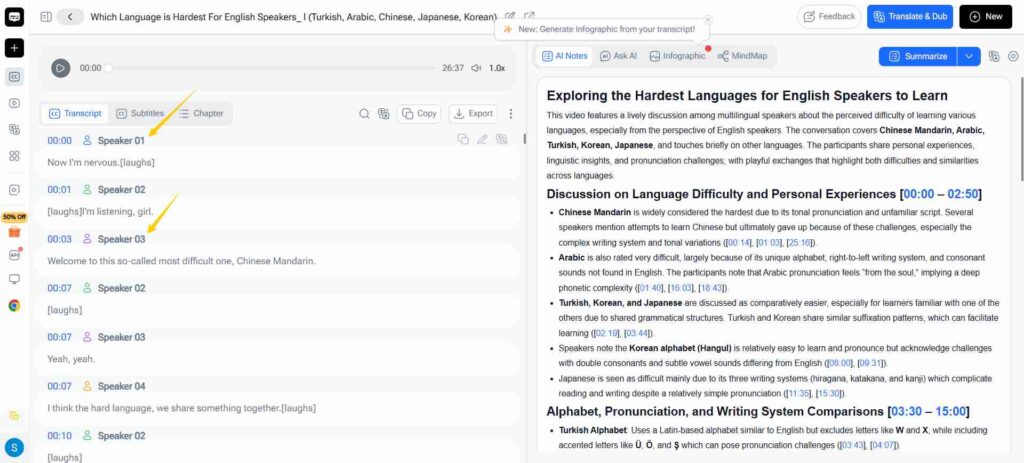
2. Speaker Labels Make Minutes Easier to Verify
A good meeting recorder and transcriber can separate speakers so you can see who said what. That becomes especially useful when three or more people are discussing similar topics.
Instead of writing “someone suggested changing the deadline,” you can verify the speaker before adding the point to the final meeting minutes.
3. Searchable Text Is Faster Than Replaying Audio
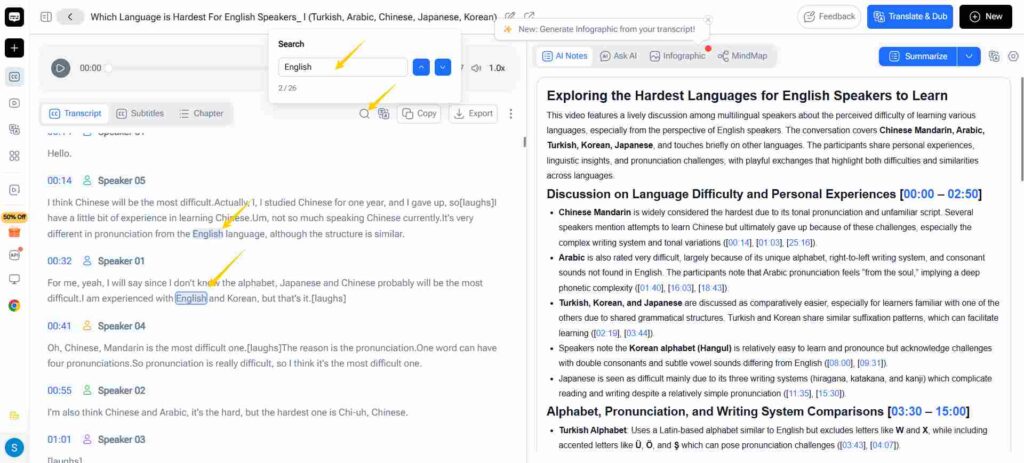
A one-hour recording may contain only two minutes of information you need later.
When you record and transcribe the meeting, you can search for a name, deadline, feature, budget, customer, or decision instead of scrubbing through the entire audio file.
This is one of the biggest differences between a traditional voice recorder and a tool designed to record and transcribe.
4. AI Meeting Notes Can Be Built From the Transcript
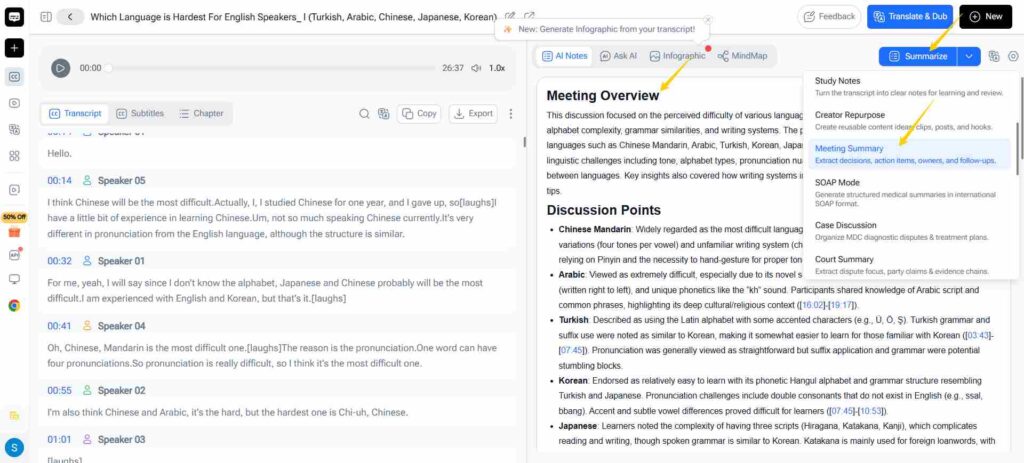
Automatic meeting notes are most useful when they are based on a transcript you can inspect.
Once you record and transcribe the discussion, you can turn the conversation into a concise summary, action-item list, decision log, follow-up outline, or structured AI meeting minutes while keeping the original transcript available for reference.
How to Record and Transcribe Meeting Minutes Free
The exact workflow depends on the tool you use, but the process should stay simple.
Step 1: Choose a Quiet Recording Setup
Before you record and transcribe, improve the audio first.
Place the microphone close to the main speakers, reduce background noise, and use a reliable headset or microphone for online meetings when possible. Clearer audio usually produces a cleaner transcript, especially with similar voices or technical terms.
You do not necessarily need professional recording equipment. For many meetings, a laptop microphone, phone, or browser-based AI voice recorder is enough if the speakers are clear and close to the microphone.
Step 2: Get Permission to Record
Before you record and transcribe meetings, make sure participants know the conversation is being recorded and that your use follows applicable company policies and local laws.
This is particularly important for client calls, interviews, medical discussions, legal conversations, or meetings containing confidential information.
Recording technology may be easier to use in 2026, but consent and responsible handling of meeting data still matter.
Step 3: Start Recording the Meeting
One way to simplify the process is to use an online AI voice recorder rather than recording in one application and uploading the file to another service afterward.
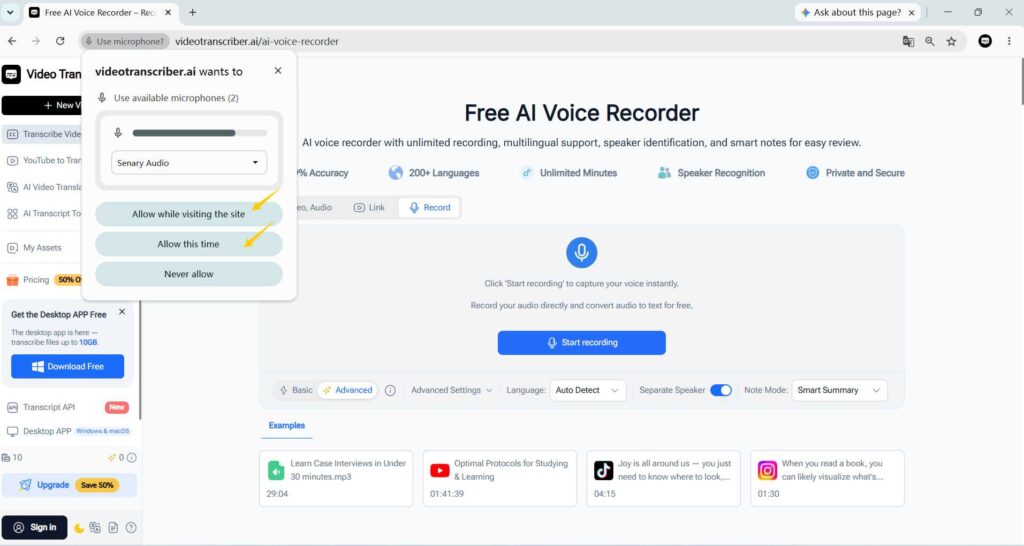
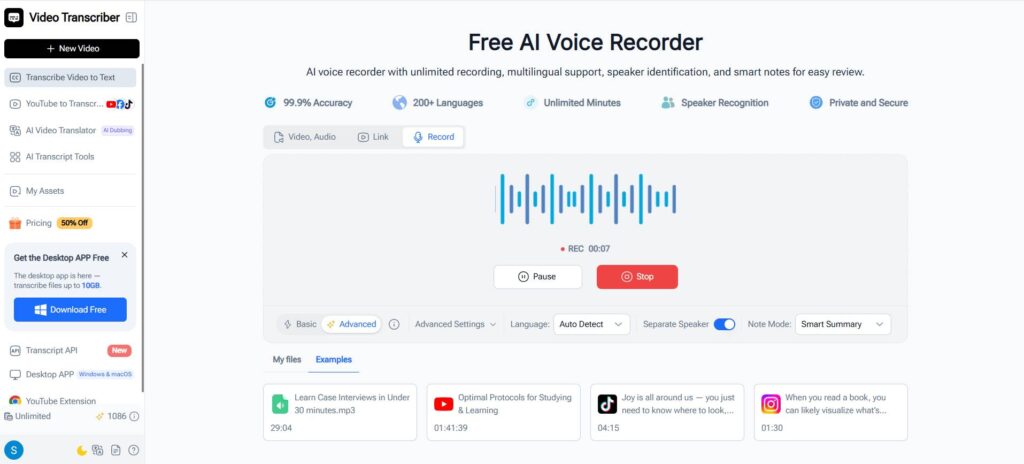
Video Transcriber AI's AI Voice Recorder is built around this type of workflow. It can capture voice in the browser and turn the recording into searchable text, with features including speaker identification, timestamps, smart notes, and multilingual transcription. The current product page lists support for more than 200 languages and browser-based use without requiring a download.
A basic workflow looks like this:
- Open the AI Voice Recorder.
- Allow microphone access.
- Start recording before the main discussion begins.
- Keep the recording active throughout the meeting.
- Stop recording when the meeting ends.
- Generate the transcript.
- Review the transcript before creating the final minutes.
The main advantage is that you can record and transcribe without building a complicated multi-app workflow.
Step 4: Review the Transcript
Do not treat any AI transcript as automatically perfect.
After you record and transcribe, check important information such as:
- names
- company and product names
- technical terms
- dates
- numbers and percentages
- currencies
- action items
- deadlines
- speaker labels
This review step is especially important if the transcript will become an official meeting record.
A reliable workflow is not simply “AI generated it, so publish it.” Good meeting minutes should be based on text that has been checked against the actual discussion.
Step 5: Turn the Transcript Into Meeting Minutes
Once the transcript is accurate enough, reduce it into a practical format:
Meeting: Weekly Product Review
Date: September 27, 2026
Participants: Speaker names
Main Topics: 3–5 discussion areas
Decisions: Confirmed outcomes
Action Items: Task + owner + deadline
Open Questions: Issues still requiring follow-up
Next Meeting: Date or follow-up plan
When you record and transcribe first, every section of the final meeting minutes can be checked against the source conversation.
That is much safer than relying entirely on memory after a long meeting.
A Better Record and Transcribe Workflow for Different Meeting Types
Not every meeting needs the same output. The best record and transcribe workflow depends on what you need afterward.
Team Meetings and Client Calls
For weekly team meetings, focus on decisions, blockers, owners, and deadlines.
You may record and transcribe the entire conversation, but the final document does not need to include every sentence.
For client calls, the priorities may be different. You might need:
- requested changes
- client requirements
- delivery expectations
- commitments
- concerns
- follow-up questions
A searchable transcript gives you somewhere to return when someone later asks, “What did we agree on?”
Interviews and Research
When you record and transcribe interviews, preserving exact wording becomes more important.
Speaker labels and timestamps can help researchers, journalists, recruiters, and content creators return to an important response without replaying an hour-long recording.
In this situation, the transcript itself may be almost as valuable as the summarized notes.
Lectures and Multilingual Meetings
Students can record and transcribe lectures or study discussions, then turn the transcript into outlines, summaries, flashcards, review questions, or searchable study material.
For multilingual meetings, choose a tool that can handle the languages actually spoken.
Video Transcriber AI currently lists support for 200+ languages as well as speaker recognition, making those capabilities relevant to multilingual meeting and transcription workflows.
What to Look for in a Free App to Record and Transcribe Meeting Minutes
If you search for a free app to record and transcribe meeting minutes, avoid choosing based only on whether it can convert speech into text.
A practical record and transcribe app should support what happens before and after transcription too.
Speaker Recognition
Speaker recognition is particularly important for meeting minutes.
Without it, a transcript from a five-person meeting can become a long block of text with little context.
Knowing who said what makes the transcript much easier to review and helps reduce mistakes when assigning decisions or action items.
Timestamps
Timestamps give your transcript a connection back to the recording.
If a deadline, decision, or quotation looks unclear after you record and transcribe, you can return to the relevant moment rather than replaying the meeting from the beginning.
Searchable Transcripts
Search is one of the biggest benefits of choosing to record and transcribe rather than keeping audio alone.
Imagine trying to find the moment where someone mentioned “Q4 budget,” “October 15,” or a particular customer in a 90-minute recording.
With text, you can search the keyword directly.
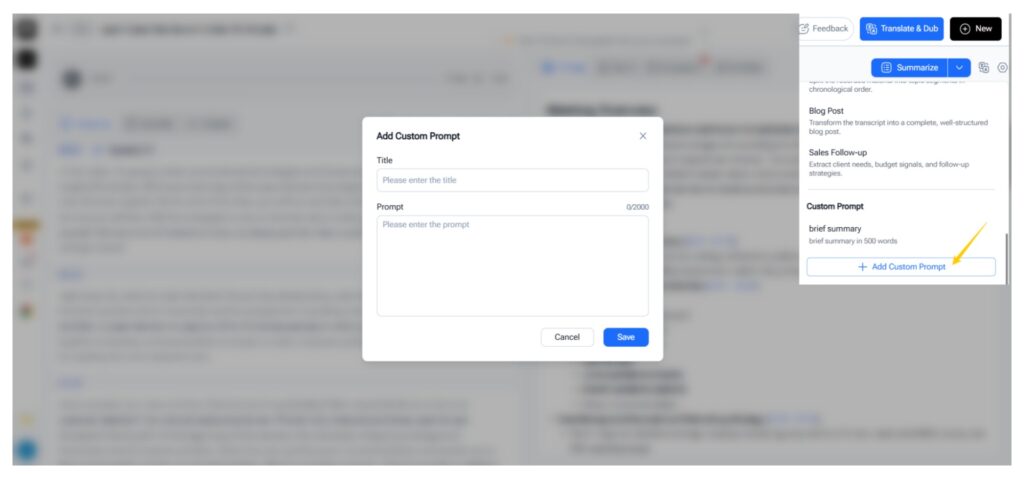
AI Meeting Notes and Summaries
AI meeting minutes should do more than shorten each paragraph of a transcript.
Useful automatic meeting notes may include:
- key points
- decisions
- action items
- assigned owners
- deadlines
- unresolved questions
- follow-up topics
The best workflow is to record and transcribe first and summarize second, so you always have source material available when a summary needs verification.
Multilingual Support
For international teams, language support should be considered before you record and transcribe an important meeting.
This matters especially when participants naturally switch languages or when meetings include colleagues from different regions.
Privacy and Access
Before choosing a meeting recorder and transcriber, check how recordings, transcripts, accounts, and sharing are handled.
For confidential discussions, follow your organization's security, access, and data-retention requirements rather than treating every meeting the same way.
How to Improve Accuracy When You Record and Transcribe
Even a strong transcription model works better when the source audio is clear.
Use a Clear Microphone Source
If six people are sitting far away from one laptop microphone, the transcription system has a harder job.
Moving the microphone closer or using a conference microphone can make it easier to record and transcribe multiple speakers clearly.
Avoid Too Much Overlapping Speech
People naturally interrupt each other, but heavy overlapping speech is difficult for both humans and AI to separate.
If accurate meeting minutes matter, encourage participants to finish important points before another person starts talking.
Say Important Names and Terms Clearly
Product names, surnames, acronyms, industry vocabulary, and technical terminology are common transcription trouble spots.
If the transcription service supports custom keywords, providing important terminology can help with specialized meetings.
Confirm Numbers Manually
Numbers deserve extra attention.
After you record and transcribe, manually verify:
- prices
- percentages
- dates
- deadlines
- quantities
- account figures
- phone numbers
A transcript is an excellent reference layer, but important figures should still be checked.
Review Speaker Labels
Speaker recognition can save significant time, especially in long meetings, but do not assume every speaker assignment will always be correct.
Review speaker labels before distributing formal minutes.
Record and Transcribe vs. Record Only
A standard voice recorder solves one problem: capturing sound.
A record and transcribe tool solves a broader problem: turning that sound into information you can search, review, summarize, and reuse.
| Workflow | Record Only | Record and Transcribe |
| Capture audio | Yes | Yes |
| Read instead of replay | No | Yes |
| Search the conversation | Difficult | Easy |
| Identify speakers | Usually manual | Can be automated |
| Generate meeting notes | Manual | AI-assisted |
| Find action items | Replay required | Search transcript |
| Reuse information later | Limited | Much easier |
If you rarely revisit recordings, a basic recorder may be enough.
But if you regularly create meeting minutes, reports, research notes, summaries, client records, or follow-up tasks, it usually makes more sense to record and transcribe from the beginning.
How to Create Better AI Meeting Minutes After Transcription
Automatic meeting notes work best when the output matches the meeting purpose.
After you record and transcribe, ask for a specific structure instead of a generic summary.
For Project Meetings
Ask AI to organize:
Decisions, blockers, task owners, deadlines, risks, and unresolved questions.
For Client Meetings
Focus on:
Client requirements, requested changes, commitments, concerns, and follow-up actions.
For Interviews
Use the transcript to organize responses by topic while keeping important quotations connected to their timestamps.
For Lectures
Turn the transcript into:
Main concepts, definitions, examples, key arguments, and review questions.
This is where a record and transcribe workflow becomes more valuable than simple speech-to-text.
The transcript is not necessarily the final product. It is the structured source that can power several useful outputs.
Common Mistakes to Avoid
Before you record and transcribe, decide what you actually need afterward: a full transcript, meeting minutes, action items, quotations, research notes, or a summary.
That goal should guide how you review the text.
Do not share an unchecked transcript. Names, figures, technical terms, deadlines, and speaker labels can be wrong, so verify important details first.
Also remember that meeting minutes are not the same as a transcript. Use the transcript as evidence, but keep the final minutes focused on decisions and actions.
And always handle recording consent, privacy, access, and retention according to the rules that apply to your meeting.
Who Benefits Most From Record and Transcribe Tools?
A record and transcribe app can be particularly useful for project managers, founders, sales teams, researchers, journalists, students, remote teams, consultants, recruiters, and content creators.
Consider a project manager who attends five meetings in one day.
Manually writing complete notes during every discussion creates a second job. If they record and transcribe those conversations, they can search the transcripts later and extract only decisions, owners, deadlines, and blockers.
A researcher may use the same workflow differently. They may record and transcribe interviews because exact answers and timestamps matter more than short meeting minutes.
A student may record and transcribe a lecture so that spoken information becomes searchable study material.
The common need is simple: spoken information becomes more useful when it is searchable, reviewable, and easier to organize.
FAQ About Recording and Transcribing Meeting Minutes
What Is the Easiest Way to Record and Transcribe Meeting Minutes Free?
One of the simplest methods is to use an online AI voice recorder that combines recording and transcription.
Start the recording, capture the meeting, generate the transcript, review important details, and then convert the verified transcript into structured meeting minutes.
This avoids moving between a separate recorder, transcription platform, and note-taking tool.
Is There a Free App to Record and Transcribe Meeting Minutes?
Yes. Browser-based AI voice recorders can provide a free way to record and transcribe without installing traditional desktop recording software.
When comparing tools, check their current recording limits, language support, speaker recognition, transcription features, and privacy options before relying on them for important meetings.
Can I Record and Transcribe a Meeting Automatically?
Yes. AI transcription tools can automate much of the record and transcribe process, including speech-to-text conversion, speaker labeling, timestamps, and summaries.
However, human review is still recommended for names, numbers, deadlines, decisions, and formal meeting records.
Automation should reduce repetitive work, not remove verification entirely.
Can I Record and Transcribe Meetings With Multiple Speakers?
Yes, if the meeting recorder and transcriber supports speaker recognition.
Good microphone placement, clear audio, and reduced overlapping speech can make the resulting transcript easier to review.
For a large meeting, speaker identification becomes particularly valuable because it helps preserve the context behind decisions and action items.
Can I Record and Transcribe in Different Languages?
Many modern AI transcription tools support multiple languages.
Video Transcriber AI currently lists support for 200+ languages on its AI Voice Recorder page, which makes the tool relevant to many multilingual recording workflows.
Are AI Meeting Minutes the Same as a Transcript?
No.
A transcript is the written representation of what people said.
AI meeting minutes are a structured interpretation of that transcript, usually focusing on topics, decisions, action items, deadlines, and follow-up tasks.
A good workflow is therefore:
Record → Transcribe → Review → Summarize → Verify → Share
This keeps the original discussion available while giving participants a shorter document they can actually use.
Conclusion
The biggest improvement in modern meeting documentation is not transcription alone. It is the ability to record and transcribe in one workflow, then turn the transcript into something people can actually use.
Instead of spending the entire meeting typing while everyone else is talking, you can record and transcribe the conversation, check the transcript, identify speakers, search important topics, and build accurate meeting minutes afterward.
For short conversations, manual notes may still be enough.
But for recurring meetings, interviews, lectures, client calls, research sessions, and discussions where details matter, a record and transcribe workflow creates a much stronger information trail.
If your goal is to record and transcribe meeting minutes free, start with a browser-based AI voice recorder, focus on clear audio, review the transcript carefully, and keep the final minutes concise.
The real value is not simply converting speech into text.
It is turning an hour of conversation into a searchable record of decisions, responsibilities, questions, and ideas that you can find and reuse long after the meeting ends